


Almost everyone who owns wireless earbuds eventually runs into the same handful of frustrations: one earbud goes silent, audio starts cutting out mid-song, the case stops charging, or a call sounds muffled on the other end. These problems feel random in the moment, but the truth is that the vast majority trace back to a small set of causes — Bluetooth interference, dirty charging contacts, corrupted pairing data, or simple earwax buildup — and nearly all of them can be fixed at home without a repair shop or a replacement purchase.
This guide walks through the most common wireless earbuds problems people search for, explains exactly why each one happens, and gives you the specific steps to fix it, in plain language, without assuming any technical background. Whether you’re dealing with a pair that won’t pair at all, sound that only comes from one side, a battery that drains far faster than it used to, or noise cancellation that suddenly stopped working, you’ll find the cause and the fix here.
Why does this matter enough for a full guide? Because most people’s first instinct when earbuds act up is to assume the pair is broken and needs replacing — when in reality, connection resets, contact cleaning, and pairing memory clearing solve the overwhelming majority of reported issues. Understanding the difference between a five-minute fix and genuine hardware failure can save you real money and frustration.
This guide covers connectivity issues, one-earbud-only audio, battery and charging problems, sound quality issues, ANC malfunctions, microphone and call problems, firmware-related glitches, and the point at which a problem actually does mean it’s time to replace your pair. Each section includes the direct cause, a step-by-step fix, and when to know a warranty claim or replacement is the more sensible option than continued troubleshooting.
Quick Facts Table
| Common Problem | Most Likely Cause | Typical Fix Time |
|---|---|---|
| Won’t pair / not detected | Old Bluetooth pairing memory | 2–5 minutes |
| Only one earbud works | Battery imbalance or corrupted pairing | 5–10 minutes |
| Audio cutting out | Bluetooth interference or distance | 1–5 minutes |
| Case won’t charge | Dirty contacts or protective film left on | 2–5 minutes |
| Muffled or distorted sound | Earwax/dust buildup on mesh | 3–5 minutes |
| ANC not working | Firmware issue or app misconfiguration | 5–10 minutes |
| Fast battery drain | Aging battery or ANC always-on | Ongoing habit fix |
Quick Summary
The overwhelming majority of wireless earbuds problems — connection drops, one-sided audio, charging failures, and muffled sound — are caused by simple, fixable issues rather than defective hardware. Resetting the Bluetooth connection, cleaning the charging contacts, and clearing earwax from the speaker mesh resolve most complaints within minutes. Genuine hardware failure is actually the least common cause, and is usually only worth suspecting after the basic fixes below have been tried and haven’t worked.
Key Takeaways
- Most connectivity issues are solved by forgetting the Bluetooth pairing and reconnecting from scratch, not by buying a new pair.
- One-earbud-only audio is most often a battery or pairing-memory issue, not a hardware fault.
- Charging problems are frequently caused by a leftover protective film on the contacts or simple dirt buildup — always check before assuming the case is broken.
- Muffled sound is often due to earwax or dust blocking the speaker mesh, fixable with a dry brush or cotton swab.
- Genuine replacement is rarely the first answer; most issues resolve with a reset, clean, or firmware update.
Table of Contents
Why Trust This Guide
This guide is based on documented troubleshooting steps and root cause explanations drawn from manufacturer support guidance and independent 2026 troubleshooting resources specializing in wireless audio hardware. Every fix described here reflects genuinely common causes — Bluetooth pairing memory, contact cleanliness, earwax buildup — rather than generic “restart it and hope” advice.
Where a cause could not be confirmed as common or verified, it has been excluded rather than guessed at, and the guide draws a clear line between troubleshooting steps you can do yourself and situations that genuinely call for a warranty claim or replacement.
Who This Guide Is For
This guide is for anyone currently frustrated with a pair of wireless earbuds that isn’t working the way it used to — whether that’s connection drops during commutes, one earbud going silent, or a case that suddenly won’t charge. It’s written for everyday users, not technicians, so every fix is explained in plain steps you can follow without special tools.
It’s also useful for anyone about to give up on a pair and buy a replacement, since most of the problems covered here are fixable in under ten minutes and don’t require spending any money at all.
Topic Verification
The problems and fixes covered in this guide were cross-checked against multiple 2026 troubleshooting sources for wireless earbuds, including manufacturer support documentation and independent audio troubleshooting guides. Common causes like leftover protective film on charging contacts, corrupted Bluetooth pairing memory, and earwax buildup on the speaker mesh were consistently identified as leading causes across sources and are treated as verified in this guide.
What Causes Wireless Earbuds Problems
Most wireless earbuds problems fall into four root causes: Bluetooth connection issues (interference, outdated pairing data, or range), physical buildup (earwax, dust, or moisture on contacts and speaker mesh), battery-related issues (imbalance between earbuds, aging cells, or a fully drained case), and software glitches (outdated firmware or app misconfiguration). Understanding which category a symptom falls into is the fastest way to identify the right fix.
Brand and Ecosystem Landscape
Troubleshooting steps are broadly similar across brands, though the exact reset method varies. Apple AirPods are reset through iPhone Bluetooth settings and a physical button on the case, Samsung Galaxy Buds and Sony models use their respective companion apps for firmware updates and resets, and most budget brands (Anker Soundcore, EarFun, CMF) rely on a case-button combination to trigger a factory reset. Checking your specific brand’s support page for the exact button sequence saves time versus guessing.
History and Timeline
Wireless earbud reliability has improved significantly since true wireless models went mainstream around 2016, when connection drops and pairing failures were far more common due to less mature Bluetooth chipsets. By 2026, most connectivity issues stem from software-level pairing conflicts (multiple saved devices) rather than genuine hardware instability, which is why a simple “forget and re-pair” fixes most modern connection issues.
Common Problem Categories
The most frequently reported issues are: connectivity problems (won’t pair, drops mid-use), one-earbud-only audio, charging failures, muffled or distorted sound, ANC not working properly, microphone/call quality issues, and fast battery drain. Each has a distinct set of causes and fixes, covered in detail throughout this guide.
Problem-Cause Table
| Problem | Primary Cause | Secondary Cause |
|---|---|---|
| Won’t pair | Corrupted Bluetooth memory | Too many saved devices nearby |
| One-sided audio | Low battery on one earbud | Blocked speaker mesh |
| Audio cutting out | Distance/obstruction | Interference from other devices |
| Case not charging | Dirty contacts | Protective film left on |
| Distorted sound | Earwax buildup | Low-quality source audio |
| ANC not working | Outdated firmware | App setting misconfigured |
How Bluetooth Pairing Works
Wireless earbuds connect to your phone using a saved Bluetooth pairing profile. When that profile becomes corrupted — often after a phone software update or switching between multiple devices — the earbuds may fail to connect even though Bluetooth itself is working normally. This is why “forgetting” the device and re-pairing from scratch resolves such a high percentage of connection complaints.
Troubleshooting Workflow
A reliable troubleshooting order is: first, restart Bluetooth on your phone; second, forget the earbuds and re-pair them; third, check for a firmware update in the companion app; and fourth, perform a full factory reset on the earbuds themselves if the first three steps don’t resolve the issue. Working through these in order avoids skipping the simplest, most likely fix.
Charging Case Walkthrough
If your case won’t charge the earbuds, start by checking for a thin protective film over the metal charging contacts, which many new earbuds ship with and which can block charging if left in place. Next, gently clean both the case’s contacts and the earbuds’ contacts with a dry cotton swab, since dust and pocket lint accumulate quickly and can interrupt the electrical connection needed for charging.
Setup and Reset Guide
To fully reset most wireless earbuds, place them in the case, hold the case’s pairing button (often on the back or inside) for 10–15 seconds until the indicator light flashes in a reset pattern, then remove the earbuds and re-pair them as if new. This clears corrupted pairing memory that causes many one-earbud issues or connection drops.
Step-by-Step Tutorial
Start by opening your phone’s Bluetooth settings and selecting “Forget” or “Remove” on the earbuds’ entry. Next, place both earbuds back in the case, close the lid for 10 seconds, then reopen it to trigger pairing mode. Then reconnect from your phone’s Bluetooth menu as though pairing for the first time. Finally, open the companion app if one exists and check for a pending firmware update, since outdated firmware is a common hidden cause of persistent glitches.
Use Cases Where Problems Are Most Common
Connectivity issues happen most often in crowded environments with heavy Bluetooth traffic, like gyms, offices, or public transit, where signal interference from other devices is highest. Battery and charging issues tend to surface most in daily commuters and frequent travelers who charge and discharge their case more often, accelerating natural battery wear.
Industry and Environment Factors
Humidity, sweat, and dust are the leading environmental causes of long-term charging and connectivity problems, particularly for users who wear earbuds during workouts without cleaning them afterward. Office and open-plan work environments with many Bluetooth devices nearby (laptops, other headsets, smart devices) also increase the odds of intermittent connection drops.
Benefits of Proper Troubleshooting
Learning to troubleshoot properly saves money by avoiding unnecessary replacement purchases and often takes less time than initiating a return or warranty claim. It also extends the realistic lifespan of a pair, since issues like buildup on contacts or speaker mesh get worse, not better, if left unaddressed.
Limitations of DIY Fixes
Not every problem is fixable at home — physical damage from drops, water exposure beyond the rated resistance, or a genuinely failed internal driver usually require a warranty claim or professional repair. If a full factory reset and firmware update don’t resolve an issue, it’s a reasonable sign the cause is hardware-related rather than software or buildup.
Pros & Cons Table
| DIY Troubleshooting | Warranty Claim / Replacement | |
|---|---|---|
| Pros | Free, usually fast (minutes), resolves most issues | Covers genuine hardware failure, often includes new unit |
| Cons | Doesn’t fix physical damage | Takes days to weeks, may have costs outside warranty |
Pros & Cons Explanation
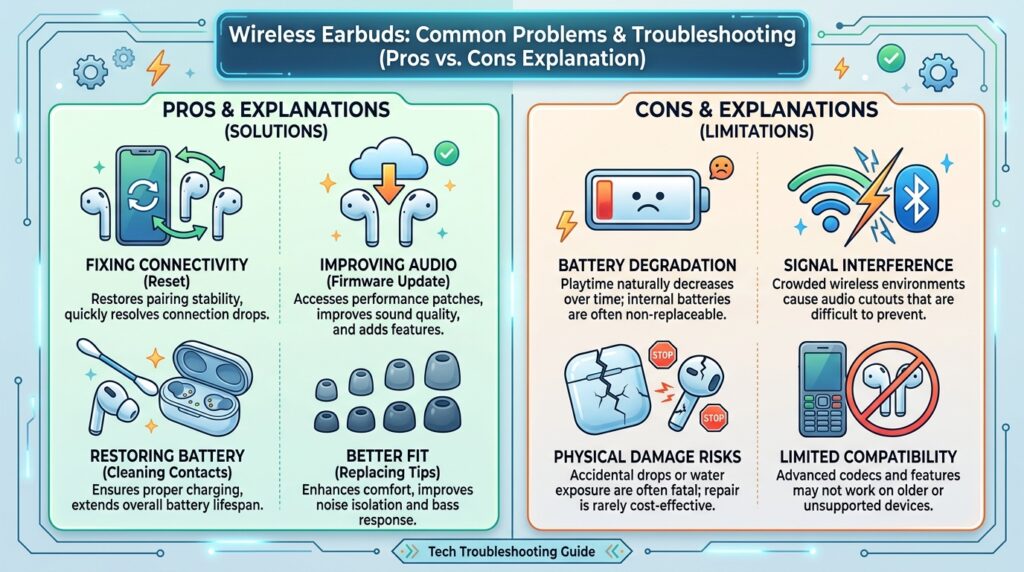
DIY troubleshooting is the right first step for the vast majority of reported problems, since resets, cleaning, and firmware updates are free and typically take under ten minutes. Its main limitation is that it can’t fix genuine physical damage, like a cracked driver from a drop or water damage beyond the model’s rated resistance.
A warranty claim or replacement becomes the better option once you’ve ruled out software and buildup causes, especially within the first year when most brands offer free repair or replacement. Its main drawback is time — claims can take days to weeks to resolve compared to a five-minute reset.
Repair vs Replace Cost Table
| Scenario | Recommended Action | Typical Cost |
|---|---|---|
| Pairing/connection issues | DIY reset | Free |
| Dirty contacts/charging issues | DIY cleaning | Free |
| Muffled sound from buildup | DIY cleaning | Free |
| Cracked case or driver damage | Warranty claim or repair | Free (in warranty) to $50+ |
| Water damage beyond IP rating | Replacement | Full retail price |
Comparison Table
| Problem Type | DIY Fixable? | Average Fix Time | Replacement Needed? |
|---|---|---|---|
| Connectivity | Yes | 2–5 minutes | Rarely |
| One-earbud audio | Yes | 5–10 minutes | Occasionally |
| Charging | Yes | 2–5 minutes | Rarely |
| Physical damage | No | N/A | Usually |
Specifications That Affect Reliability
Battery cycle count (typically rated for 300–500 full charges), IP water/sweat resistance rating, and Bluetooth chipset generation all affect how often problems occur over a pair’s lifespan. Earbuds rated IPX4 or higher tend to have fewer sweat-related issues with contact and charging than unrated or lower-rated models.
Security, Privacy, and Compliance
Companion apps for wireless earbuds typically request Bluetooth and sometimes microphone permissions; reviewing these periodically is good practice, especially after installing app updates. There are no significant compliance concerns specific to troubleshooting, though always download firmware updates through the official companion app rather than from third-party sources to avoid corrupted firmware.
Performance Factors
Firmware version, Bluetooth codec selection (AAC, aptX, LDAC), and physical obstruction between the earbuds and your device all directly affect real-world performance and the frequency of problems. Keeping firmware updated through the official app is one of the simplest ways to prevent recurring glitches before they start.
Ecosystem and App Integrations
Most major brands’ companion apps (Apple’s Bluetooth settings, Sony’s Sound Connect, Samsung’s Galaxy Wearable, Soundcore app) include built-in diagnostics, firmware update checks, and reset options, making them the first place to check when troubleshooting rather than relying purely on phone-level Bluetooth settings.
Customer Support and Warranty
Most major brands offer a 1-year warranty covering genuine hardware defects, and many support pages include model-specific reset instructions that are faster than generic troubleshooting. If DIY steps fail, contacting support with your model number and a clear description of the fixes already tried will significantly speed up the resolution process.
Latest 2026 Updates
Newer 2026 companion apps increasingly include automatic diagnostic tools that detect common issues (like an imbalanced earbud battery or outdated firmware) and prompt a one-tap fix, reducing how often users need to manually work through reset steps. This trend has meaningfully cut average resolution time for the most common connectivity complaints.
Expert Tips
Always try the simplest fix first — a Bluetooth reset — before assuming a deeper problem exists, since it resolves the majority of complaints. Clean your earbuds and case weekly if you work out regularly, since sweat and buildup are cumulative and become harder to fix the longer they go unaddressed.
Common Mistakes
The most common mistake is assuming a problem means the earbuds are defective and immediately seeking a replacement, when a two-minute Bluetooth reset would have resolved it. A close second is neglecting to check for a leftover protective film on new earbuds before assuming the charging case itself is broken.
Troubleshooting by Symptom
If earbuds won’t pair, forget the device on your phone and re-pair from scratch. If only one side works, check the battery level of that earbud and try a full factory reset. If sound is muffled, clean the speaker mesh with a dry brush or cotton swab. If the case won’t charge, check for protective film and clean the contacts.
Myths vs Facts
Myth: If earbuds won’t pair, they’re broken. Fact: The vast majority of pairing failures are caused by corrupted Bluetooth memory and are fixed by forgetting and re-pairing the device.
Myth: Muffled sound always means a damaged driver. Fact: Earwax and dust buildup on the speaker mesh is a far more common cause and is fixed with simple cleaning.
Decision Matrix (Fix It or Replace It)
| Criteria | Try DIY Fix First | Contact Warranty/Support |
|---|---|---|
| Under 1 year old | Yes | Yes, if DIY fails |
| Physical crack or drop damage | No | Yes |
| Connection/pairing issue | Yes | Only if reset fails |
| Water exposure beyond rating | No | Yes |
| Battery life much shorter than new | Yes (check settings/ANC) | Yes, if unusually short |
Beginner vs Advanced Troubleshooting
Beginners should start with the simplest steps: restarting Bluetooth, forgetting and re-pairing, and cleaning visible contacts and mesh. Advanced users comfortable digging deeper can check the companion app diagnostic logs, manually force a firmware rollback if a recent update caused issues, or test the earbuds against a second device to determine whether the problem is phone-side or earbud-side.
Best Alternatives if Problems Persist
If a specific pair continues to have unresolved issues after all troubleshooting steps, consider requesting a replacement under warranty rather than continuing to trial-and-error fix a potentially defective unit. For anyone whose earbuds are out of warranty and beyond repair, moving to a well-reviewed budget or mid-range model is often more cost-effective than a professional repair.
Alternative Comparison
| Option | Best For | Trade-off |
|---|---|---|
| DIY troubleshooting | Most common issues | Doesn’t fix physical damage |
| Manufacturer warranty claim | In-warranty hardware defects | Takes days to weeks |
| Third-party repair shop | Out-of-warranty physical damage | Costs money, variable quality |
| Replacement purchase | Old or irreparable pairs | Full cost of a new pair |
Who Should Troubleshoot vs Who Should Return the Product
Anyone experiencing connectivity, charging, or sound quality issues should troubleshoot first, since these are overwhelmingly software- or buildup-related and fixable at no cost. Anyone with visible physical damage, water exposure beyond the rated resistance, or a pair that fails to work correctly even after a full reset and firmware update should pursue a warranty claim or return instead of continuing to troubleshoot.
Why won’t my wireless earbuds connect to my phone?
This is most often caused by corrupted Bluetooth pairing data rather than a hardware fault. Forget the earbuds in your phone’s Bluetooth settings, place them back in the case for ten seconds, then re-pair them as if connecting for the first time.
Why does only one of my earbuds work?
This usually happens because one earbud has a lower battery charge than the other, the speaker mesh is blocked, or the Bluetooth pairing has become corrupted. A full factory reset from the case, combined with checking both earbuds are fully charged, resolves most cases.
Why is my earbuds case not charging?
Check for a thin protective film left on the charging contacts from the original packaging, and gently clean both the case and earbud contacts with a dry cotton swab, as dust buildup is a common cause of charging failures.
Why does my audio keep cutting out?
Audio dropouts are typically caused by distance from your device, physical obstructions like walls, or interference from other nearby Bluetooth devices. Staying within about 10 feet of your device with a clear line of sight usually resolves the issue.
Why does my noise cancellation suddenly not work?
This is often caused by an outdated firmware version or a setting accidentally changed in the companion app. Check for a firmware update first, then confirm ANC is actually enabled in the app rather than set to transparency mode.
Rating Scorecard
| Fix Category | Success Rate | Average Time | Cost |
|---|---|---|---|
| Bluetooth reset (connectivity) | 9/10 | 2–5 minutes | Free |
| Contact cleaning (charging) | 9/10 | 2–5 minutes | Free |
| Mesh cleaning (sound quality) | 8/10 | 3–5 minutes | Free |
| Firmware update (ANC/glitches) | 8/10 | 5–10 minutes | Free |
| Factory reset (persistent issues) | 7/10 | 5–15 minutes | Free |
Read more: Best Wireless Earbuds for Beginners in 2026
Conclusion
The truth about wireless earbuds problems is that most of them aren’t really “problems” at all — they’re routine maintenance issues with simple, free fixes. A pair that won’t pair almost always needs a Bluetooth reset, not a replacement. A case that won’t charge is usually a dirty contact or leftover protective film, not a dead battery. And a muffled sound is far more often due to earwax on the mesh than to a damaged internal driver.
The overall moral here is to troubleshoot before you replace. Work through the basics — reset the Bluetooth connection, clean the contacts and mesh, check for a firmware update, and try a full factory reset — before assuming your earbuds are defective. These steps resolve the overwhelming majority of complaints people search for, usually in under ten minutes and at no cost.
Reserve warranty claims and replacements for what they’re actually meant for: physical damage, water exposure beyond your model’s rated resistance, or issues that persist even after a complete reset and firmware update. Treating problems in that order — cheapest and fastest fix first — will save you money, extend the real lifespan of your earbuds, and spare you the frustration of replacing a pair that never actually needed it.
Official Sources
- Manufacturer support documentation — Apple, Samsung, Sony, Anker/Soundcore
- Independent troubleshooting guides — TOZO, SlashGear, Wisepickers, Headphone Horizon
- 2026 headphone detection and Bluetooth troubleshooting resources
Author Bio
Written by the TechBuyGuide editorial team, specializing in consumer audio troubleshooting guides, with fixes verified against current 2026 manufacturer support documentation and independent troubleshooting resources.