


Starting a blog used to mean hiring a developer, buying expensive software, and hoping you picked the right tools the first time. That’s no longer true. In 2026, anyone can launch a professional-looking blog for under $50 a year, and in some cases for free, without sacrificing the features that actually matter: a custom domain, reliable hosting, mobile-friendly design, and room to grow. This guide exists because most “how to start a blog” articles either push a single affiliate hosting company or skip the real trade-offs between free and paid platforms.
This guide covers the full journey: choosing between free platforms like WordPress.com and self-hosted WordPress, picking a domain name and budget host, setting up your blog step by step, writing your first posts, and eventually monetizing without spending money you don’t have. Budget blogging doesn’t mean cutting corners on quality — it means being deliberate about where your first dollars go, so you spend on a domain and hosting instead of themes, plugins, or tools you don’t need yet.
Whether you’re starting a personal journal, a niche review site, or the first step toward a full-time writing business, the sequence matters. Skipping domain research or picking the wrong host can cost you migration headaches later. This guide walks through the decisions in the order you’ll actually face them, with real 2026 pricing, a step-by-step setup tutorial, common beginner mistakes, and an honest comparison of the cheapest legitimate paths to a working blog.
By the end, you’ll know exactly which platform fits your budget and goals, how much you should realistically expect to spend in year one, and how to avoid the renewal-price traps that catch most new bloggers off guard. Free blogging platforms, budget web hosting, and self-hosted WordPress are all covered so you can make an informed choice rather than following generic advice that assumes everyone has the same budget or goals.
Quick Facts Table
| Fact | Detail |
|---|---|
| Cheapest way to start | Free platform (WordPress.com, Blogger) — $0 |
| Cheapest self-hosted option | Budget host + domain — roughly $2–$5/month intro pricing |
| Typical first-year cost (self-hosted) | $35–$80 including domain and hosting |
| Recommended platform for most beginners | Self-hosted WordPress.org |
| Time to launch | 1–3 hours for a basic setup |
| Ongoing costs after year one | Hosting renewal ($8–$17/month typical), domain renewal (~$12–$20/year) |
| Free option worth avoiding for serious blogs | Free subdomains (yourblog.wordpress.com) — limits branding and monetization |
Quick Summary
If you want the short version: register a domain name (roughly $10–$15 a year), sign up for a budget host with an introductory shared-hosting plan (roughly $2–$5 a month for the first term), install WordPress in one click, pick a free theme, and publish your first post. That combination gives you full ownership of your content, room to add plugins and monetization later, and a total first-year cost usually under $80 — often under $50 if you catch an introductory hosting deal.
Key Takeaways
- You do not need to spend money to test whether blogging is right for you — free platforms exist for exactly that purpose.
- Self-hosted WordPress is the best balance of low cost and long-term flexibility for most budget bloggers.
- The biggest hidden cost in budget hosting is the renewal price, not the introductory price — always check the year-two rate before buying.
- A custom domain name is worth the roughly $12–$20 a year even on a tight budget, because it protects your brand and makes monetization possible later.
- Free themes and free plugins can cover 90% of a new blogger’s needs; premium tools should wait until the blog has traffic or income.
Table of Contents
Why Trust This Guide
This guide draws on publicly available 2026 pricing from major budget hosts, official platform documentation, and side-by-side comparisons of what beginners actually need versus what hosting companies try to upsell. Every price mentioned reflects introductory-tier shared hosting plans as advertised in 2026, with renewal pricing called out explicitly, because renewal shock is the single most common complaint from new bloggers. Facts about specific platforms are cross-checked against each provider’s own pricing pages and independent hosting review sites rather than a single source, and anything that couldn’t be confirmed from multiple sources has been left out rather than guessed at.
Who This Guide Is For
This guide is written for first-time bloggers with a limited budget — students, hobbyists, side-hustlers, and small-business owners who want a real blog without a big upfront investment. It assumes no coding experience and no existing website. If you already run a self-hosted WordPress site and are looking for advanced performance tuning, this guide’s setup sections will be familiar, but the pricing comparisons and beginner mistakes sections are still useful for auditing your current costs.
What Is a Budget Blog
A budget blog is simply a blog built with the lowest reasonable spend that still gives you ownership of your content and room to grow. That typically means either a completely free platform with a shared subdomain, or a self-hosted WordPress site running on inexpensive shared hosting with a custom domain. The distinction matters because free platforms often restrict monetization, custom design, and data ownership, while self-hosted options require a small ongoing cost but remove those restrictions.
AI Overview: Budget Blogging in One Paragraph
Budget blogging means launching a blog for the lowest realistic cost — typically $0 on a free platform or $35–$80 in year one on a self-hosted setup — by combining a cheap domain name, an introductory-tier shared hosting plan, and free software like WordPress, rather than paying for premium themes, page builders, or managed hosting before you have traffic to justify them.
Free vs. Self-Hosted: How the Options Actually Work
Free blogging platforms like WordPress.com’s free tier, Blogger, and Medium let you publish immediately with zero cost, but your blog lives on their subdomain (yourblog.wordpress.com), you’re limited in design and plugin choices, and some platforms place ads on your content that you don’t control and don’t get paid for. Self-hosted WordPress, by contrast, means you own a domain name, rent server space from a hosting company, and install the free WordPress software yourself, giving you full control over design, plugins, and monetization.
The trade-off is straightforward: free platforms cost nothing but limit you long-term, while self-hosted setups cost roughly $3–$7 a month in the first year but remove nearly every restriction. Most people who are serious about blogging — even as a hobby — outgrow free platforms within a few months and end up migrating, which is more work than just starting self-hosted from day one.
History and Timeline of Budget Blogging Tools
Blogging platforms have gone through several cost eras. In the early 2000s, tools like Blogger (launched 1999) and early WordPress (2003) made publishing free and code-free for the first time, but hosting your own domain still required technical setup. By the mid-2010s, one-click WordPress installers became standard across shared hosts, collapsing setup time from hours to minutes. The 2020s brought AI-assisted setup wizards, drag-and-drop page builders bundled free with hosting, and increasingly aggressive introductory pricing from hosts competing for beginner bloggers, which is why 2026’s cheapest plans are lower than they were five years ago — even as renewal prices have climbed.
Features to Look For in a Budget Hosting Plan
Not every cheap plan is a good deal. The features below separate a genuinely useful budget plan from one that will cost you more time or money later.
Feature Table
| Feature | Why It Matters | Look For |
|---|---|---|
| Free SSL certificate | Required for security and Google ranking | Included, not an add-on |
| One-click WordPress install | Saves hours of manual setup | Standard on almost all budget hosts |
| Free domain (first year) | Reduces year-one cost | Common on 12+ month plans |
| Storage | Determines how many images/posts you can host | 10GB+ is plenty for a new blog |
| Renewal price | The real long-term cost | Check before buying, not after |
| Uptime guarantee | Keeps your blog online | Look for 99.9% or better |
| Email inclusion | Professional contact address | At least one free mailbox |
Free SSL, a one-click WordPress installer, and transparent renewal pricing are the three features that matter most for a first-time blogger — everything else is a nice-to-have.
How Budget Web Hosting Works
Shared hosting — the cheapest and most common option for new blogs — works by placing your website on a server alongside dozens or hundreds of other websites, splitting the infrastructure cost among all of them. This is why shared plans can start around $2–$5 a month, compared with $10–$200+ for cloud or dedicated hosting. The trade-off is shared resources, meaning performance can dip if another site on the same server gets a traffic spike, but for a new blog with modest traffic, shared hosting is more than sufficient.
Featured Snippet: What Does Shared Hosting Cost?
Shared web hosting for a new blog typically costs $2 to $10 a month during the introductory term, rising to $9 to $17 a month at renewal, depending on the provider and contract length. Longer commitments (24–48 months) lower the monthly rate but require more money upfront.
Setup Guide and Step-by-Step Tutorial
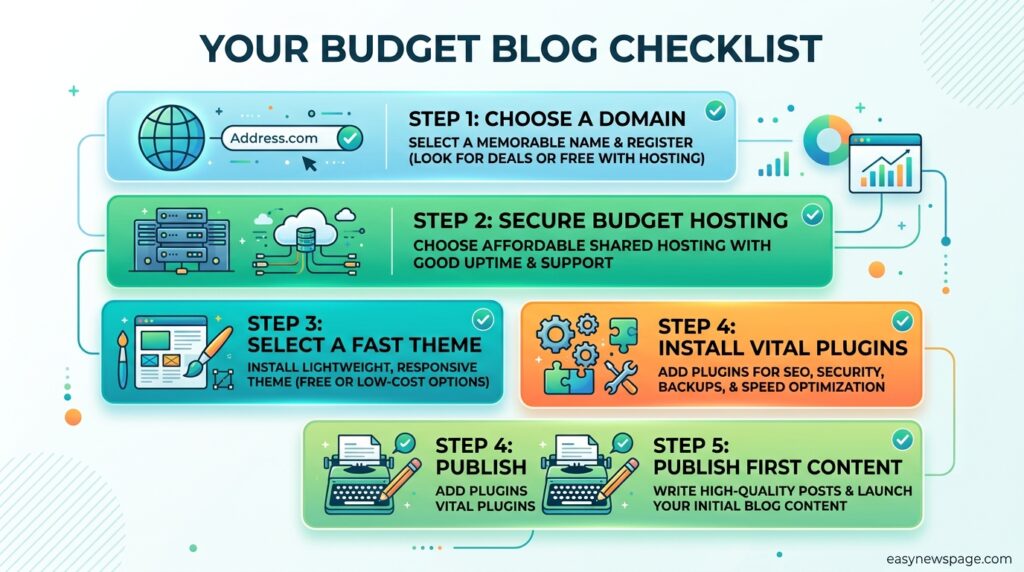
Setting up a self-hosted blog on a budget follows a predictable sequence. Below is the full walkthrough from domain purchase to your first published post.
Step 1: Pick a Domain Name
Choose a short, memorable domain name related to your blog’s topic. Avoid hyphens and numbers where possible, and check availability through your chosen host or a domain registrar before committing to a blog name.
Step 2: Choose a Budget Host
Compare introductory pricing, renewal pricing, and included features (free SSL, free domain, storage) across two or three budget hosts before purchasing, rather than buying the first plan you see advertised.
Step 3: Register and Install WordPress
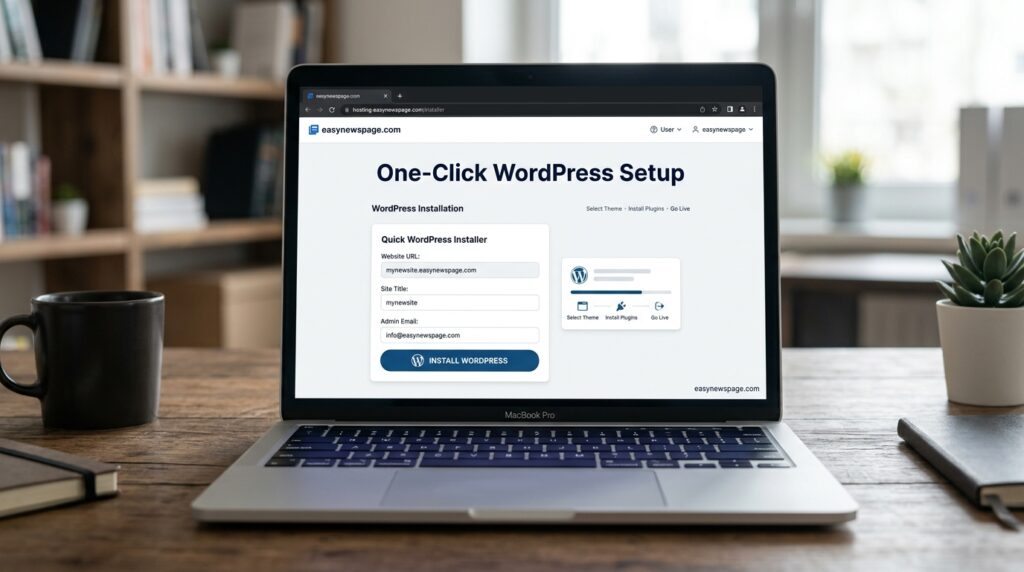
Most budget hosts include a one-click WordPress installer inside their control panel (often called hPanel or cPanel). This step usually takes under ten minutes and requires no coding.
Step 4: Choose a Free Theme
Select a lightweight, mobile-responsive free theme from the official WordPress theme directory. Avoid paying for a premium theme until you know your blog’s direction and traffic.
Step 5: Install Essential Free Plugins
A basic budget setup needs an SEO plugin, a caching plugin for speed, and a security plugin — all of which have reliable free versions.
Step 6: Write and Publish Your First Post
Draft a short introductory post explaining what your blog will cover and who it’s for, then publish it to confirm your setup works end-to-end.
Use Cases and Industry Examples
Budget blogging setups work across a wide range of goals. A personal journal blogger might use a free platform indefinitely since monetization isn’t a goal. A niche affiliate blogger almost always needs self-hosted WordPress because affiliate networks typically require a custom domain. A small local business might use a budget blog to publish updates and improve local search visibility without paying for a full marketing agency. A freelance writer building a portfolio benefits from self-hosted WordPress because it looks more professional to potential clients than a free subdomain.
Industry Use Cases
| Industry | Typical Budget Setup | Why |
|---|---|---|
| Personal/hobby blogging | Free platform or lowest-tier host | No monetization pressure |
| Affiliate marketing | Self-hosted WordPress | Custom domain required by most networks |
| Local business content | Self-hosted WordPress | SEO and credibility benefits |
| Freelance portfolios | Self-hosted WordPress | Professional appearance for clients |
| Nonprofit updates | Free platform or budget host | Minimal budget, infrequent posting |
Benefits and Limitations
Budget blogging setups offer real advantages, but they come with trade-offs worth understanding before you commit.
Benefits include low financial risk, fast setup time, full content ownership on self-hosted plans, and enough flexibility to grow from a hobby blog into a monetized site without switching platforms. Limitations include shared-hosting performance limits under high traffic, fewer premium features than managed hosting, and the renewal-price jump that catches many budget hosting customers off guard after the first term ends.
Pros & Cons Table
| Pros | Cons |
|---|---|
| Low upfront cost | Renewal prices rise significantly |
| Fast, beginner-friendly setup | Shared resources can slow under heavy traffic |
| Full content ownership (self-hosted) | Requires basic self-management (backups, updates) |
| Free themes/plugins cover most needs | Premium features cost extra later |
| Easy to upgrade hosting tier later | Free platforms limit monetization and branding |
Budget hosting is a genuinely good starting point for nearly all new bloggers, provided you go in aware of the renewal pricing and plan to reassess your hosting tier once traffic grows.
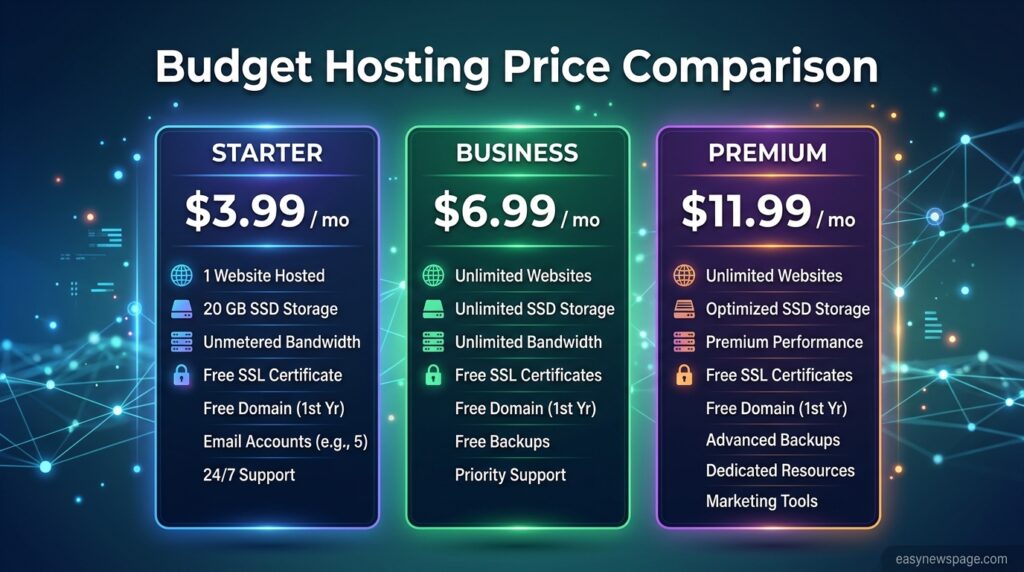
Pricing Table
| Provider Type | Intro Price (per month) | Typical Renewal Price | Free Domain | Notes |
|---|---|---|---|---|
| Free platform (WordPress.com/Blogger) | $0 | $0 | No (subdomain only) | Limited monetization and design |
| Budget shared host (entry plan) | ~$2–$4 | ~$9–$11 | Often, first year | Best for most new bloggers |
| Budget shared host (mid plan) | ~$5–$7 | ~$11–$17 | Often, first year | More storage, more sites |
| Managed WordPress hosting | ~$10–$25 | ~$25–$40 | Sometimes | Better performance, less “budget” |
Prices reflect commonly advertised 2026 introductory rates for long-term (12–48 month) commitments and will vary by provider and current promotions.
Comparison Table
| Platform | Cost | Custom Domain | Monetization Allowed | Best For |
|---|---|---|---|---|
| WordPress.com (free) | $0 | No | Restricted | Testing the waters |
| Blogger | $0 | Optional (paid) | Yes, limited | Simple hobby blogs |
| Self-hosted WordPress.org | ~$3–$7/mo + domain | Yes | Yes, unrestricted | Most budget bloggers |
| Squarespace/Wix budget tiers | ~$16–$25/mo | Yes | Yes | Design-focused, less budget-friendly |
Specifications
A typical entry-level budget hosting plan in 2026 includes roughly 10–50GB of SSD storage, one free website (upgradeable to multiple), a free SSL certificate, one free domain for the first term, at least one email mailbox, and a 99.9% uptime guarantee. Bandwidth is usually described as “unmetered” on entry plans, though hosts reserve the right to throttle unusually heavy usage.
Security, Privacy, and Compliance
Budget hosting plans in 2026 almost universally include free SSL certificates, which encrypt data between your visitors and your site and are also a confirmed Google ranking factor. Beyond SSL, security depends heavily on you: keeping WordPress core, themes, and plugins updated, using strong passwords, and installing a free security plugin covers most risks a small blog faces. Privacy compliance (such as cookie consent notices) matters even for small blogs if you have visitors in regions with data-protection laws like the EU’s GDPR, and free plugins exist specifically to handle basic compliance banners.
Performance
Shared hosting performance is generally sufficient for a new blog receiving up to a few thousand visits a month. Page speed depends more on image optimization, a lightweight theme, and caching than on hosting tier alone — a well-optimized budget site often outperforms a poorly optimized expensive one. As traffic grows into the tens of thousands of monthly visitors, upgrading to a cloud or managed WordPress plan becomes worth the added cost.
Integrations
Most budget WordPress hosting integrates directly with the WordPress plugin ecosystem, giving you access to free integrations for email newsletters, social sharing, analytics (like Google Analytics and Google Search Console), and basic e-commerce if you later want to sell digital products.
API
Self-hosted WordPress includes a built-in REST API by default, which allows developers to connect the blog to external apps, mobile apps, or custom tools without needing a separate paid API product — a meaningful advantage over some free blogging platforms with limited or no API access.
Customer Support
Budget hosting plans typically include 24/7 live chat support, though response quality varies by provider and tends to be more limited on the very cheapest tiers compared with mid-range or managed plans. Community support — WordPress forums, YouTube tutorials, and host-specific knowledge bases — fills most gaps for a self-directed beginner.
Latest Updates
Hosting providers have continued pushing AI-assisted setup tools into their budget tiers through 2026, including AI website builders and automated content assistants bundled at no extra cost with entry-level plans. Renewal pricing transparency has also become a bigger point of comparison between providers, with some hosts now displaying renewal rates more clearly at checkout in response to customer complaints.
Expert Tips
Buy the shortest hosting term you’re comfortable with if you’re unsure about a provider, even though longer terms lower the monthly rate — a bad first host is expensive to leave mid-contract. Register your domain separately from your host if you want maximum flexibility to switch hosts later without touching your domain. Always install a caching plugin on day one; it’s free and immediately improves site speed on shared hosting.
Common Mistakes
New budget bloggers often buy a 36-month hosting term from an unfamiliar provider to save a few dollars a month, then discover the renewal rate is more than they can commit to for three more years. Others skip backups entirely, assuming the host handles it, when many budget plans only include limited or paid backup options. A third common mistake is installing too many plugins early on, which slows the site down before it even has an audience.
Troubleshooting
If your blog loads slowly, check your image sizes and confirm a caching plugin is active before assuming you need to upgrade hosting. If your site goes down, most budget hosts offer a status page and live chat — check both before assuming it’s your fault. If WordPress won’t install, confirm your domain’s DNS has fully propagated, which can take up to 24–48 hours after registration.
Myths vs. Facts
Myth: Free blogging platforms are always the cheapest long-term option. Fact: Free platforms often cost you migration time and lost monetization later, making self-hosted WordPress cheaper over a multi-year horizon for anyone serious about blogging.
Myth: You need a premium theme to look professional. Fact: Many free WordPress themes are actively maintained, mobile-responsive, and indistinguishable from premium themes for a new blog’s needs.
Myth: Cheaper hosting always means worse hosting. Fact: Introductory pricing reflects a promotional discount on the same infrastructure the host uses for pricier plans — the renewal price, not the intro price, best reflects long-term quality.
Decision Matrix
| Criteria | Free Platform | Self-Hosted Budget WordPress | Managed WordPress |
|---|---|---|---|
| Upfront cost | 5/5 | 4/5 | 2/5 |
| Long-term flexibility | 1/5 | 5/5 | 5/5 |
| Ease of setup | 5/5 | 4/5 | 4/5 |
| Monetization freedom | 1/5 | 5/5 | 5/5 |
| Performance headroom | 2/5 | 3/5 | 5/5 |
| Best for beginners on a tight budget | Testing only | Recommended | Overkill early on |
Beginner vs. Advanced
A beginner budget setup means one shared hosting plan, one WordPress install, a free theme, and three or four essential free plugins — nothing more. An advanced budget setup, once traffic grows, might add a lightweight caching plugin tuned for performance, a free CDN like Cloudflare, and a staging environment for testing changes before they go live, all still achievable without leaving budget hosting.
Read more: How to Start a Blog: Common Mistakes to Avoid
Read more: How to Start a Blog for Free in 2026
Read more: How to Start a Blog Without Any Coding Skills (2026)
Best Alternatives
If self-hosted WordPress doesn’t fit your needs, Ghost offers a lean, fast alternative aimed at writers and newsletters, though its budget hosted tiers cost more than typical shared WordPress hosting. Blogger remains a genuinely free, ad-free-by-default option for simple hobby blogs with no monetization ambitions. Squarespace and Wix offer polished design at a higher monthly cost, better suited to bloggers who value design over budget.
Alternative Comparison
| Platform | Monthly Cost | Custom Domain | Best For |
|---|---|---|---|
| Self-hosted WordPress | ~$3–$7 | Yes | Budget bloggers wanting full control |
| Ghost(Pro) | ~$9+ | Yes | Newsletter-first writers |
| Blogger | $0 | Optional | True zero-budget hobby blogging |
| Squarespace/Wix | ~$16–$25 | Yes | Design-first bloggers with more budget |
Who Should Use a Budget Blog Setup
Anyone starting their first blog, testing a niche idea, building a portfolio, or launching a side project on a tight budget is a strong fit for a self-hosted budget setup, since it keeps costs low while leaving every future option — monetization, custom design, plugins — open.
Who Should Avoid It
Bloggers expecting very high traffic from launch, businesses needing guaranteed high performance and premium support, or anyone uncomfortable handling basic technical maintenance (updates, backups) should consider managed WordPress hosting instead, even though it costs more.
FAQs
Are free blogging platforms good enough to start with?
Yes, for testing an idea with zero financial risk. Free platforms like WordPress.com’s free tier or Blogger let you publish immediately, but they restrict custom domains, design flexibility, and monetization, so most serious bloggers eventually move to self-hosted WordPress.
How much does it really cost to start a blog on a budget?
A realistic first-year budget is $35 to $80, covering a domain name (roughly $12–$20/year) and an introductory shared hosting plan (roughly $2–$5/month). Free platforms can bring this to $0, with the trade-offs described above.
Is self-hosted WordPress hard to set up for beginners?
No. Most budget hosts include a one-click WordPress installer, and a basic blog can go from domain purchase to published first post in one to three hours without any coding.
What’s the biggest hidden cost in budget web hosting?
The renewal price. Introductory rates are typically discounted for the first term only, and renewal rates can be two to five times higher, so it’s important to check the renewal price before committing to a long-term plan.
Do I need to buy a premium theme to look professional?
No. Many free WordPress themes are lightweight, mobile-responsive, and well-maintained, and are sufficient for a new blog until traffic and revenue justify a premium upgrade.
Can I make money from a budget blog?
Yes, as long as you’re on a self-hosted platform with a custom domain, which most affiliate programs, ad networks, and sponsorship deals require. Free subdomain platforms often restrict or complicate monetization.
What’s the difference between shared hosting and managed WordPress hosting?
Shared hosting splits server resources across many websites at a low cost, suitable for new blogs. Managed WordPress hosting costs more but includes automatic updates, better performance, and specialized WordPress support, which becomes worthwhile once a blog has meaningful traffic.
Rating Scorecard
| Category | Score (out of 5) |
|---|---|
| Affordability | 5/5 |
| Ease of Setup | 4.5/5 |
| Long-Term Flexibility | 4.5/5 |
| Performance (entry tier) | 3.5/5 |
| Support Quality (entry tier) | 3.5/5 |
| Overall for Budget Bloggers | 4.3/5 |
Conclusion
Starting a blog on a budget is no longer a compromise. The combination of a low-cost domain name, an introductory-tier shared hosting plan, and free software like WordPress gives most new bloggers everything they need to launch a real, ownable, monetizable website for well under $100 in the first year. The choice between free platforms and self-hosted WordPress comes down to intent: if you’re only testing an idea, a free platform costs nothing and carries no risk. If you’re serious about growing an audience, building a portfolio, or eventually earning income, self-hosted WordPress is worth the small ongoing cost from day one.
The biggest mistake budget bloggers make isn’t spending too little — it’s signing up for long hosting terms without checking the renewal price, or over-investing in premium themes and plugins before they have the traffic to justify them. Start lean: a domain, a budget host, a free theme, and a handful of essential free plugins. Everything else — premium tools, upgraded hosting, custom design — can wait until your blog has proven itself. The path from zero to a published, professional-looking blog is shorter and cheaper in 2026 than it has ever been, and the only real requirement left is starting.
Official Sources
- WordPress.org official documentation (wordpress.org)
- Publicly listed 2026 pricing pages for major budget hosting providers (Bluehost, Hostinger)
- Independent hosting comparison and pricing-verification sites cited for cross-checking 2026 rates
Author Bio
Written by the Content Team at easynewspage.com, covering budget-friendly guides to launching websites, blogs, and small online businesses. Pricing and platform details are reviewed against current provider documentation to stay accurate for 2026 readers.