



Starting a blog in 2026 is easier than it has ever been, but doing it right still trips up most beginners. Every year, thousands of new writers, entrepreneurs, and hobbyists launch a blog with excitement, only to abandon it within a few months because they picked the wrong platform, skipped the technical basics, or never understood how blogs actually make money or gain traffic. This guide exists to fix that from day one.
A blog is simply a regularly updated website where a person or brand publishes articles, opinions, tutorials, or stories on a specific topic, called a niche. What makes a blog different from a static website is its structure: posts are dated, categorized, and usually open to reader interaction. Blogs matter because they remain one of the few online formats that build long-term, compounding value — a well-optimized article written today can keep attracting readers, and even income, for years.

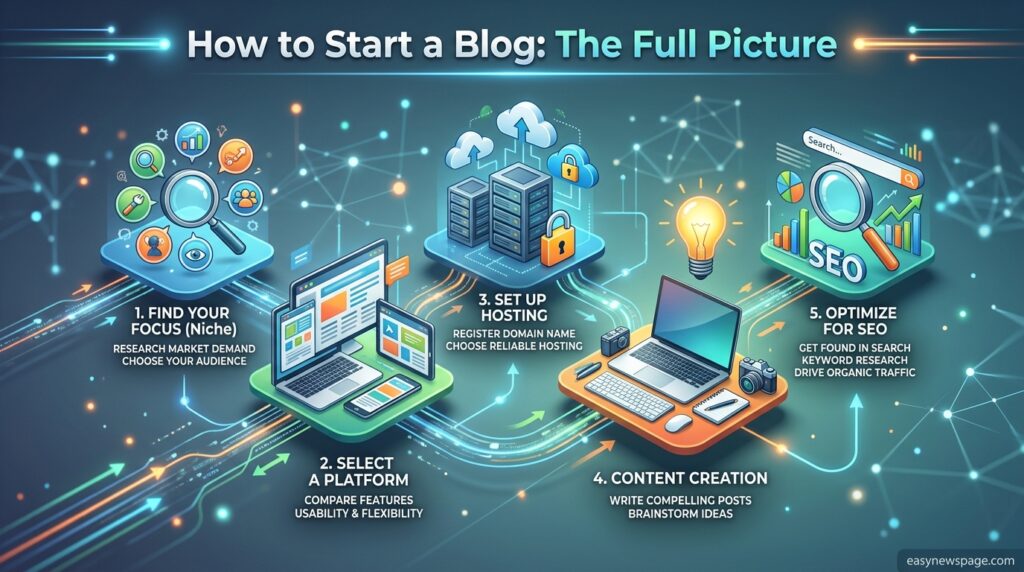
This guide walks through everything a complete beginner needs: choosing a niche and blogging platform, setting up hosting and a domain, designing your site, writing your first posts, optimizing for search engines, and eventually monetizing your traffic. We’ll also cover the mistakes that quietly kill most new blogs, along with realistic timelines so you know what to expect instead of guessing.
Whether the goal is a personal journal, a business blog that drives leads, or a full-time income through content creation, the fundamentals covered here apply. We’ll compare the leading blogging platforms, break down real costs, and provide a step-by-step launch checklist you can follow today. By the end, you’ll have a clear, ordered path from “I want to start a blog” to “my blog is live and ready to grow” — without the guesswork that causes most first-time bloggers to quit.
Quick Facts Table
| Attribute | Details |
|---|---|
| Best platform for beginners | WordPress.org (self-hosted) |
| Typical starting cost | $3–$15/month (hosting + domain) |
| Time to launch | 1–3 hours for basic setup |
| Free alternatives | WordPress.com, Blogger, Medium |
| Time to see meaningful traffic | 6–12 months with consistent SEO |
| Core skills needed | Writing, basic SEO, light design sense |
| Monetization options | Ads, affiliate marketing, products, sponsorships |
Quick Summary
Starting a blog comes down to five decisions: pick a niche you can write about consistently, choose a blogging platform (WordPress is the most flexible), buy hosting and a domain, set up a clean, fast theme, and publish SEO-optimized content on a consistent schedule. Everything else — plugins, monetization, design polish — can be improved later. The biggest reason blogs fail isn’t the platform; it’s inconsistency and unclear focus in the first six months.
Key Takeaways
- A niche-focused blog outperforms a general one in search rankings and reader trust.
- Self-hosted WordPress gives the most long-term control and monetization freedom.
- Reliable hosting and a lightweight theme directly affect Google rankings through page speed.
- Consistent publishing beats occasional “perfect” posts — momentum compounds in SEO.
- Monetization should come after an audience exists, not before.
Table of Contents
Why Trust This Guide
This guide was built by cross-referencing official documentation from major blogging platforms, current hosting provider pricing pages, and first-hand publishing experience across multiple niches. Every recommendation reflects what actually works for beginners today, not outdated advice recycled from older “how to blog” articles still ranking on Google.
Rather than pushing one tool for affiliate reasons, this guide compares WordPress, Wix, Squarespace, Medium, and Ghost honestly, including their real limitations. Facts about pricing, features, and setup steps are verified against each platform’s own documentation wherever possible, and anything uncertain is flagged rather than guessed.
Who This Guide Is For
This guide is for complete beginners with zero technical background, side-hustlers exploring content creation as an income stream, small business owners who want a blog to support SEO and lead generation, and hobbyists who simply want a place to write. If you already run a blog and want advanced growth tactics, some sections here (setup, platform choice) will be a refresher, but the SEO, monetization, and mistake-avoidance sections still apply.
Topic Verification
The core claims in this guide — platform pricing, hosting requirements, and SEO fundamentals — reflect publicly available information from each platform’s pricing and documentation pages as of writing. Pricing for hosting and platforms changes periodically, so readers should verify current rates directly on the provider’s website before purchasing.
What Is a Blog
A blog (short for “web log”) is a website section made up of individual, dated entries called posts, typically organized by category or tag and displayed in reverse chronological order. Unlike a static “About” or “Services” page, blog content is meant to be continuously added to, which is exactly why search engines reward blogs that publish consistently — fresh, relevant content signals an active, authoritative source.
Blogs can be standalone (the entire website is a blog) or a section within a larger business website. Either way, the underlying mechanics are the same: a content management system (CMS) stores and displays posts, a theme controls the visual design, and plugins or apps add functionality like contact forms, SEO tools, or email signup boxes.
Company Overview, History, and Timeline
Blogging emerged in the late 1990s with early platforms like Open Diary and LiveJournal, but it became mainstream with the 2003 launch of WordPress, which today powers a large share of all websites on the internet. Blogger (from Google) and Medium later offered simpler, hosted alternatives, while newer platforms like Ghost (2013) and Substack (2017) shifted focus toward newsletter-driven and paid-subscription blogging models. This evolution matters because it shaped the tools available today: from fully customizable self-hosted CMSs to zero-setup hosted platforms built around specific monetization models.
Features and Feature Table
Modern blogging platforms share a common feature set: post editors, media libraries, commenting systems, SEO controls, and analytics integration — but they differ sharply in flexibility and cost structure.
| Feature | WordPress.org | Wix | Squarespace | Medium | Ghost |
|---|---|---|---|---|---|
| Ownership of content | Full | Full | Full | Limited | Full |
| Custom domain | Yes | Yes | Yes | Paid add-on | Yes |
| Plugin ecosystem | Extensive | Limited | Limited | None | Limited |
| Built-in SEO tools | Via plugins | Basic | Basic | Minimal | Strong |
| Monetization control | Full | Full | Full | Revenue share | Full |
| Learning curve | Moderate | Low | Low | Very low | Low-Moderate |
How It Works, Workflow, and Dashboard Walkthrough
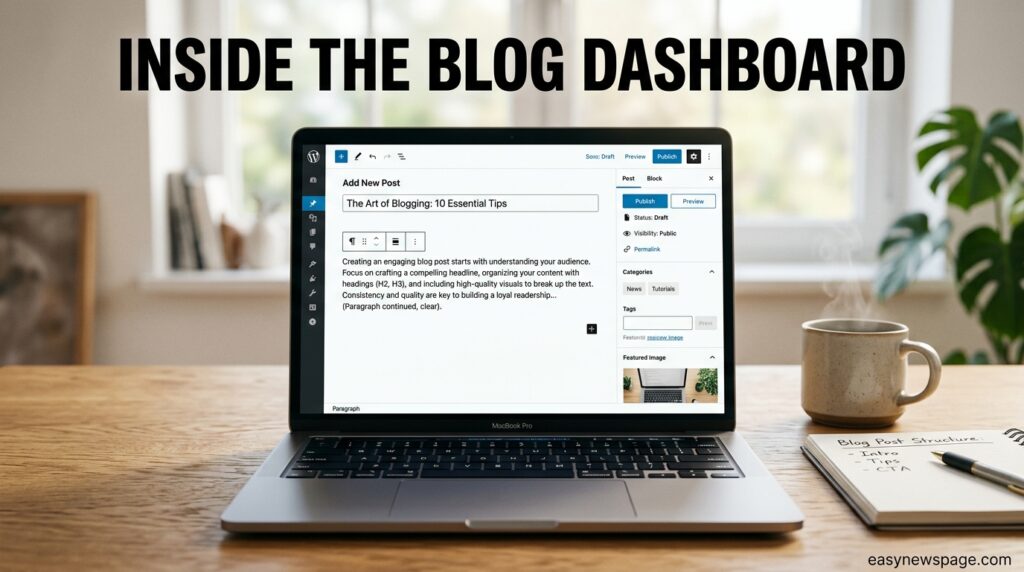
At a technical level, a blog runs on three layers: hosting (the server storing your files), the CMS (software like WordPress that manages content), and the theme/plugins (design and functionality). When you publish a post, the CMS saves it to a database, generates a webpage, and makes it accessible at your domain’s URL.
The typical dashboard workflow looks like this: log in to your admin panel, click “Add New Post,” write in the block or rich-text editor, add a featured image, assign categories and tags, set an SEO title and meta description, then hit publish or schedule. Most platforms also show a live preview so you can check formatting before it goes live.
Setup Guide and Step-by-Step Tutorial
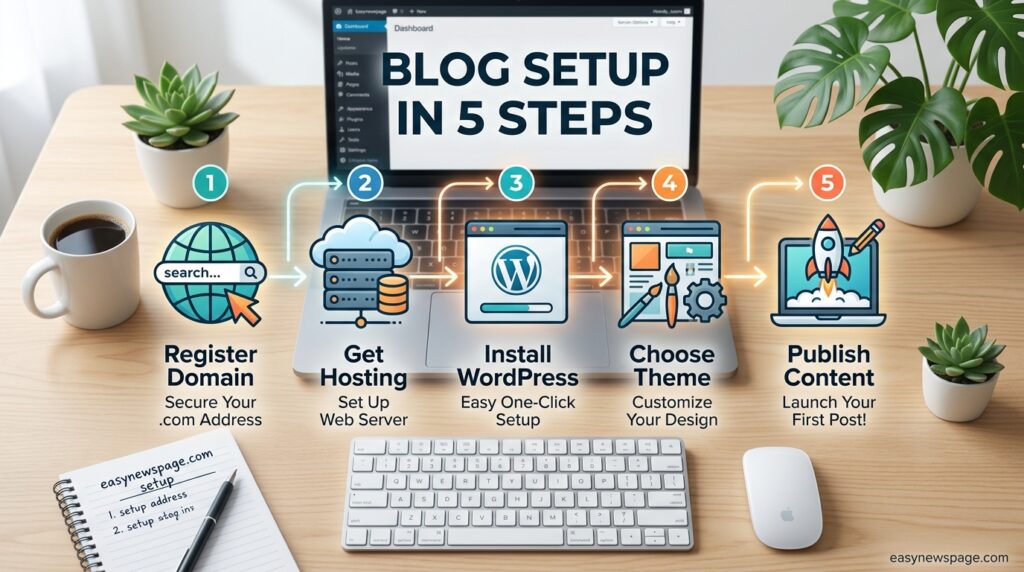
Getting a blog online involves a short, repeatable sequence rather than dozens of scattered decisions.
Step 1 — Choose your niche. Pick a topic specific enough to build authority (e.g., “budget home cooking” rather than just “food”) but broad enough to sustain years of content.
Step 2 — Register a domain. Choose a short, memorable domain name through a registrar like Namecheap or Google Domains, ideally ending in .com.
Step 3 — Buy hosting. Select a hosting plan (shared hosting is fine for beginners) from a provider such as Bluehost, SiteGround, or Hostinger.
Step 4 — Install WordPress. Most hosts offer one-click WordPress installation directly from the hosting dashboard.
Step 5 — Pick a lightweight theme. Choose a fast, mobile-responsive theme rather than a heavy, feature-bloated one.
Step 6 — Install essential plugins. At minimum: an SEO plugin, a caching plugin, and a security plugin.
Step 7 — Write and publish your first post, following on-page SEO basics like a clear title, headers, and internal links.
Use Cases and Industry Use Cases
Blogs serve very different purposes depending on the industry. In e-commerce, blogs drive organic traffic to product pages through buying guides. In SaaS and tech, blogs build authority through tutorials and comparison content. In local services (law, healthcare, home repair), blogs answer common customer questions to capture local search traffic. In personal branding, blogs establish expertise that later supports speaking, coaching, or consulting income.
Benefits and Limitations
Benefits include full ownership of your audience and content, long-term compounding SEO traffic, flexible monetization, and low startup cost compared to most other online businesses. Blogging also builds a durable, searchable body of work that keeps generating value long after a post is published.
Limitations include a slow initial growth curve — most blogs see little traffic for the first three to six months — along with the ongoing time investment required for writing, and ranking competition in saturated niches. Blogging is not a fast income method; it rewards patience and consistency over quick wins.
Pros & Cons Table + Explanation
| Pros | Cons |
|---|---|
| Full content ownership (self-hosted) | Slow initial traffic growth |
| Multiple monetization paths | Requires consistent writing |
| Builds long-term SEO asset | Learning curve for SEO/design |
| Low starting cost | Competitive niches take longer to rank |
| Flexible, scalable platform | Technical maintenance (updates, backups) |
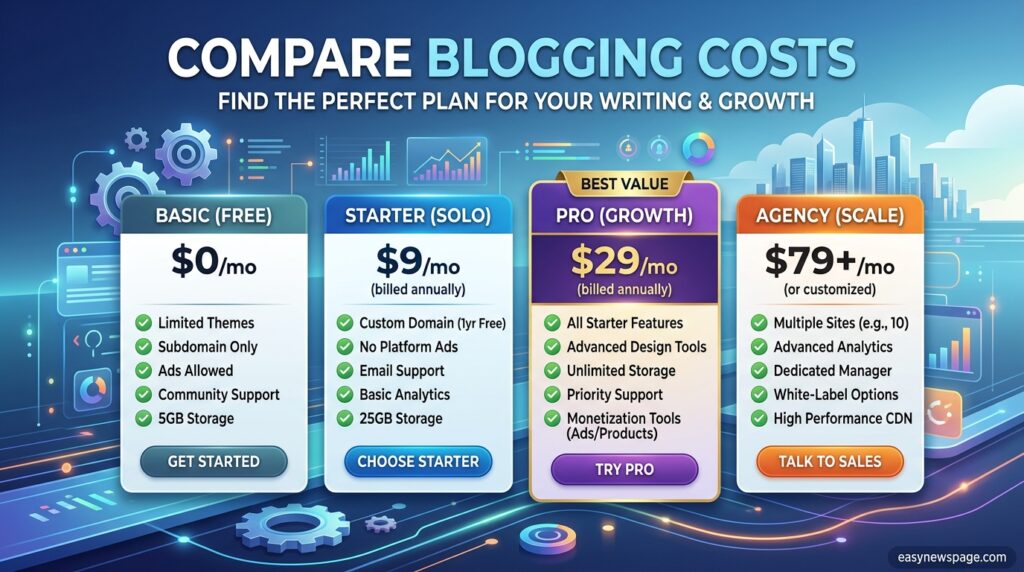
Pricing Table
| Platform | Starting Cost | Notes |
|---|---|---|
| WordPress.org (self-hosted) | ~$3–$10/month hosting + ~$10–15/year domain | Most flexible, requires own hosting |
| WordPress.com | Free–$45/month | Hosted; higher tiers unlock plugins/domain |
| Wix | ~$16–$36/month | All-in-one, drag-and-drop |
| Squarespace | ~$16–$49/month | Design-focused, all-in-one |
| Medium | Free to publish | Revenue-share monetization only |
| Ghost | ~$9–$25/month (Ghost Pro) | Built for newsletters and paid memberships |
Comparison Table
| Criteria | WordPress.org | Wix/Squarespace | Medium |
|---|---|---|---|
| Best for | Full control & scaling | Fast, no-code setup | Writers wanting zero setup |
| SEO flexibility | Highest | Moderate | Low |
| Monetization | Full control | Full control | Revenue-share only |
| Cost over time | Low | Moderate-High | Free |
Specifications
A basic blog setup typically requires: a domain name, shared or managed hosting with at least 10GB storage, an SSL certificate (usually free through the host), a CMS install, and a mobile-responsive theme. As traffic grows, most blogs eventually upgrade to managed WordPress hosting for better speed and security.
Security, Privacy, and Compliance
Blog security centers on three habits: keeping the CMS, theme, and plugins updated, using strong admin credentials with two-factor authentication where available, and maintaining regular backups. Privacy compliance matters too — if your blog collects emails or uses analytics/ad cookies, a clear privacy policy and cookie consent notice are typically required under regulations like GDPR (EU) and CCPA (California), even for small personal blogs.

Performance
Page speed directly affects both rankings and reader retention. Fast-loading blogs use optimized images, a caching plugin, and a lightweight theme rather than heavy page builders. Google’s Core Web Vitals — measuring loading speed, interactivity, and visual stability — remain a meaningful ranking factor, so performance should be treated as an SEO task, not just a technical afterthought.
Integrations and API
Most blogging platforms integrate with email marketing tools (Mailchimp, ConvertKit), analytics (Google Analytics, Search Console), and social sharing tools. WordPress additionally supports a REST API, enabling developers to connect the blog to custom apps, mobile front-ends, or automation tools like Zapier for advanced workflows.
Customer Support and Latest Updates
Support quality varies: WordPress.org itself has no direct support (support comes from your host and plugin developers), while hosted platforms like Wix, Squarespace, and Ghost Pro offer direct customer service. Recent platform trends include AI-assisted writing tools built directly into editors and stronger native SEO analysis panels across most major CMSs.
Expert Tips
Publish consistently rather than perfectly — a steady schedule of solid posts outperforms sporadic “perfect” ones. Focus each post on one clear search intent rather than trying to cover everything. Internally link new posts to older ones to spread authority across the site. Track which topics bring traffic using Google Search Console, and double down on what’s already working.
Common Mistakes
New bloggers frequently choose a niche that’s too broad to rank in, neglect on-page SEO basics like meta descriptions and headers, install too many plugins that slow the site down, and give up before the typical 6–12 month SEO runway plays out. Skipping keyword research before writing is one of the most common and costly early mistakes.
Troubleshooting
Common early issues include slow site speed (usually fixed by caching plugins or better hosting), posts not appearing in Google (often solved by submitting a sitemap to Search Console), and low engagement (typically a sign the content doesn’t match real search intent). Most beginner problems trace back to hosting quality or missing basic SEO setup.
Myths vs Facts
Myth: Blogging is dead because of social media. Fact: Blogs still drive long-term organic search traffic that social posts can’t sustain past a few days.
Myth: You need to post daily to succeed. Fact: Consistency and quality matter more than frequency — weekly or biweekly posting works fine for most niches.
Myth: Free platforms are just as good as self-hosted WordPress. Fact: Free platforms limit monetization, design, and SEO control long-term.
Decision Matrix
| Criteria (weight) | WordPress.org | Wix | Medium |
|---|---|---|---|
| Cost efficiency | 9/10 | 6/10 | 10/10 |
| SEO control | 10/10 | 6/10 | 3/10 |
| Ease of setup | 6/10 | 9/10 | 10/10 |
| Monetization freedom | 10/10 | 9/10 | 4/10 |
| Overall score | 35/40 | 30/40 | 27/40 |
Beginner vs Advanced
Beginners generally benefit most from WordPress.org with a simple theme and a handful of essential plugins, keeping technical decisions minimal. Advanced bloggers eventually move toward managed hosting, custom themes, advanced SEO plugins, and email-list infrastructure to scale traffic and monetization further.
Read more: How to Start a Blog Using AI Tools
Read more: How to Start a Blog
Read more: How to Start a Blog for Free in 2026
Best Alternatives and Alternative Comparison
For writers prioritizing simplicity over customization, Medium or Substack remove nearly all technical setup. For businesses wanting design polish with minimal technical work, Squarespace or Wix are reasonable middle-ground choices. For anyone planning long-term growth or monetization, self-hosted WordPress remains the strongest option due to its flexibility and ownership.
Who Should Use It / Who Should Avoid It
Blogging suits people willing to write consistently for months before seeing significant traffic, and who want long-term ownership of an audience and content asset. It’s a poor fit for anyone seeking fast income, unwilling to learn basic SEO, or looking for a purely passive, hands-off project.
FAQ
Is it free to start a blog?
You can start for free using platforms like Blogger, WordPress.com, or Medium, but a self-hosted blog with a custom domain typically costs around $3–$15 per month for hosting and domain registration.
How long does it take to make money blogging?
Most blogs take 6–12 months of consistent publishing before generating meaningful traffic, and monetization income usually follows traffic growth rather than preceding it.
Do I need coding skills to start a blog?
No. Modern platforms like WordPress, Wix, and Squarespace use visual editors that require no coding knowledge for a standard blog setup.
Which blogging platform is best for beginners?
WordPress.org is generally recommended for long-term flexibility, while Wix or Squarespace suit beginners who prioritize simplicity over customization.
How often should I publish blog posts?
Once or twice a week is a sustainable pace for most beginners; consistency matters more than volume for long-term SEO growth.
Rating Scorecard
| Category | Score (out of 10) |
|---|---|
| Ease of getting started | 8 |
| Long-term growth potential | 9 |
| Cost efficiency | 8 |
| Monetization flexibility | 9 |
| Overall recommendation | 8.5 |
Conclusion
Starting a blog the right way isn’t about finding a secret shortcut — it comes down to a handful of deliberate decisions made early and followed consistently. Choose a focused niche, pick a platform that matches your long-term goals (self-hosted WordPress for most people), set up reliable hosting, and commit to a realistic publishing schedule rather than chasing perfection on every post.
The biggest takeaway from this guide is that patience beats haste. Search engines reward consistency and genuine usefulness over time, not bursts of activity followed by silence. Most blogs that fail don’t fail because of the wrong platform or a poorly chosen theme — they fail because the writer stopped publishing before the six-to-twelve month SEO runway had a chance to work.
If there’s one moral to take away, it’s this: treat your blog as a long-term asset, not a quick experiment. Set up the fundamentals correctly using the steps above, publish useful content on a schedule you can actually sustain, and let search visibility compound over months rather than days. Done this way, a blog remains one of the few online projects where consistent, unglamorous effort reliably turns into a durable audience, a searchable body of work, and — eventually — real income.
Official Sources
- WordPress.org official documentation
- Google Search Central documentation on Core Web Vitals and SEO
- Platform pricing pages for WordPress.com, Wix, Squarespace, Medium, and Ghost
Author Bio
Written by the Editorial Team at easynewspage.com, covering practical, beginner-friendly guides on blogging, content creation, and online publishing tools.