


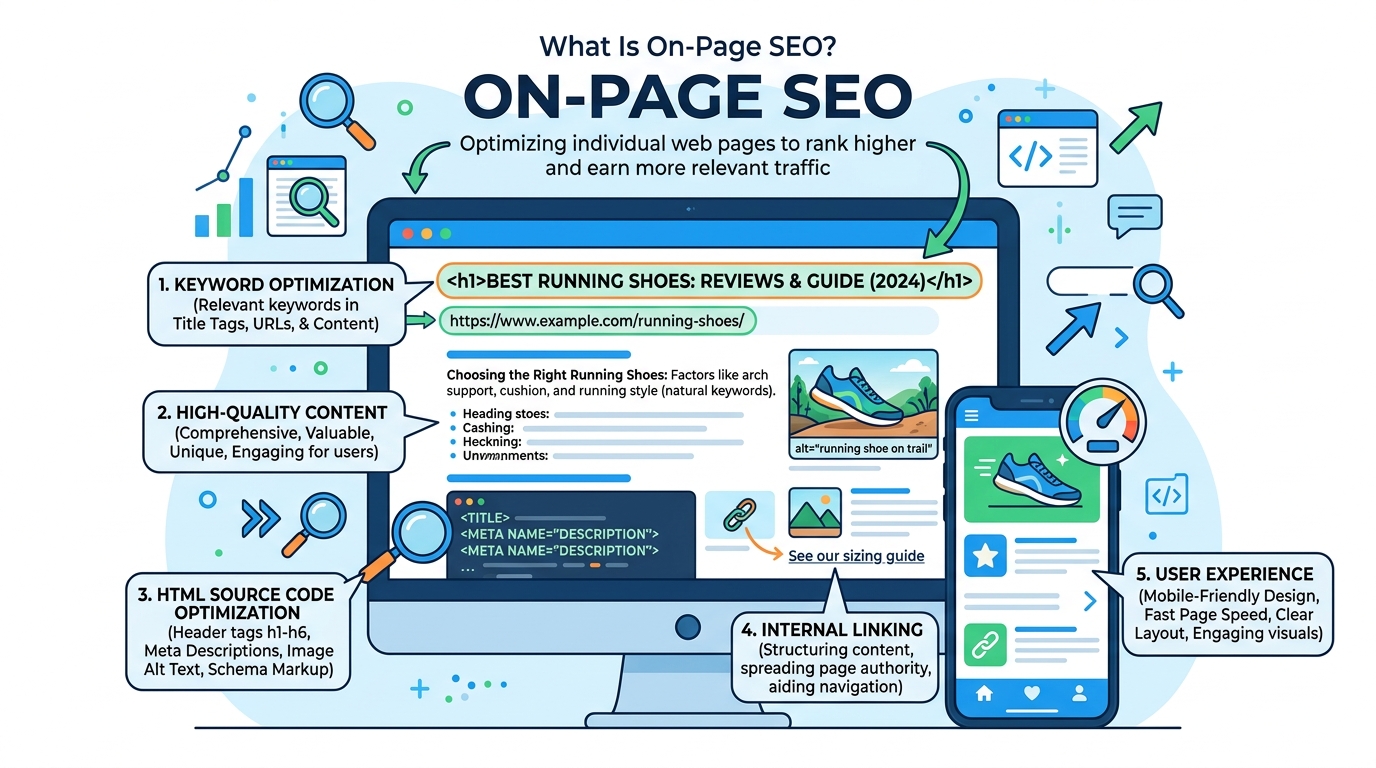
If you’ve ever published a page and watched it sit on page four of Google forever, the problem is usually not your writing — it’s your on-page SEO. This is the layer of optimization that lives entirely inside your own page, and it’s the first thing both Google and AI search tools evaluate before deciding whether your content deserves to rank.
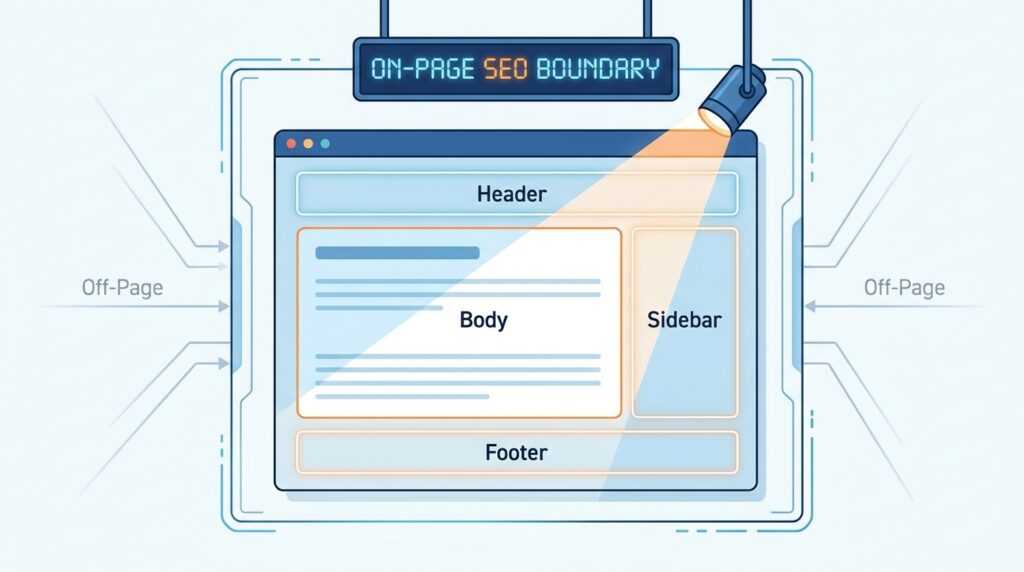
Off-page SEO (backlinks, brand mentions, social signals) matters too, but it can’t rescue a page that Google’s crawlers or AI systems can’t clearly understand in the first place. On-page SEO is the layer you can control completely, making it the best place for a total beginner to start.
This guide walks through what on-page SEO actually is, the terms you’ll keep running into, and a literal step-by-step sequence for optimizing your first page. It also covers the mistakes that quietly sink beginner content, and which tools are actually worth using instead of every shiny option in your search results.
By the end, you won’t just know the definitions. You’ll have a repeatable process you can run on every new page you publish, and you’ll understand why AI Overviews have made clear structure more valuable than ever, not less. That shift is good news for beginners: the same fundamentals that help human readers also help you get cited by AI search tools, so you’re not learning two separate skill sets.
One more thing before diving in — on-page SEO is not a one-time checklist you complete and forget. Search engines re-crawl your pages, algorithms shift, and your competitors keep publishing. Treat this guide as a starting framework you’ll revisit, not a box you tick once and walk away from.
TL;DR:
On-page SEO means optimizing the things directly on your web page — title tags, headings, content, URLs, images, and internal links — so search engines and readers instantly understand what the page is about. In 2026, that also means writing clearly enough for AI Overviews and answer engines to extract and cite you. Start with one primary keyword per page, a clear title tag under 60 characters, short paragraphs, and a genuine answer to the reader’s question in the first 100 words. Everything else in this guide builds on that foundation.
Table of Contents
What Is On-Page SEO?
On-page SEO is the practice of optimizing everything that lives directly on a web page — the title tag, headings, body content, URL, images, and internal links — so that both search engines and human readers immediately understand what the page covers. It sits opposite off-page SEO, which covers signals from outside your own site, such as backlinks from other domains.
In practice, on-page SEO answers one question for every element on your page: Does this make it obvious what the page is about and why it deserves to rank? A title tag that clearly states the topic answers that question. A vague, clickbait-style title does not, and it also risks Google rewriting it in search results.
Google’s own crawlers scan a page by following links and reading structural elements like headings and title tags to build an understanding of what the page covers. In 2026, that same structural clarity determines whether AI systems like Google AI Overviews or ChatGPT Search can accurately extract and cite your content. A page that’s messy for Google is equally messy for an AI model trying to summarize it.
This is why on-page SEO has become more valuable, not less, in the AI-search era. The fundamentals haven’t changed — clear titles, logical headings, direct answers — but the audience reading those signals now includes AI systems alongside human searchers and traditional crawlers.
Why On-Page SEO Matters (Core Benefits)
Strong on-page SEO compounds over time instead of expiring like a paid ad. A well-optimized page can continue to drive search traffic for years with only occasional updates, making it one of the highest-return activities for a beginner blogger or business owner.
It also directly affects whether AI Overviews cite you. Recent industry data suggests websites appearing in AI-generated answers receive noticeably more organic traffic than similar sites left out of those responses, largely because clear structure is exactly what lets AI systems extract your content accurately.
Beyond visibility, on-page SEO improves the actual reading experience. Short paragraphs, descriptive headings, and a logical page flow help real visitors find what they came for faster, which reduces the kind of quick “back button” behavior that signals a poor match to Google.
Finally, it’s the one part of SEO you fully control. You can’t force other sites to link to you, but you can rewrite a weak title tag or restructure a confusing page this afternoon, which makes on-page SEO the best starting point for anyone new to search optimization.
Key Terms Every Beginner Should Know
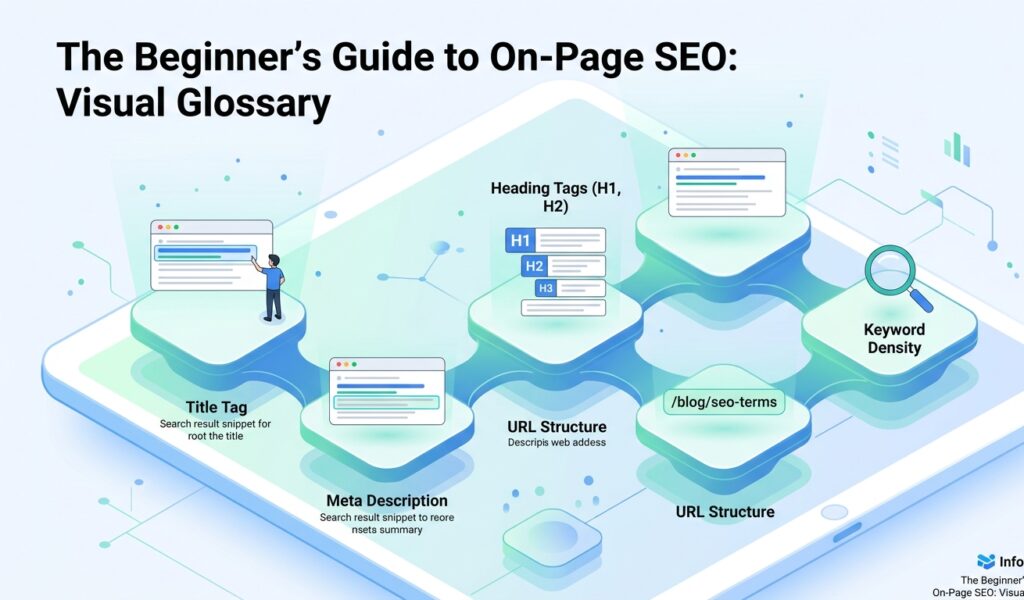
Before working through the steps below, it helps to recognize a handful of terms that show up constantly in on-page SEO discussions:
- Title Tag — the clickable headline shown in search results; ideally under 60 characters, since longer titles are frequently rewritten by Google.
- Meta Description — the short summary beneath your title tag in search results; it doesn’t directly boost rankings but strongly affects click-through rate.
- Header Tags (H1–H4) — the heading hierarchy that organizes your content; one H1 per page, with H2S and H3S breaking the body into scannable sections.
- Internal Linking — links from one page on your site to another; a common guideline is 3–5 internal links per 1,000 words, using descriptive anchor text rather than “click here.”
- Core Web Vitals — Google’s confirmed technical ranking signals covering loading speed, interactivity, and visual stability.
- Schema Markup — structured code added to a page that helps search engines and AI systems understand specific facts, like FAQ answers or product prices.
These terms will reappear throughout the rest of this guide, so it’s worth bookmarking this section if you need to double back later.
Step-by-Step: Getting Started With On-Page SEO
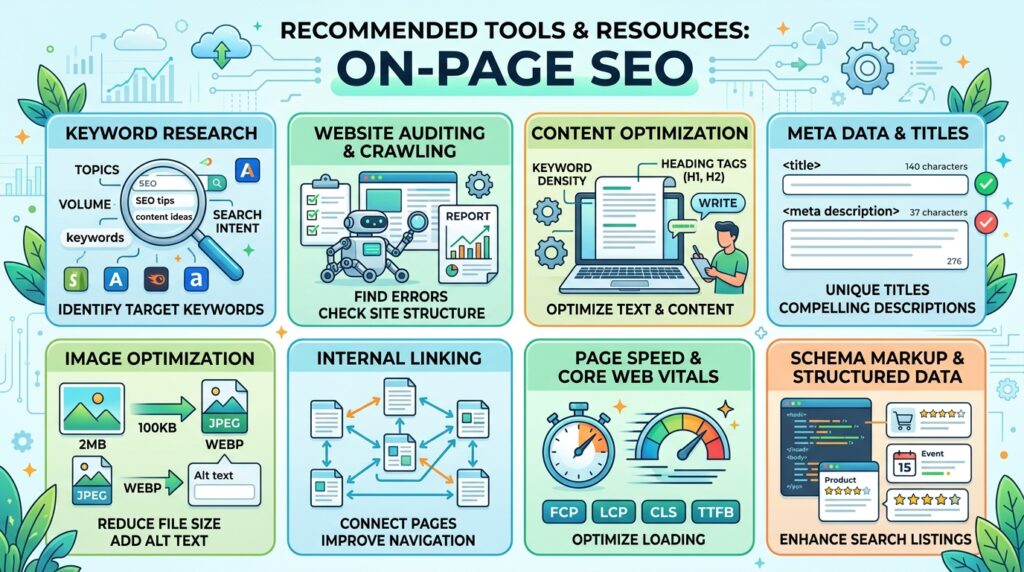
Step 1: Pick One Primary Keyword Per Page
Every page should target exactly one primary keyword that reflects what someone is actually typing into Google. Trying to rank one page for five unrelated keywords usually means it ranks well for none of them.
Step 2: Write a Clear, Honest Title Tag
Keep it under 60 characters, include your primary keyword naturally, and describe the page accurately. A misleading title might earn a click, but it also earns a fast bounce, which hurts you over time.
Step 3: Answer the Core Question in the First 100 Words
Don’t bury your main point under three paragraphs of introduction. Both readers and AI systems reward pages that state the direct answer early, then expand with supporting detail afterward.
[IMAGE 4 — Step Flow Visual]
Step 4: Structure Content With Clear Headings
Use one H1 for the page title, then H2S for major sections and H3S for subsections. The paragraph directly under each heading should answer that heading’s implicit question immediately, using the specific terms tied to it.
Step 5: Add Internal Links With Descriptive Anchor Text
Link to 3–5 relevant pages on your own site per 1,000 words, using anchor text that describes the destination page rather than generic phrases.
Step 6: Optimize Images and Check Page Speed
Add descriptive alt text to every image, compress file sizes, and check your Core Web Vitals scores. A slow page loses both readers and its potential for ranking before your content is even evaluated.
Step 7: Add an FAQ Section With Schema
Close the page with a short FAQ block and mark it up with the FAQPage schema. This single addition is one of the most reliable ways for a beginner page to start appearing in AI Overviews and voice search results.
Common Mistakes to Avoid
The most frequent beginner mistake is keyword stuffing — repeating a phrase unnaturally in hopes of ranking higher. It doesn’t work and actively degrades readability, which hurts you with both human readers and quality algorithms.
A close second is writing dense, unbroken paragraphs. Long blocks of text are harder for readers to scan and harder for AI systems to extract cleanly, which is exactly the opposite of what you want in 2026’s search landscape.
Many beginners also skip internal linking entirely, treating each new post as an island. This wastes the authority your existing pages have already built and makes it harder for search engines to understand how your content connects.
Finally, plenty of beginners obsess over word count instead of matching what’s actually ranking for their target keyword. A 600-word page that fully answers the question often outperforms a padded 2,000-word page that doesn’t.
Recommended Tools & Resources
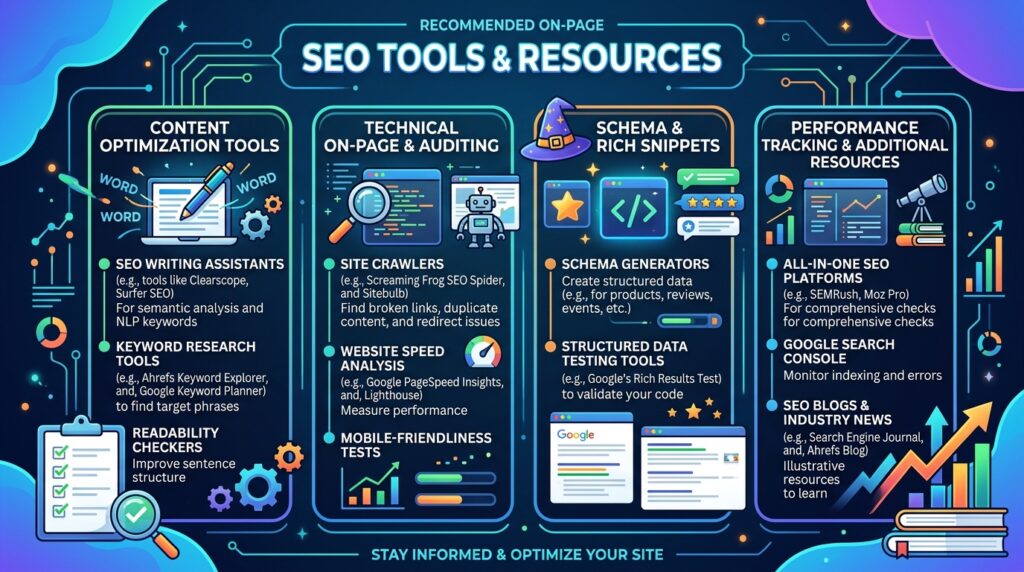
For keyword research, Google’s own Keyword Planner is free and sufficient for beginners, while Semrush and Ahrefs offer deeper competitive data once you’re ready to invest. For technical checks, Google’s PageSpeed Insights and the Rich Results Test cover Core Web Vitals and schema validation without any cost. Google Search Console remains the single most important free tool in this list, since it shows you exactly which queries are already bringing your pages traffic.
Read more: How to Use ChatGPT for Beginners
Frequently Asked Questions
What’s the difference between on-page and off-page SEO?
On-page SEO covers elements you can control directly on your page, such as titles and headings. Off-page SEO covers external signals like backlinks, which you can influence but not directly control.
Do header tags directly affect rankings?
Google has confirmed that heading structure carries minimal direct ranking weight. Its real value is helping readers and AI systems navigate and extract your content accurately, which indirectly supports rankings.
How long should my content be for good on-page SEO?
There’s no fixed target. Match your length to what’s already ranking for your target keyword rather than chasing an arbitrary word count that may not fit the topic.
Does on-page SEO specifically help with AI Overviews?
Yes. The same structural signals that help traditional rankings — clear headings, direct answers, FAQ schema, and short paragraphs — are exactly what AI systems need to extract and cite your content accurately.
Conclusion
On-page SEO isn’t a mysterious algorithm you have to guess your way through. It’s a repeatable set of decisions — one keyword per page, a clear title tag, logical headings, and short paragraphs that answer the reader’s question early. Every step in this guide is something you can apply to a page you already have live today.
The biggest shift for 2026 isn’t a new trick to learn. It’s the fundamentals that always helped human readers, now double as the exact signals AI Overviews and answer engines need to cite you. Beginners who focus on genuine clarity, rather than chasing algorithm rumors, are building a skill that survives the next update instead of getting reset by it.
Start small. Pick one existing page, run it through the seven steps above, and watch what changes over the next few weeks in Google Search Console. That single page will teach you more about on-page SEO than any checklist read in isolation, because you’ll see your own before-and-after data.
From there, apply the same process to your next page, and the one after that. On-page SEO compounds — a handful of properly optimized pages will consistently outperform a large volume of unoptimized ones, and that gap only widens as AI-driven search continues to reward pages built for real clarity over pages built for old-style keyword tricks.