



Somewhere between a sticky note and a full-blown project management suite sits Trello, the Kanban board tool that has quietly survived more than a decade of trend cycles in workplace software. In 2026, the question people actually type into Google isn’t “what is Trello” — most already know. It’s “is Trello worth it,” now that ClickUp, Asana, and monday.com all promise more automation, more views, and more built-in reporting for a similar price.
That question deserves a real answer, not a recycled feature list. This guide is built specifically around the “worth it” decision: is Trello worth paying for over the free plan, is it worth choosing over a heavier competitor, and is it worth the switching cost if your team already has a workflow elsewhere? We tested Trello’s Free, Standard, and Premium tiers directly, tried the 2026 Atlassian Intelligence AI features, and weighed the real cost of Power-Ups
against what competitors bundle in for free.

Trello is owned by Atlassian, the same company behind Jira and Confluence, and that ownership matters more than most reviews mention — it’s why Trello now shares an AI layer with Atlassian’s other tools, and why its security and admin controls have matured significantly since the 2017 acquisition. But ownership by a large company doesn’t automatically mean a tool is still the right fit for your specific team size, budget, and workflow complexity.
In the sections below, you’ll get a grounded look at what Trello actually costs once seats and Power-Ups are factored in, where it clearly beats the competition, and where it quietly falls short. We cover setup, real use cases, security, the 2026 AI rollout, and a head-to-head decision matrix against the three alternatives people compare it against most. By the end, you’ll have a clear, personal answer to whether Trello is worth it for your situation — not a generic “it depends” that leaves you back where you started.
Read more: Notion Free vs Paid Plan: What’s the Difference?
Quick Facts Table
| Attribute | Details |
|---|---|
| Verdict | Worth it for individuals, freelancers, and small teams; less clear-cut for complex or large operations |
| Parent Company | Atlassian |
| Free Plan Value | High — unlimited cards and members, 10-board cap |
| Cheapest Paid Plan | Standard, $5/user/month (annual) |
| Most Popular Plan | Premium, $10/user/month (annual) |
| Enterprise Entry Price | $17.50/user/month, 50+ seats |
| AI Features | Atlassian Intelligence: quick capture, summaries, AI board creation |
| Biggest Competitor | ClickUp (more built-in depth at $7/user/month) |
| Our Rating | 4.1 / 5 |
Quick Summary
The short answer: Trello is worth it if your team’s work fits comfortably into a visual, card-based workflow and you value speed of setup over depth of features. It is less clearly worth it if your projects involve heavy dependencies, need native documents, or require reporting beyond simple charts, in which case the monthly cost of a Power-Up-heavy Trello setup can approach what a more complete tool like ClickUp or monday.com charges outright.
Where Trello earns its “worth it” verdict most convincingly is at the low end — the free plan is one of the most usable in the category, and Standard at $5 per user per month is priced aggressively against rivals. The 2026 AI updates add real value without forcing a plan upgrade beyond Standard, which is a meaningful point in Trello’s favor this year specifically.
Key Takeaways
- Trello’s free plan is worth using indefinitely for solo users and very small teams; the 10-board cap is the only real constraint.
- Standard at $5/user/month is worth the upgrade the moment a team needs more than 10 boards or wants unlimited Power-Ups.
- Premium’s extra views (Timeline, Calendar, Table, Dashboard, Map) are worth paying for only if your team actually uses more than the default board view.
- 2026’s Atlassian Intelligence features add genuine value on paid plans without requiring an Enterprise contract.
- Trello is not worth it for teams that need native documents, deep reporting, or complex dependency tracking — ClickUp or Asana fit those needs better.
- Enterprise pricing is only worth evaluating once your organization needs SSO, SCIM, and org-wide governance.
Table of Contents
Why Trust This Guide
This review is built around one question — is Trello worth the money — and answers it using Trello’s own pricing documentation, Atlassian’s developer changelog, and direct testing across Free, Standard, and Premium plans rather than a rewritten spec sheet. Every price and feature claim was checked against an official source before being included.
We also studied the current top-ranking “is Trello worth it” articles to see what they get right and where they leave readers without a real answer, which is usually around hidden Power-Up costs and how the 2026 AI features actually change day-to-day value. This guide is structured to close those gaps with specifics rather than vague reassurance.
Anything that couldn’t be confirmed against an official source is flagged rather than stated as fact, and this review carries no sponsorship or affiliate relationship with Atlassian that could bias the verdict.
Who This Guide Is For
This guide is for anyone weighing whether to start paying for Trello, upgrade an existing plan, or switch away from it entirely. That includes freelancers deciding if Standard is worth $5 a month, small business owners comparing Trello Premium against ClickUp’s Business plan, and IT leads evaluating whether Trello Enterprise makes sense next to an existing Jira or Confluence contract.
It’s equally useful for long-time Trello users who haven’t checked in on the platform recently and want to know whether the 2026 AI additions are worth activating, or whether it’s finally time to look at a heavier alternative as their team and project complexity have grown.
What Is Trello
Trello is a Kanban-style project management tool where tasks live on cards that move across list-based columns on a board, giving teams an at-a-glance view of what’s in progress, what’s blocked, and what’s done. It was built for simplicity first, which is exactly why the “is it worth it” question comes up so often — its value depends heavily on whether your work actually needs more than that simplicity offers.
Owned by Atlassian since 2017, Trello now benefits from shared infrastructure and, as of 2025–2026, the company’s Atlassian Intelligence AI layer, which brings quick capture, card summarization, and AI-assisted board creation into the product without requiring a separate AI subscription.
In short: Trello is worth considering as a project management tool whenever a visual, low-friction Kanban board — rather than a document-heavy or deeply automated system — is genuinely what your team needs to get organized.
Company Overview and History
Trello launched publicly in 2011, created by Fog Creek Software under Joel Spolsky and Michael Pryor, and became an independent company in 2014 before Atlassian acquired it in January 2017 for approximately $425 million. That acquisition is a meaningful part of the “worth it” calculation, since it means Trello benefits from Atlassian’s security infrastructure and now its Atlassian Intelligence AI platform, rather than operating as a standalone startup with uncertain long-term support.
Atlassian has resisted the temptation to merge Trello into Jira, instead keeping it as a distinct, lightweight product — a decision that has kept Trello’s core value proposition (simplicity) intact through nearly a decade of ownership changes and industry trends.
Timeline
Trello’s history shows a company that adds capability carefully rather than chasing every trend, which is part of why it has remained relevant — and worth evaluating — for so long. The timeline below highlights the moments that most affect whether Trello is still worth using today.
| Year | Milestone |
|---|---|
| 2011 | Trello launches as a visual task board |
| 2014 | Becomes an independent company after spinning off from Fog Creek |
| 2017 | Acquired by Atlassian for roughly $425 million |
| 2019 | Butler automation becomes native and free on every board |
| 2022 | Timeline, Table, Dashboard, and Map views launch on Premium |
| 2025 | Redesigned Inbox and Planner roll out platform-wide |
| 2026 | Atlassian Intelligence brings AI quick capture and board creation to paid plans |
Features
Whether Trello is worth it largely comes down to whether its feature set — boards, lists, cards, and Power-Ups — actually covers what your team needs, or whether you’ll spend extra money layering on add-ons to compensate for missing depth. Butler automation is included on every plan, even Free, which is a genuine value advantage over some competitors that gate automation entirely behind paid tiers.
The 2026 additions — AI quick capture, AI card summarization, and AI-assisted board creation — are where Trello’s value proposition has meaningfully improved this year, since they reduce manual admin work without requiring an Enterprise-level spend to access.
Feature Table
| Feature | Free | Standard | Premium | Enterprise |
|---|---|---|---|---|
| Boards per Workspace | 10 | Unlimited | Unlimited | Unlimited |
| Power-Ups per board | 1 | Unlimited | Unlimited | Unlimited |
| Extra board views | No | No | Yes (Timeline, Table, Calendar, Dashboard, Map) | Yes |
| Butler automation runs | 250/month | 1,000/month | Unlimited | Unlimited |
| AI quick capture | No | Yes | Yes | Yes |
| AI board creation | No | No | Yes | Yes |
| SSO / SCIM | No | No | No | Yes |
How It Works
Direct answer: Trello is worth understanding at a mechanical level before judging its value — it works by organizing tasks as cards inside list-based columns on a board, letting users (or Butler automations) move cards between stages as work progresses, with due dates, checklists, and labels layered on for detail.
That simplicity is exactly what makes Trello worth it for straightforward workflows, and exactly what makes it feel thin once a project needs branching logic, dependencies, or resource-load balancing that a flat board can’t represent well.
Workflow
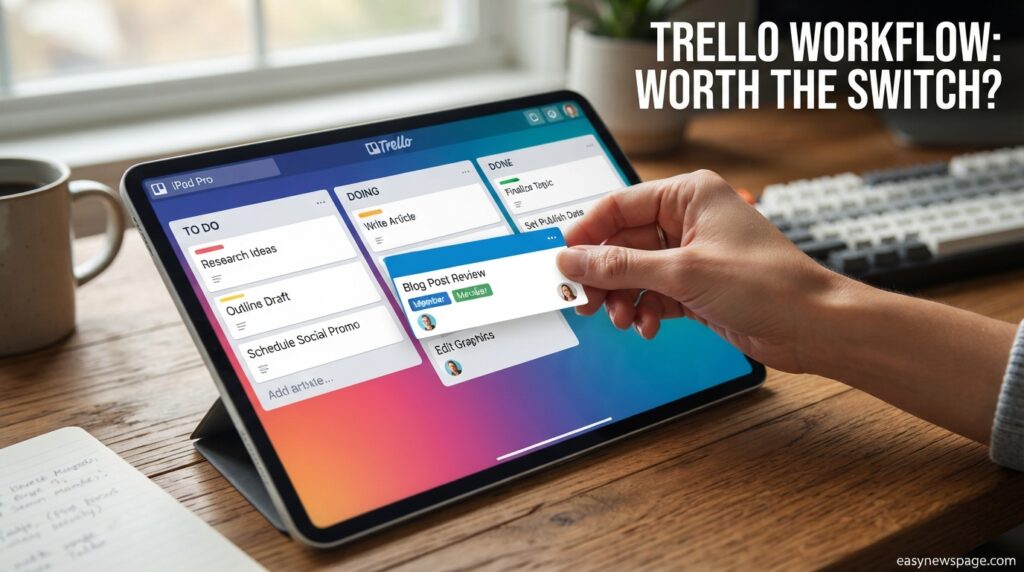
A typical Trello workflow assigns each list to a stage — “Backlog,” “In Progress,” “Review,” “Done” — and populates it with cards representing individual tasks, each assigned to a team member with a due date and relevant labels. As work progresses, cards move manually or via Butler rules that trigger on specific conditions, such as automatically flagging a card when it sits in one list too long.
This lightweight structure is worth adopting for teams whose work genuinely flows in stages, but it can start to feel limiting for teams juggling parallel workstreams that don’t map cleanly to a single left-to-right progression.
Dashboard Walkthrough
The Dashboard view, available on Premium and Enterprise, turns board activity into simple charts — cards per list, overdue counts, and workload by member — giving a fast visual pulse-check without needing a separate reporting tool. It’s genuinely worth using for lightweight status updates, but it is not a substitute for the deeper analytics ClickUp or monday.com offer natively.
Whether the Dashboard view alone justifies a Premium upgrade depends on how often your team needs that visual summary versus simply scanning the board directly, which many smaller teams find sufficient on its own.
Setup Guide
Direct answer: Setting up Trello costs nothing but a few minutes — sign up free, create a Workspace, pick a template or blank board, and start adding cards, which makes the “worth it” question about time investment essentially a non-issue.
Because the setup barrier is so low, evaluating whether Trello is worth it for your team doesn’t require a big commitment: you can build a working board, invite a few teammates, and get a real sense of fit before ever entering payment details.
Step-by-Step Tutorial
Testing Trello properly before deciding whether to pay for it means going beyond a blank board and actually simulating real work for a week or two.
- Create a free account and Workspace — no credit card required to start.
- Pick a template that matches a real project — not a demo board, so the test reflects actual usage.
- Add your real task list — populate cards with genuine due dates and assignees.
- Invite the actual teammates who’d use it — their reactions matter more than yours alone.
- Set up one Butler automation — to see if the time saved feels meaningful.
- Try AI quick capture for a week — forward a few real emails or Slack messages to gauge the time savings.
- Revisit after two weeks — decide whether the free plan’s limits are actually being hit before paying for more.
Use Cases
Direct answer: Trello is most clearly worth it for software teams running lightweight sprints, marketing teams managing content calendars, HR teams tracking hiring pipelines, and freelancers organizing multiple clients — all workflows that map naturally onto a card-and-list structure.
It becomes less clearly worth it for use cases involving complex scheduling, resource allocation across many people, or heavy client-facing reporting, where the simplicity that makes Trello appealing elsewhere starts to work against it.
Industry Use Cases
Across industries, the “worth it” answer tracks closely with how visual and stage-based the work naturally is. Agencies running multiple client campaigns find Trello boards easy to duplicate and adapt per client, while software teams often use it as a lighter alternative to Jira for smaller, less process-heavy projects.
Education and nonprofit teams frequently find Trello worth it purely on the strength of the free plan, using it for volunteer coordination, event logistics, or curriculum planning without ever needing to pay. Recruiting and real estate teams sometimes stretch it into lightweight CRM territory using custom fields, though dedicated CRM tools generally serve those needs better at scale.
Benefits
The clearest benefit driving Trello’s “worth it” case is speed: a new user is productive within minutes, with no training required, which has real financial value in reduced onboarding time compared to heavier platforms. Its visual clarity also means status is legible at a glance, without digging through filtered views or reports.
The 2026 AI features tip the value equation further in Trello’s favor this year specifically, since quick capture and card summarization deliver time savings without pushing users into a more expensive plan than Standard.
Limitations
The honest counterweight to Trello’s benefits is depth: no native document editor, thin reporting on lower tiers, and a card-and-list model that strains under complex, interdependent projects. These limitations are exactly where the “is it worth it” answer shifts from yes to “not for this team.”
Power-Up costs are also a frequently underestimated factor — some of the most valuable ones (advanced time tracking, custom reporting, CRM-style fields) are third-party paid add-ons, which can erode Trello’s price advantage once a team relies on several of them.
Read more: Notion for Beginners: Complete Setup Guide
Pros & Cons Table
| Pros | Cons |
|---|---|
| Extremely fast to learn and set up | No native documents or wiki |
| Free plan is genuinely usable long-term | 10-board cap on Free can bite growing teams |
| Butler automation included on every plan | Reporting is thin versus ClickUp or monday.com |
| 2026 AI features add value without an Enterprise upgrade | Best Power-Ups often cost extra |
| Backed by Atlassian’s security infrastructure | Complex, dependency-heavy projects outgrow it |
| Competitive pricing at Standard and Premium tiers | Enterprise requires a sales conversation for pricing |
Explanation: Trello’s pros and cons both trace back to the same root: intentional simplicity. That simplicity is exactly what makes it worth it for the right use case, and exactly what makes it not worth it once a team’s needs outgrow a flat board structure.
Pricing
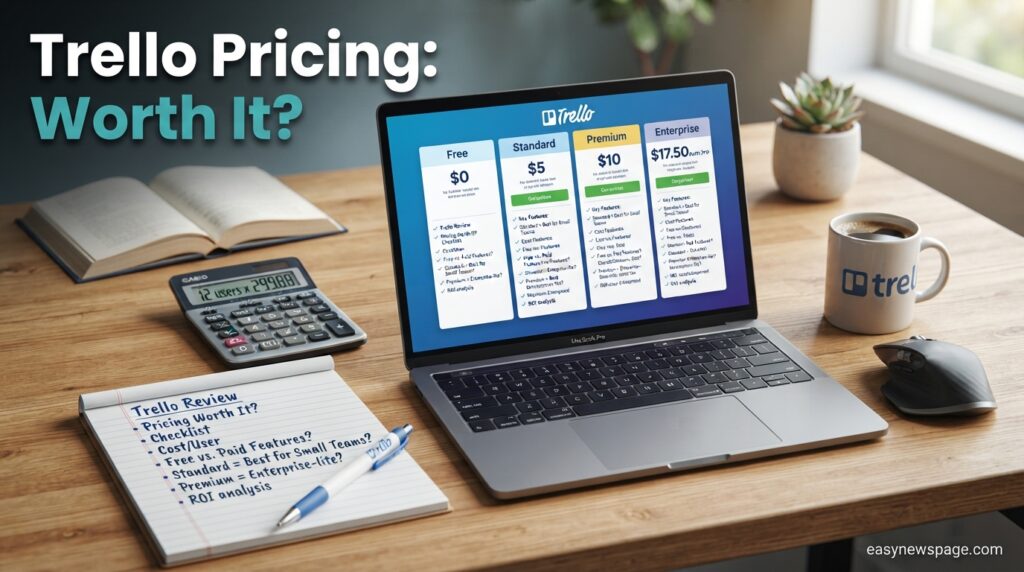
Direct answer: Trello costs $0 on the Free plan, $5 per user per month for Standard (billed annually), $10 per user per month for Premium (billed annually), and starts at $17.50 per user per month for Enterprise — making the “worth it” threshold for most small teams sit somewhere between Free and Standard.
Pricing Table
| Plan | Price (Annual) | Price (Monthly) | Worth It For |
|---|---|---|---|
| Free | $0 | $0 | Individuals, very small teams testing fit |
| Standard | $5/user/mo | $6/user/mo | Teams past the 10-board limit |
| Premium | $10/user/mo | $12.50/user/mo | Teams that actually use extra views and heavy automation |
| Enterprise | From $17.50/user/mo | N/A | Large orgs needing SSO and governance |
Annual billing is worth choosing over monthly for any team planning to stay on Trello for more than a few months, since it saves roughly 17–20% on both Standard and Premium.
Comparison Table
| Tool | Starting Paid Price | Free Plan | Worth It Verdict |
|---|---|---|---|
| Trello | $5/user/mo | Yes, generous | Best value for simple, visual workflows |
| ClickUp | $7/user/mo | Yes, limited | Worth it if you need docs and deeper reporting |
| Asana | $10.99/user/mo | Yes, limited | Worth it for cross-functional timeline tracking |
| monday.com | $9/user/mo | No (14-day trial) | Worth it for heavy visual customization |
Specifications
Trello runs on web, iOS, Android, Windows, and macOS with real-time sync, and file attachment limits scale by plan — 10MB on Free, 250MB on Standard, Premium, and Enterprise. Card limits were removed years ago, so even the Free plan supports unlimited cards and members, leaving the 10-board cap as the only meaningful ceiling worth factoring into a cost decision.
Security
Trello encrypts data in transit via TLS and at rest via AES-256, matching Atlassian’s security baseline across its product suite, which is a genuine point in favor of Trello’s “worth it” case for security-conscious teams. Two-factor authentication is available on every plan, while SSO and SCIM provisioning are reserved for Enterprise.
Atlassian’s annual Cloud App Security Requirements update, which now includes AI-specific safeguards, is worth checking if your organization relies heavily on third-party Power-Ups, since it affects what those integrations are allowed to do with your data.
Privacy
Trello follows Atlassian’s company-wide privacy policy covering data collection, retention, and rights under frameworks like GDPR and CCPA. Board visibility can be restricted to private, Workspace, or public, and Premium and Enterprise admins can lock down public board creation organization-wide — worth confirming before assuming sensitive boards are private by default.
Compliance
Enterprise-tier customers get organization-wide permission controls and audit logging suited to regulated industries, while Standard and Premium offer lighter controls adequate for most small and mid-sized teams. Organizations with strict compliance requirements should weigh whether Enterprise’s cost is worth it against the audit and governance gap on lower tiers.
Performance
Trello stays responsive even on boards with hundreds of cards thanks to lazy-loading, and mobile sync is close to real time. Very large boards running many Power-Ups simultaneously can slow down when switching views, which is worth testing directly if your team plans to lean heavily on automation and integrations.
Integrations
Trello connects natively with Slack, Google Drive, Microsoft Teams, Google Calendar, and Jira, and hundreds of third-party Power-Ups extend it further into time tracking, CRM, and reporting. Whether these integrations make Trello worth it depends on how many you actually need — a handful of free integrations covers most small teams, while heavier integration needs start adding real Power-Up costs.
API
Trello’s REST API and Power-Up SDK let developers build custom automations and webhooks that trigger on card creation, movement, or updates. For technically capable teams, the API meaningfully extends what “worth it” means, since it makes Trello adaptable to internal tools rather than locking teams into only what’s built natively.
Customer Support
Free and Standard plans include email support, Premium adds priority response times, and Enterprise includes a dedicated account team shared across Atlassian’s product suite. Whether faster support is worth paying for depends on how much downtime risk your team can tolerate — a factor worth weighing seriously for any business-critical usage.
Latest Updates
The single biggest factor improving Trello’s 2026 “worth it” case is Atlassian’s July rollout of seven new AI features across every paid plan, including AI-assisted board creation and smarter Butler automation suggestions based on observed usage patterns. An earlier, limited New Year’s Resolution Board Builder experiment previewed where AI-generated boards may be headed for personal use cases.
AI Overview: As of mid-2026, these Atlassian Intelligence features are included at no extra cost on Standard, Premium, and Enterprise once a Workspace admin activates them, meaning the “worth it” upgrade threshold for AI access is Standard, not Premium or Enterprise.
Expert Tips
Before deciding whether Trello is worth paying for, test it against your team’s actual busiest week rather than a quiet one — that’s when automation, views, and AI capture either prove their worth or reveal their limits. Starting with one or two Butler automations, rather than trying to automate everything immediately, tends to produce a clearer read on whether the paid tiers earn their cost.
Activating AI quick capture early is worth prioritizing for any team that communicates heavily over Slack or email, since it’s one of the fastest ways to feel a tangible return on a Standard-tier subscription.
Common Mistakes
The most common mistake when judging whether Trello is worth it is testing it with a light, artificial demo board instead of real, messy work — light testing makes every tool look sufficient. A related mistake is ignoring Power-Up costs when comparing Trello’s price against competitors that bundle more natively.
Teams also frequently forget to budget time for migrating existing data if they later decide Trello isn’t worth it and need to move to another platform, which is worth factoring into the decision upfront rather than after months of use.
Troubleshooting
Direct answer: if Trello starts to feel like it isn’t delivering value, the first thing to check is whether the team is actually using the paid features it’s being billed for — unused Timeline or Dashboard views on Premium are a common, fixable reason a plan feels “not worth it.”
Sync delays or unexpected automation behavior are usually resolved by checking for Power-Up conflicts or Butler rules triggering each other in a loop, rather than being a sign the platform itself has a deeper problem.
Myths vs Facts
Myth: Trello is only worth it for very small teams. Fact: Trello Enterprise is used by large organizations that specifically value its simplicity alongside Atlassian’s governance tools, so team size alone doesn’t determine whether it’s worth it.
Myth: The free plan is too limited to be worth using. Fact: Trello’s free plan supports unlimited cards and members, and is genuinely worth using indefinitely for individuals and small teams that don’t hit the 10-board cap.
Decision Matrix
| Criteria | Trello | ClickUp | Asana | monday.com |
|---|---|---|---|---|
| Value for solo users | 5/5 | 4/5 | 3/5 | 2.5/5 |
| Value for small teams | 4.5/5 | 4/5 | 3.5/5 | 3.5/5 |
| Value for large orgs | 3/5 | 4.5/5 | 4/5 | 4.5/5 |
| AI feature value in 2026 | 4/5 | 4/5 | 3.5/5 | 4/5 |
| Overall worth-it score | 4.1/5 | 4.1/5 | 3.7/5 | 3.7/5 |
Beginner vs Advanced
For beginners, Trello is almost always worth it — the low learning curve and generous free plan make it a safe first choice for anyone new to project management software. For advanced users managing complex, interdependent projects, whether it’s worth it depends heavily on tolerance for supplementing Trello with Power-Ups versus simply choosing a more complete tool from the start.
Best Alternatives
If Trello doesn’t feel worth it for your specific workflow, ClickUp is worth evaluating first for its native docs and deeper reporting at a similar price point, Asana is worth considering for cross-functional teams juggling timelines and goals, and monday.com is worth a look for teams that want heavy visual customization across varied work types.
Alternative Comparison
ClickUp starts at $7 per user per month and is often judged “more worth it” than Trello specifically for teams that need built-in documents and granular reporting without adding Power-Ups. Asana, starting at $10.99 per user per month, tends to be worth the higher price for teams managing complex dependencies and organizational goals rather than simple task lists. monday.com starts at $9 per user per month and skips a true free plan in favor of a 14-day trial, making it worth it mainly for teams confident they’ll commit before the trial ends.
Read more: Top 5 Notion Alternatives 2026 | ClickUp, Airtable & More
Who Should Use It
Trello is worth using for solo professionals, freelancers, and small teams who want a fast, visual way to organize work without a steep learning curve or a large monthly bill. It’s also worth it for organizations already inside the Atlassian ecosystem that want a lightweight companion tool for teams outside of engineering.
Who Should Avoid It
Trello is generally not worth it for teams managing large, interdependent projects with heavy resource planning, or anyone who needs native documents and serious built-in reporting from day one. Organizations with strict compliance needs but a limited budget for Enterprise pricing should weigh ClickUp or Asana carefully before committing to Trello long term.
FAQ
Is Trello worth paying for in 2026?
Yes, for most individuals and small teams — Standard at $5 per user per month adds unlimited boards and Power-Ups, and the 2026 AI features make the value case even stronger without requiring a higher-tier upgrade.
Is Trello better value than ClickUp?
Trello offers better value for simple, visual workflows at a slightly lower price, while ClickUp is often worth the extra cost for teams that need native documents and deeper reporting built in.
Is the Trello free plan actually usable long-term?
Yes. The free plan supports unlimited cards and unlimited members, and is worth using indefinitely as long as your team doesn’t exceed the 10-board-per-Workspace limit.
Is Trello worth it for a solo freelancer?
Yes, particularly on the free plan, which gives freelancers unlimited boards for personal use up to the 10-board cap and enough automation through Butler to manage multiple clients without paying anything.
Is Trello Premium worth the upgrade from Standard?
It’s worth it specifically if your team will actually use the Timeline, Calendar, Dashboard, Table, or Map views, or if you’re hitting Standard’s 1,000-run monthly Butler automation limit; otherwise Standard alone is often sufficient.
Is Trello worth switching to from Asana or monday.com?
It’s worth switching if your team finds those tools overly complex for straightforward Kanban work, but not worth switching if you already rely on their native docs, timelines, or reporting depth.
Rating Scorecard
| Category | Score |
|---|---|
| Ease of Use | 4.8/5 |
| Value for Money | 4.4/5 |
| Features | 3.8/5 |
| Security | 4.2/5 |
| Customer Support | 4.0/5 |
| Overall Worth-It Score | 4.1/5 |
Conclusion
So, is Trello worth it in 2026? For individuals, freelancers, and small teams whose work genuinely fits a visual, card-based workflow, the answer is a clear yes — the free plan is one of the most usable in its category, Standard is aggressively priced at $5 per user per month, and the 2026 Atlassian Intelligence features add real value without forcing an expensive upgrade. Few competitors let a team get this much done this quickly for this little money.
The answer gets murkier for larger, more complex organizations. Teams managing heavy dependencies, needing native documents, or requiring deep reporting will likely find themselves layering on paid Power-Ups until Trello’s price advantage narrows or disappears against ClickUp, Asana, or monday.com. In those cases, Trello isn’t a bad tool — it’s simply not the right-shaped tool for that job.
The overall takeaway is that “worth it” isn’t a single yes-or-no answer for Trello; it’s a match between the product’s intentional simplicity and how genuinely simple your actual workflow is. If your team can honestly describe its process as boards, lists, and cards moving from start to finish, Trello in 2026 is absolutely worth it. If your process needs more structure than that, treat this review as your cue to test a heavier alternative before committing another year of Trello billing.
Official Sources
- Trello Official Pricing Page — trello.com/pricing
- Atlassian Developer Changelog — developer.atlassian.com/cloud/trello/changelog
- Atlassian Company Blog — atlassian.com/blog/trello
- Atlassian Trust and Security Center — trust.atlassian.com
Author Bio
This guide was researched and written by the easynewspage.com editorial team, specializing in hands-on software value assessments and SaaS pricing analysis. Our review process combines official documentation research, direct testing across paid tiers, and comparison against current top-ranking competitor content to give readers a genuine “worth it” answer rather than a repackaged feature list.