


Building a website used to require a developer, a server, and a working knowledge of HTML. In 2026 it requires an afternoon and a credit card. The tools have improved so dramatically that the hard part is no longer construction — it is deciding what to build, choosing among a dozen credible platforms, and avoiding the small setup mistakes that quietly cost you visitors, rankings, and money for years afterward.
How to build a website is a question with five legitimate answers, not one, and the correct answer depends entirely on what the site must do. A restaurant needs a menu, a map, and a phone number. A photographer needs a portfolio that loads fast on a phone. A shop needs inventory, checkout, and tax handling. Each of these points toward a different website builder or content management system, and the guides that recommend a single platform to everyone are usually paid to.
This guide walks the entire path in the order a beginner actually faces it: define the purpose, choose the platform, register a domain name, arrange web hosting, plan the page structure, design and build, add essential pages, connect analytics, and launch. Every decision includes the trade-off, not just the recommendation, and every price is current for 2026 with renewal rates stated alongside introductory ones.
You will also find the parts most beginner guides skip. What an SSL certificate actually does and why your site looks broken without one. Why mobile-first design is not optional when most traffic arrives on phones. How Core Web Vitals affect both rankings and whether visitors stay. What legally required pages you need before running ads or collecting emails. And a scored decision matrix comparing Wix, Squarespace, WordPress, Shopify, and Framer against criteria that matter to a first-time builder.
Whether you are building a personal portfolio, a small business site, a blog, or an online store, the foundations are the same: a clear purpose, a domain you own, a platform that fits, pages that load quickly, and content that answers what visitors came to find. By the end of this guide you will have a site live and a realistic checklist for the weeks that follow.
Read more: How to Start a Blog on a Budget: The Complete 2026 Guide
Quick Facts Table
| Item | Detail |
|---|---|
| Time to build a basic site | 2–6 hours with a drag-and-drop builder |
| Time to build a business site properly | 1–3 weeks including content writing |
| Minimum realistic first-year cost | $0 (free tier) to roughly $200–$400 (business site) |
| Domain name cost | Roughly $10–$20 per year for a .com |
| Wix paid plans | Roughly $17–$159/month depending on tier and billing |
| Squarespace paid plans | Roughly $16–$99/month annual, higher monthly |
| Shopify plans | From roughly $29–$39/month at entry tier |
| Shared hosting for WordPress | Roughly $2.99–$5.99/month intro, $10.99–$16.99 renewal |
| Coding required | None on any major builder |
| Most flexible platform | Self-hosted WordPress |
| Easiest platform for beginners | Wix or Squarespace |
| Best for online stores | Shopify |
| Essential pages before launch | Home, About, Contact, Privacy Policy |
| Target load time | Under 2.5 seconds |
Quick Summary
To build a website, define what the site must achieve, choose a platform that matches that goal, register a domain name, arrange hosting if your platform does not include it, plan a simple page structure, build and style the pages, add the essential legal and contact pages, connect analytics, then test on mobile and launch. A functional site can be live in a single afternoon.
The platform decision drives everything else. An all-in-one website builder such as Wix or Squarespace bundles hosting, design, security, and support into one subscription, which is why beginners finish faster with them. Self-hosted WordPress separates those pieces, giving unlimited flexibility at the cost of assembling and maintaining them yourself. Shopify is purpose-built for selling physical products and is the right answer whenever inventory and checkout are central.
Key Takeaways
- The platform you need depends on the site’s purpose, not on which one is most popular.
- A drag-and-drop builder gets a beginner online in hours; WordPress offers more power but more maintenance.
- Your domain name is the one asset you truly own — register it yourself, not through a third party.
- Advertised hosting prices are introductory; renewal rates are frequently two to three times higher.
- Mobile layout is the real layout, because most visitors will never see your desktop design.
- Four pages are non-negotiable before launch: Home, About, Contact, and Privacy Policy.
- Speed is a feature. Compressed images and a lean plugin list matter more than any theme choice.
Table of Contents
Why Trust This Guide
Most articles answering this query are written by affiliates earning a commission of roughly $100 to $150 per hosting or builder signup. That incentive shapes the advice in a predictable direction: a single platform is recommended in the first three hundred words, before anyone asks what the site is actually for. This guide contains no affiliate links, and the platform recommendation appears only after the purpose question is settled.
Every price quoted was checked against current 2026 market data rather than recalled from memory, and where sources disagreed — builder pricing varies significantly between monthly and annual billing and between regions — a range is given instead of a falsely precise number. Renewal rates appear alongside introductory rates, because that gap is the most common billing surprise for first-time site owners.
The practical advice also reflects something anyone who has shipped real sites recognizes: beginners lose far more time to indecision and redesigns than to any technical obstacle. Choosing one platform and finishing beats comparing five and launching nothing, which is why this guide pushes toward a decision rather than an endless comparison.
Who This Guide Is For
This guide is written for someone who has never built a website and is not sure where to begin. No coding knowledge is assumed, no jargon is used without definition, and every step includes what to do when it goes wrong. If you have never heard of DNS, hosting, or a CMS, you are the intended reader.
It also serves three adjacent groups. Small business owners deciding whether to build or hire will find realistic cost and time figures for both paths. Freelancers and creatives needing a portfolio will find the fastest route to something presentable. And people with an abandoned half-built site will find the common mistakes section more useful than starting over.
It is not written for developers building custom applications, for teams evaluating enterprise content platforms, or for anyone who wants a finished site without writing any of the content themselves. Every platform here still requires you to supply the words.
Topic Verification
The website-building landscape has changed meaningfully in the last two years, and older guides are partly obsolete. AI site generators now produce a complete first draft of a site from a few sentences of description, which removes the blank-page problem but not the editing work. Every major builder now ships one, and treating its output as a starting point rather than a finished site is the difference between a good result and a generic one.
The second change is in how sites are found. Search engines increasingly answer simple questions directly, so a site that exists only to describe what a business does captures less traffic than it once did. Sites that earn visits now offer something specific: genuine detail, local information, original photography, tools, or content that a summary cannot replace.
The practical implication is encouraging for beginners. You no longer need a large site to compete. A five-page site that is fast, clear, honest about what it offers, and genuinely useful outperforms a forty-page site padded with generic copy.
What Is a Website
A website is a collection of linked pages stored on a server and delivered to visitors through a browser when they request your domain name. Every site, however simple or complex, is built from three components: the content, the code that structures and styles it, and the hosting that makes it reachable.
Modern sites separate these concerns differently depending on the tool. With a website builder, all three are bundled into one subscription and managed visually. With a content management system like WordPress, you supply hosting and the CMS organizes content and themes. With hand-coded or static sites, you control every layer directly.
The visitor never sees this distinction, which is the point worth remembering. A well-built Squarespace site and a hand-coded site can look and perform identically to the person reading them. Choose based on how you want to work, not on which approach sounds more legitimate.
The Website Builder Landscape
Five names cover the overwhelming majority of new websites. Wix is the most flexible drag-and-drop builder, with the largest app ecosystem and a genuine free tier. Squarespace trades some flexibility for consistently better design defaults, which is why it dominates among photographers, designers, and restaurants.
WordPress exists in two forms beginners constantly confuse: WordPress.org is free open-source software installed on hosting you control, and WordPress.com is a commercial hosted service run by Automattic. The open-source version powers a very large share of the web and remains the most flexible option available to a non-developer.
Shopify is purpose-built for selling physical products, handling inventory, checkout, shipping, and tax in ways general builders approximate but do not match. Framer and Webflow target designers who want precise visual control and clean output. Budget hosts like Hostinger and GoDaddy also bundle AI-assisted builders at the lowest price points in the market.
History of Website Building
The earliest websites were hand-written HTML files uploaded by FTP, which meant publishing required technical skill that most people lacked. Through the late 1990s, tools like FrontPage and Dreamweaver introduced visual editing, and free hosting communities gave millions of people their first personal page.
The mid-2000s brought the content management era. WordPress launched in 2003, Squarespace in 2003, and Wix in 2006, and between them they moved website creation from a technical task to a subscription purchase. Shopify, founded in 2006 out of frustration with existing store software, did the same for e-commerce.
The 2010s were defined by mobile. Responsive design became mandatory rather than optional, and search engines began ranking sites by their mobile experience. The 2020s added two more shifts: performance measurement through Core Web Vitals, and AI-assisted generation that now produces a full draft site in under a minute.
Timeline
| Year | Milestone |
|---|---|
| 1991 | The first public website goes live |
| 1996–1999 | Visual HTML editors and free hosting bring the web to non-technical users |
| 2003 | WordPress and Squarespace both launch |
| 2006 | Wix and Shopify launch, establishing the builder and commerce categories |
| 2010–2012 | Responsive design becomes standard practice |
| 2015 | Search engines begin prioritizing mobile-friendly sites |
| 2018 | Webflow and design-led builders gain traction |
| 2021 | Core Web Vitals become a documented ranking consideration |
| 2023–2025 | AI site generation ships across every major builder |
| 2026 | AI-assisted editing and adaptive content become standard platform features |
Features to Look For
Before comparing platforms, know which features actually matter. Custom domain support matters immediately, because a branded address separates a real site from a hobby page. Mobile responsiveness is non-negotiable, since most visitors arrive on phones. Content export determines whether you can ever leave, which makes it a feature about freedom rather than convenience.
SEO control is the next filter: editable page titles, meta descriptions, URL structure, image alt text, and redirects. A platform that hides these makes you invisible to search engines regardless of how good the design looks. Page speed and clean underlying code matter for the same reason.
Everything else is comfort. Template libraries, AI generators, animation tools, and stock photo integrations are pleasant and occasionally time-saving, but they do not determine whether the site succeeds. Choose on ownership, mobile output, SEO control, and export first.
Feature Table
| Feature | Wix | Squarespace | WordPress.org | Shopify | Framer |
|---|---|---|---|---|---|
| Free tier | Yes | Trial only | Software free, hosting paid | Trial only | Yes |
| Custom domain | Paid plans | Paid plans | Yes | Yes | Paid plans |
| Drag-and-drop editing | Full freedom | Structured grid | Via page builders | Theme-based | Full freedom |
| App or plugin ecosystem | Large | Moderate | Very large | Large | Moderate |
| Built-in e-commerce | Yes | Yes | Via plugin | Native and best-in-class | Basic |
| SEO control | Good | Good | Complete | Good | Good |
| Content export | Limited | Limited | Complete | Product data | Limited |
| Maintenance burden | None | None | Yours | None | None |
| Best for | Flexible general sites | Design-led sites | Anything, long-term | Online stores | Designer-built sites |
How Websites Work
When someone types your domain, their browser asks the domain name system which server holds your site. That server returns HTML, CSS, JavaScript, and images, and the browser assembles them into the page you see. The whole exchange normally takes under two seconds, and everything in performance optimization is about shortening it.
Two implications matter for beginners. First, your domain and your hosting are separate things that must be connected, which is why a newly purchased domain does not immediately show your site — DNS changes can take up to forty-eight hours to spread. Second, every image, font, and script is a separate request, which is why cluttered pages load slowly.
Search engines work on the same mechanism. A crawler requests your pages, reads the content and structure, and decides what each page is about. Clear headings, descriptive titles, and a sitemap make that job easier, which is the foundation of technical search engine optimization.
The Build Workflow
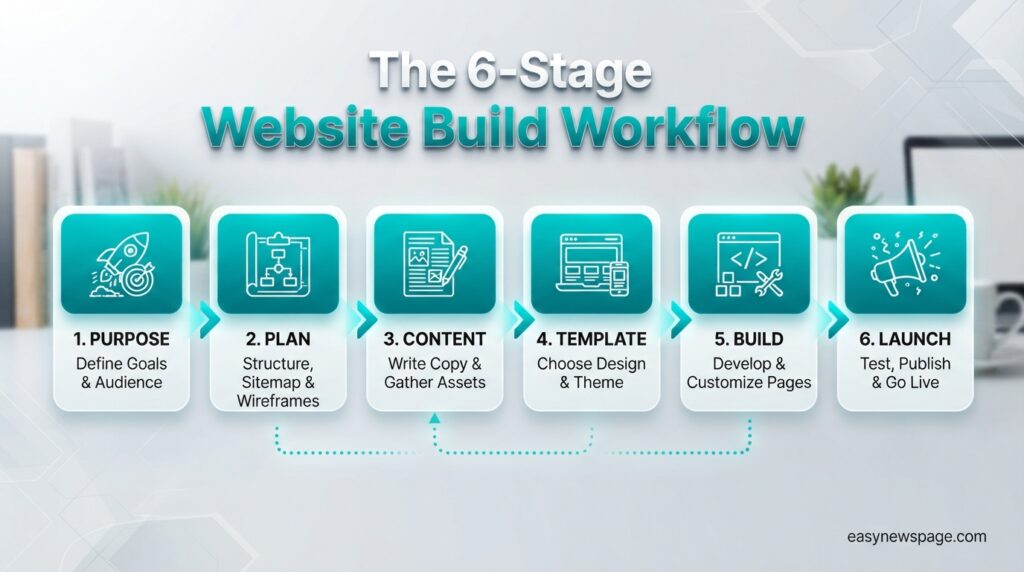
A repeatable workflow prevents the most common failure, which is endless redesigning. The version that works has six stages: define the purpose, plan the pages, gather the content, choose a template, build and style, then test and launch. Content comes before design, not after.
Defining purpose means writing one sentence about what a visitor should be able to do on your site. Planning pages means listing them — usually five or fewer for a first site. Gathering content means writing the actual words and collecting real photographs before you open the editor, because building around placeholder text produces layouts that break when real content arrives.
Testing is the stage most beginners skip. Check every page on a phone, click every link, submit your own contact form, and load the site on a slow connection. Twenty minutes of testing prevents the embarrassment of a live site with a broken form.
Editor Walkthrough
Every modern builder shares the same basic interface, so learning one transfers to the others. A left panel adds elements — text, images, buttons, forms, galleries. A top bar switches between desktop and mobile views and holds the preview and publish buttons. A right panel adjusts whatever element is currently selected.
Four things deserve attention on day one. Set your site title and description in settings, because these appear in search results and social shares. Switch to mobile view and fix the layout there separately, since desktop adjustments do not always carry over. Learn where your site’s global colors and fonts live, so you change them once rather than element by element. And find the SEO panel for each page, where the title and meta description are edited.
The editors are more forgiving than they look. Everything supports undo, and most platforms keep version history, so experimentation carries almost no risk.
Setup Guide
Setup divides into decisions and actions. The decisions — purpose, platform, domain name — deserve a few days of thought. The actions take an afternoon once the decisions are made, which is the opposite of how most beginners allocate their time.
Choose your platform by matching it to the site’s job. Selling physical products points to Shopify. A design-led portfolio points to Squarespace or Framer. A content-heavy site you intend to grow for years points to self-hosted WordPress. Anything general with unusual requirements points to Wix.
Choose a domain that is short, easy to spell aloud, and preferably a .com. Avoid hyphens and numbers. Register it yourself with auto-renewal enabled and domain privacy turned on, so your personal address is not published in public records and you never lose the name to an expired card.
Read more: How to Start a Blog: Common Mistakes to Avoid
Step-by-Step Tutorial
Step one: define the purpose. Write one sentence describing what a visitor should be able to do. If you cannot write it, you are not ready to build.
Step two: plan the pages. Most first sites need five or fewer: Home, About, Services or Products, Contact, and Privacy Policy. Sketch the structure on paper before opening any tool.
Step three: write the content. Real headlines, real body copy, real photographs. This takes longer than building and is the stage that determines whether the site works.
Step four: register the domain. Enable privacy and auto-renewal. If you are using a builder, you can often register through it; otherwise use a dedicated registrar.
Step five: choose a template and build. Pick one template and commit. Replace placeholder content with yours, keep the layout simple, and use no more than two typefaces and three colors.
Step six: optimize each page. Write a unique page title and meta description, add descriptive alt text to every image, compress images before uploading, and check that headings follow a logical order.
Step seven: test and launch. Confirm HTTPS is active, check every page on a phone, submit your own contact form, then connect analytics and a search console property before announcing the site.
Use Cases
The most common use case is the small business website, built to be found locally and to convert visitors into calls, bookings, or visits. It needs surprisingly little: clear services, a real address, opening hours, contact details, and proof through reviews or photographs.
The portfolio site serves freelancers and creatives, where the work is the content and the design must stay out of its way. Speed and mobile presentation matter disproportionately here, since clients frequently browse on phones between meetings.
The online store needs inventory, payment processing, shipping rules, and tax handling, which is a genuinely different category of software. The content site or blog is built for search traffic and compounds slowly. And the landing page, a single focused page built to convert traffic from ads, can be built in under an hour.
Industry Use Cases
| Industry | Site’s main job | Best-fit platform |
|---|---|---|
| Restaurants and cafés | Menu, hours, location, bookings | Squarespace or Wix |
| Retail and product brands | Inventory and checkout | Shopify |
| Photography and design | Visual portfolio | Squarespace or Framer |
| Trades and local services | Lead generation and trust | Wix or WordPress |
| Consultants and coaches | Authority and booking | WordPress or Squarespace |
| Nonprofits | Donations and storytelling | WordPress or Wix |
| Publishers and blogs | Content volume and SEO | Self-hosted WordPress |
Benefits
The core benefit of building your own site is ownership and speed. You can change a price, fix a typo, or publish a new page in minutes rather than waiting on a developer’s queue, and the site belongs to you rather than to a platform that could change its terms.
Building it yourself also costs a fraction of hiring out. A professionally built small business site typically runs into the thousands, while the same site built on a good template costs a few hundred a year and often looks close to identical to visitors who are not designers.
Finally, the process teaches you what matters. Owners who build their first site understand why page speed, clear contact details, and honest copy affect enquiries, and that understanding makes every subsequent marketing decision better informed.
Limitations
Builders trade flexibility for convenience. When your requirements outgrow what a platform supports, the workarounds get awkward and the migration path is often painful, because most builders do not export designs in a portable format.
Time is the second limitation. Building takes an afternoon; writing good content takes a week or more, and beginners routinely underestimate this by a factor of five. A beautiful site with placeholder copy is worth nothing.
Third, a website does not generate traffic by existing. Launching is the beginning of the work, not the end. Without search optimization, local listings, or promotion, a new site can sit unvisited indefinitely, which surprises owners who expected the site itself to be the marketing.
Pros & Cons Table
| Pros | Cons |
|---|---|
| Live in hours, editable in minutes | Content writing takes far longer than building |
| Costs a fraction of hiring a developer | Builders limit flexibility as needs grow |
| No coding skill required on any major platform | Migrating between builders is genuinely difficult |
| Full control over updates and pricing changes | Launching does not produce traffic by itself |
| Professional templates raise the design floor | Template sites can look generic without editing |
| Analytics show exactly what visitors do | Ongoing costs continue for as long as the site exists |
The balance favors building it yourself for most small sites. Nothing in the cons column is disqualifying, but two items cause most failures: underestimating content work, and assuming traffic follows launch. Plan for both and the exercise almost always pays for itself, particularly for local businesses where a handful of enquiries covers years of subscription cost.
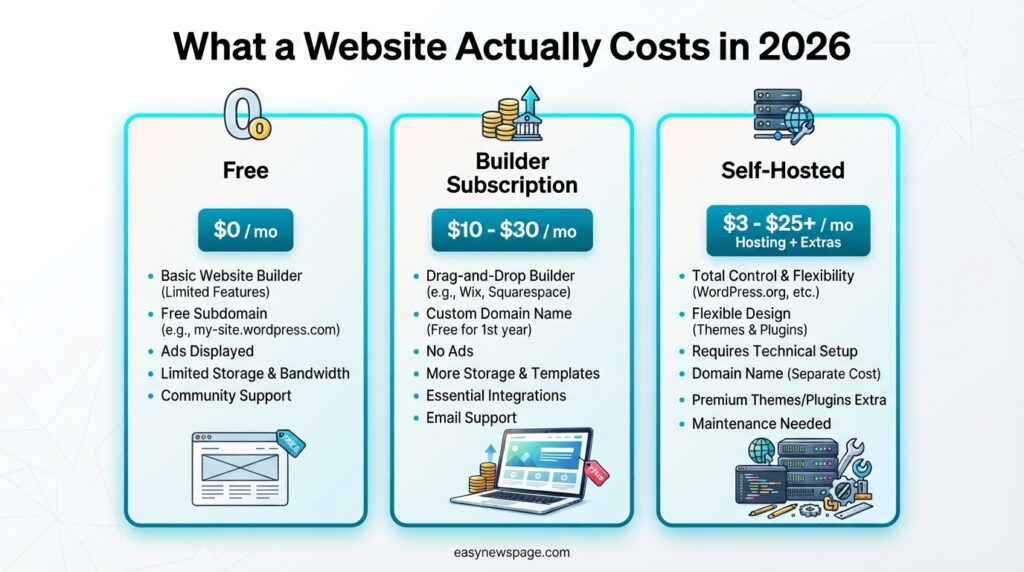
Pricing Table
| Option | Typical 2026 cost | Includes | Best for |
|---|---|---|---|
| Wix free plan | Free | Hosting, subdomain, platform branding | Testing the tool |
| Wix paid plans | Roughly $17–$159/month by tier | Custom domain, apps, commerce on higher tiers | Flexible general sites |
| Squarespace | Roughly $16–$99/month annual, higher monthly | Hosting, templates, commerce on most tiers | Design-led sites |
| Shopify | From roughly $29–$39/month | Full commerce stack, payments, shipping | Online stores |
| Self-hosted WordPress | $2.99–$5.99/month intro, $10.99–$16.99 renewal, plus domain | Full control, unlimited plugins | Long-term content sites |
| Budget host builders | From roughly $2.99/month | AI builder, hosting, domain often included | Lowest-cost simple sites |
| Domain only | Roughly $10–$20/year | The address itself | Every site |
Two pricing realities matter. Builder plans are substantially cheaper billed annually than monthly, often by a quarter to a third, and hosting introductory rates require long upfront commitments with renewals frequently two to three times higher. Always treat the renewal figure as the real price, and confirm current numbers on the provider’s own pricing page before committing.
Comparison Table
| Criterion | Wix | Squarespace | WordPress.org | Shopify | Framer |
|---|---|---|---|---|---|
| Ease for beginners | Very easy | Very easy | Moderate | Easy | Moderate |
| Design flexibility | Very high | Moderate but polished | Very high | Theme-bound | Very high |
| E-commerce strength | Good | Good | Plugin-dependent | Excellent | Basic |
| SEO control | Good | Good | Complete | Good | Good |
| Ownership and portability | Limited | Limited | Complete | Product data only | Limited |
| Maintenance required | None | None | Regular | None | None |
| Long-term cost | Moderate | Moderate | Low to moderate | Higher | Moderate |
Specifications
| Specification | Recommended target |
|---|---|
| Largest contentful paint | Under 2.5 seconds |
| Total page weight | Under 1 MB where possible |
| Image format | WebP or AVIF, compressed before upload |
| Hero image width | 1920px maximum, resized before upload |
| Mobile breakpoint | Designs tested at 360–430px width |
| SSL certificate | Required on every page |
| Typefaces per site | Two maximum |
| Colors per site | Three including neutrals |
| Pages for a first site | Five or fewer |
| Backups | Automatic daily, stored off-server |
Security
Website security rests on three habits rather than any single product. Keep software current, because the majority of compromised sites are breached through outdated plugins and themes rather than the core platform. Use unique passwords stored in a password manager. Enable two-factor authentication on your domain registrar, hosting, and site admin accounts.
HTTPS is mandatory, not optional. Without a valid SSL certificate, browsers display a “not secure” warning that destroys visitor confidence and search engines treat the site unfavorably. Every reputable builder includes a certificate automatically, and self-hosted sites can get one free through Let’s Encrypt.
Backups are the real safety net. Automated daily backups stored somewhere other than the server turn a serious incident into a thirty-minute restore. Test a restore once, while nothing is wrong, so you know the process works before you need it.
Privacy
Running a website means handling other people’s data, usually without noticing. Contact forms collect names and email addresses. Analytics records behavior. Newsletter signups create a subscriber database. Each of these triggers privacy obligations in most jurisdictions.
Enable domain privacy at registration so your home address is not published in public WHOIS records — most registrars now include it at no charge. Publish a privacy policy explaining what you collect, why, and how someone can request deletion. Configure analytics to anonymize IP addresses where that option exists.
Collect only what you will actually use. A contact form asking for a phone number, company size, and budget when you only ever reply by email creates liability for no benefit, and it reduces the number of people who complete the form.
Compliance
Compliance obligations scale with your audience. If visitors from the European Union can reach your site, GDPR applies, requiring a lawful basis for data collection, consent for non-essential cookies, and a route for deletion requests. California and several other jurisdictions impose comparable duties.
E-commerce sites carry more. Terms of service, a returns and refunds policy, shipping terms, and accurate tax handling are legally required in most markets and are also what customers check before buying. Most platforms provide policy generators as a starting point, though they are not a substitute for advice on anything unusual.
Accessibility matters legally in some markets and practically everywhere. Descriptive alt text, sufficient color contrast, keyboard-navigable menus, and a logical heading order widen your audience and improve search performance at the same time.
Performance
Speed affects both rankings and revenue, and most slow sites are slow for the same three avoidable reasons: enormous uncompressed images, too many scripts and apps, and heavy animations that delay the first meaningful paint.
Fix images first, because they typically account for most of a page’s weight. Resize to the largest size actually displayed, compress, serve WebP, and enable lazy loading below the fold. Then remove apps and integrations you are not using, since each adds requests. Limit custom fonts to two weights of two families.
Measure rather than guess. Free tools report Core Web Vitals — loading, interactivity, and visual stability — and identify the specific element causing a delay. Test on a mid-range phone over mobile data, because that is the real experience for a large share of visitors.
Integrations
A few integrations turn a static brochure into a working business tool. An email marketing platform is the highest-value one, because email is the only audience channel you fully own. Connect a signup form before launch, even if nobody subscribes for weeks.
Analytics comes next. Google Search Console shows which queries bring people to you and flags indexing problems, and it is free and essential. A privacy-friendly analytics tool shows on-site behavior. Booking tools, live chat, payment processors, and review widgets each solve a specific problem.
Restraint matters here more than on any other decision. Every integration adds scripts, and scripts slow the page. Add one, confirm you use it for a month, then consider the next. A site with four well-chosen integrations outperforms one with twenty.
API Access
Most builders expose some programmatic access, which matters once you want your site to talk to other systems. Shopify offers extensive APIs for products, orders, and customers, and a large developer ecosystem built on them. Self-hosted WordPress ships a REST API exposing posts, pages, media, and users, which enables headless setups and automated publishing.
Wix and Squarespace provide more limited APIs plus webhook support, which covers common needs like pushing form submissions into a CRM or syncing inventory. Automation platforms such as Zapier or Make bridge most remaining gaps without any code.
For a first site, API access is a future consideration rather than a launch requirement. Its value is optionality — choosing a platform with an open API means you are not blocked later when your needs become more technical.
Customer Support
Support quality differs sharply by platform type. All-in-one builders support the entire stack because they control it, which is a genuine advantage for beginners and a large part of what the subscription buys. Response times and channels vary, and some budget providers offer chat only with no phone option.
Self-hosted WordPress splits responsibility across your host, your theme developer, and each plugin developer, with nobody owning the boundaries between them. That gap is why the enormous community ecosystem matters — most beginner problems are solved within a search of the official documentation or support forums.
When comparing providers, check the support channels rather than the marketing promises. Around-the-clock live chat beats email-only ticketing, and for a first-time builder, responsive support is worth a few dollars a month.
Latest Updates
The most consequential recent development is AI site generation. Every major builder now produces a complete draft site from a text description, including layout, placeholder copy, and images. Used as a starting structure it saves hours; accepted as a finished site it produces something generic that reads exactly like every other generated site.
The second is AI-assisted editing inside builders — SEO assistants, copy rewriting, image generation, and adaptive content that adjusts what different visitors see. These are genuinely useful for producing first drafts and alternatives, and less useful as a replacement for knowing what you want to say.
Third, pricing across builders has been repeatedly restructured, with tiers renamed and features shuffled between them. Any price you read in an article, including this one, should be confirmed at the source before you commit to an annual plan.
Expert Tips
Write the content before you open the editor. Building around real words produces layouts that work; building around placeholder text produces layouts that break the moment real content arrives.
Design the mobile view first, or at minimum check it after every change. Most visitors will only ever see the mobile layout, and desktop-first designs routinely collapse into unusable stacks on a phone.
Limit yourself to two typefaces and three colors. Nearly every amateur-looking site breaks this rule, and nearly every professional-looking template follows it.
Compress every image before uploading rather than relying on the platform to handle it. This single habit does more for page speed than any other beginner-accessible change.
Launch before it is perfect. A live site at eighty percent generates enquiries; a perfect site still in draft generates nothing. You can keep improving after visitors arrive.
Common Mistakes
The most common mistake is starting in the editor instead of with the content, which produces weeks of layout work that has to be redone once real copy exists.
Second is ignoring mobile until the end, when fixing it means rebuilding rather than adjusting. Third is choosing a domain that is long, hyphenated, or hard to spell aloud, which costs you every time someone tries to type it from memory.
Fourth is the missing contact information — no address, no phone number, no real name — which destroys trust for local businesses in particular. Fifth is uploading full-resolution photographs straight from a camera, producing pages that take ten seconds to load on mobile data. Sixth is launching without analytics or Search Console connected, so the first months of data are lost permanently.
Read more: How to Start a Blog the Right Way (Beginner Friendly)
Troubleshooting
| Problem | Likely cause | Fix |
|---|---|---|
| Domain shows nothing after setup | DNS still propagating | Wait up to 48 hours, verify nameserver settings |
| “Not secure” browser warning | SSL missing or mixed content | Enable SSL, force HTTPS, fix HTTP asset links |
| Site looks broken on phone | Desktop-only layout adjustments | Edit the mobile view separately in the editor |
| Pages load slowly | Oversized images, too many apps | Compress and resize images, remove unused apps |
| Site not appearing in Google | Not yet indexed or blocked | Submit sitemap in Search Console, check indexing settings |
| Contact form never arrives | Notification email misconfigured or filtered | Confirm the notification address, check spam, use a domain email |
| Changes not visible to visitors | Not published, or cached | Publish the site, clear cache, test in a private window |
Myths vs Facts
Myth: you need to know how to code. Fact: every major builder produces a complete professional site through a visual interface with no code at all.
Myth: a free website is good enough for a business. Fact: free tiers add platform branding and block custom domains, both of which undermine credibility with customers.
Myth: more pages means better rankings. Fact: five excellent pages outperform forty thin ones, and padding a site with generic copy actively hurts.
Myth: the design is the most important part. Fact: clarity, speed, and contact details drive enquiries far more than visual style.
Myth: once it is launched, the work is done. Fact: launch is the beginning. Traffic requires ongoing content, listings, and promotion.
Decision Matrix
| Criterion (weight) | Wix | Squarespace | WordPress.org | Shopify | Framer |
|---|---|---|---|---|---|
| Ease for beginners (25%) | 9 | 9 | 6 | 8 | 6 |
| Design quality out of the box (20%) | 7 | 10 | 7 | 8 | 10 |
| Flexibility and growth (20%) | 8 | 6 | 10 | 8 | 7 |
| SEO capability (20%) | 8 | 8 | 10 | 8 | 8 |
| Cost efficiency (15%) | 7 | 7 | 9 | 5 | 6 |
| Weighted score | 7.9 | 8.2 | 8.4 | 7.5 | 7.5 |
WordPress edges ahead on weighted score because flexibility and SEO carry significant weight, but the matrix hides a real caveat: it also demands the most from the person running it. Reweighting toward ease and design — appropriate for a first site with no growth plans — puts Squarespace comfortably in front. Use the matrix to clarify your own priorities rather than as a universal verdict.
Beginner vs Advanced
A beginner build is deliberately minimal: one template committed to, five pages or fewer, two typefaces, compressed images, and analytics connected. The goal in the first months is a live, fast, clear site — not a distinctive one. Distinctiveness comes from content and photography long before it comes from custom design.
An advanced build adds a staging environment for testing changes, structured data markup, a content delivery network, custom fonts served locally, conversion tracking tied to specific goals, A/B testing on key pages, and a documented content plan rather than ad-hoc additions.
The transition point is usually the first consistent traffic or the first genuine constraint. Before then, advanced tooling is a distraction that delays launch. After then, it is how you compound something already working.
Best Alternatives
If none of the main platforms fit, four alternatives are worth knowing. Webflow offers designer-grade visual control with clean output and a steeper learning curve, popular with agencies and product teams. Ghost suits publications and paid newsletters with those features built in natively.
Hostinger and GoDaddy bundle AI-assisted builders with hosting at the lowest price points available, which makes them reasonable for simple sites where budget dominates every other consideration. Carrd builds excellent single-page sites in minutes for a few dollars a year.
For the technically inclined, static site generators such as Astro, Hugo, or Eleventy paired with free hosting produce extremely fast sites at near-zero running cost, in exchange for writing in Markdown and managing deployments.
Alternative Comparison
| Alternative | Strength | Weakness | Typical cost | Best for |
|---|---|---|---|---|
| Webflow | Designer-level control, clean code | Steep learning curve | Mid-to-high monthly | Design-led teams |
| Ghost | Native publishing and memberships | Narrow beyond publishing | Mid-tier monthly | Publications |
| Hostinger builder | Very low cost, hosting included | Fewer advanced features | From roughly $2.99/month | Budget simple sites |
| Carrd | Single-page sites in minutes | One page only | A few dollars per year | Links and landing pages |
| Static generators | Exceptional speed, near-zero cost | Requires technical comfort | Near zero | Developers |
Who Should Build Their Own
You should build your own site if it is small, if the requirements are clear, and if you can write the content yourself. That describes most portfolios, most local service businesses, most personal projects, and most small shops — which is to say the large majority of sites that get built.
It suits people who want to change things frequently without waiting on anyone, and people testing an idea where spending thousands before validating demand would be reckless. It also suits anyone who wants to understand how their own marketing works.
Building your own first site is worthwhile even if you later hire a professional, because you will brief them far better having done it once yourself.
Who Should Avoid It
Avoid building it yourself if the site is genuinely complex — custom functionality, integrations with internal systems, membership logic, or anything where a bug costs real money. Those needs justify a developer, and attempting them on a builder produces fragile workarounds.
Avoid it if your time is worth more than the saving. A professional running at a high hourly rate who spends thirty hours building a site has spent more than the quote they declined, and the result is usually worse.
Avoid it if you will not write the content. No platform and no AI generator solves this — a site full of generic copy converts poorly regardless of how it looks. If writing is the blocker, hire a copywriter before you hire a designer.
FAQ
How much does it cost to build a website?
A basic site can be built free on a platform subdomain. A proper small business site typically costs roughly $200 to $400 in the first year, combining a builder subscription of around $16 to $30 per month with a domain at $10 to $20 per year. Self-hosted WordPress can be cheaper initially but costs more at renewal.
How long does it take to build a website?
A simple site can be live in two to six hours using a drag-and-drop builder. A business site done properly usually takes one to three weeks, and almost all of that time goes into writing content and gathering photographs rather than building pages.
Do I need to know how to code to build a website?
No. Every major website builder produces a complete, professional site through a visual interface with no coding at all. Basic HTML or CSS knowledge is occasionally useful for small tweaks, but it is not required to build, launch, or maintain a site.
What is the easiest website builder for beginners?
Wix and Squarespace are the easiest for complete beginners. Wix offers more layout freedom and a larger app selection, while Squarespace produces better-looking results with less effort because its templates constrain your choices more tightly.
Can I build a website for free?
Yes, on free tiers from Wix, Framer, GoDaddy, and others. The limitations are consistent: platform branding on your pages, no custom domain, and restricted features. Free tiers work well for testing an idea and poorly for representing a business.
Do I need a domain name and hosting separately?
Not with a website builder — hosting is included in the subscription, and you only need a domain, which you can often register through the same provider. Self-hosted WordPress requires both a domain and separate hosting, connected through DNS settings.
How do I get people to visit my website?
Traffic comes from search optimization, a Google Business Profile for local businesses, email, social sharing, and links from other sites. Launching alone produces almost no visitors, so plan promotion as part of the project rather than as an afterthought.
Should I use a website builder or WordPress?
Use a builder if you want speed, simplicity, and no maintenance. Use self-hosted WordPress if you want complete control, full data ownership, unlimited extensibility, and a site you plan to grow substantially over several years.
Rating Scorecard
| Category | Score | Notes |
|---|---|---|
| Ease of getting started | 9/10 | Genuinely accessible with no technical skill |
| Cost to build | 8/10 | Free options exist; business sites remain cheap |
| Speed to results | 8/10 | Live in hours; traffic takes longer |
| Design quality achievable | 8/10 | Templates raise the floor considerably |
| Flexibility and growth | 7/10 | Builders constrain; WordPress does not |
| Ongoing maintenance burden | 8/10 | Minimal on builders, real on self-hosted |
| Skill requirement | 9/10 | No coding needed anywhere |
| Overall | 8.1/10 | Excellent for most small sites, limiting for complex ones |
Conclusion
Building a website is now a solved technical problem and an unsolved decision problem. The construction — template, pages, domain, publish — is genuinely an afternoon’s work that anyone can complete without writing a line of code. What separates sites that work from sites that sit unvisited is not the platform, the template, or the animation library. It is clarity of purpose and quality of content.
The verdict is straightforward. For most beginners building a small site, choose Squarespace or Wix, commit to one template, and accept the constraint in exchange for finishing this week. If the site is a shop, choose Shopify. If it is a content site you intend to grow for years, choose self-hosted WordPress and accept the maintenance. Any of these produces a professional result; none of them produces one without your words.
The moral running through everything above is that beginners overweight the build and underweight the content. A plain five-page site with real photographs, honest copy, a working contact form, and a two-second load time will outperform a beautifully animated site full of placeholder text every single time, in every industry.
Register the domain. Write the content first, imperfect as it will be. Build the simplest version that does the job, publish it before it feels ready, then improve it with real visitors telling you what is missing. The site you launch this month and refine will always beat the perfect one you are still planning next year.
Official Sources
- Wix — official platform and current pricing: https://www.wix.com
- Squarespace — official platform and plan pricing: https://www.squarespace.com/pricing
- WordPress.org — official open-source software and documentation: https://wordpress.org
- Shopify — official e-commerce platform and pricing: https://www.shopify.com/pricing
- Google Search Central — official search and indexing documentation: https://developers.google.com/search
- Let’s Encrypt — free SSL certificate authority: https://letsencrypt.org
Author Bio
Written by the editorial team at easynewspage.com, which covers practical technology, online publishing, and digital tools for non-technical readers. This guide draws on hands-on experience building and launching sites across Wix, Squarespace, WordPress, and static-site stacks, and on current 2026 pricing and platform documentation checked at the time of writing. We publish setup guides without affiliate links so recommendations reflect what suits the reader rather than what pays a commission. Corrections and reader questions are welcome through our contact page and are used to update guides on a rolling basis.