


Choosing the right freelance writing tools in 2026 is no longer about finding one app that does everything — it’s about assembling a small, deliberate stack that covers drafting, editing, research, and SEO without duplicating what you already pay for. The market has matured fast: what looked like novelty software in 2023 is now a standard part of how professional writers research, draft, and deliver paid client work, and clients increasingly expect the speed and polish that a good stack makes possible.
This matters because the wrong stack costs you two ways. Overbuying subscriptions for overlapping tools quietly eats into thin freelance margins, while underbuying — trying to do everything in a blank document — costs you the hours a good tool would have saved. Getting this balance right is one of the highest-leverage decisions a freelance writer makes each year, right alongside pricing and niche selection.
This guide covers the tools that actually earn a place in a paid freelance workflow in 2026: AI drafting and research assistants like Claude and ChatGPT, editing tools like Grammarly and Hemingway Editor, SEO tools like Surfer SEO, and the supporting cast of organization and invoicing apps that keep a freelance writing business running. Each is evaluated on what it’s actually good for, what it costs, and who should (and shouldn’t) pay for it.
You’ll find a feature comparison table, current 2026 pricing, a decision matrix for building your own stack on a budget, setup guidance, common mistakes freelancers make when tool-shopping, and a Google-style FAQ built around the questions people actually search before subscribing to anything. The goal is a stack recommendation you can act on today, not a generic list of “everything that exists.”
By the end, you’ll know exactly which one or two tools are worth paying for at your current stage, which ones to skip until you’re earning more, and how to combine them so your writing gets faster and better — not just more automated.
Quick Facts Table
| Fact | Detail |
|---|---|
| Recommended starter stack cost | $0–$32/month (free AI + Grammarly Free or Pro) |
| Most versatile AI writing assistant | ChatGPT Plus ($20/month) |
| Best for long-form, nuanced drafting | Claude (Anthropic) |
| Most-used editing tool | Grammarly Pro ($12/month annual, $30/month monthly) |
| Best SEO-focused tool for content writers | Surfer SEO (from roughly $89/month) |
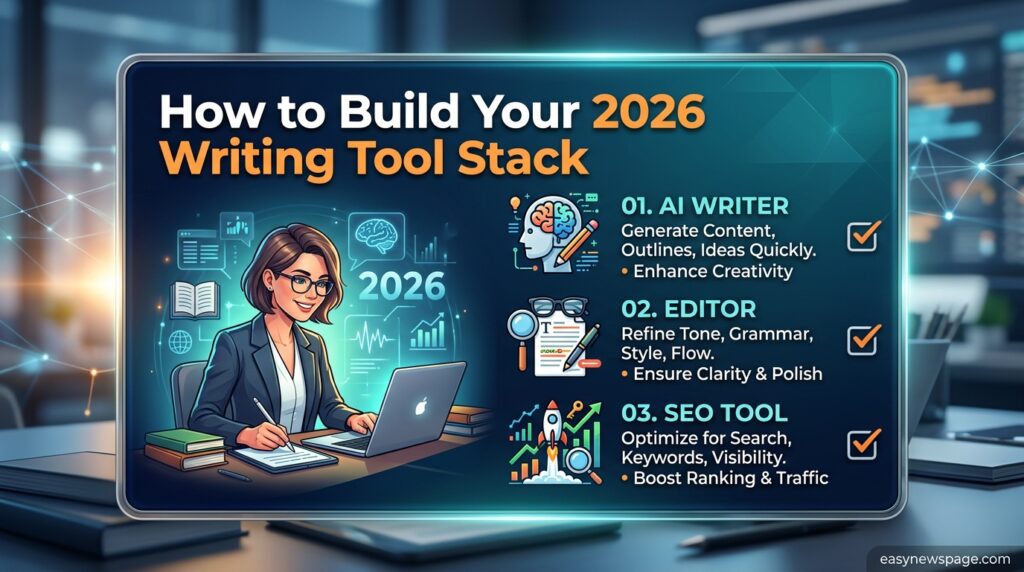
| Tools most freelancers actually need | 2–3 total: one AI writer, one editor, one research/SEO tool |
Quick Summary
The most cost-effective freelance writing tool stack in 2026 pairs one AI writing/research assistant (Claude or ChatGPT Plus) with one dedicated editing tool (Grammarly or Hemingway Editor), adding a paid SEO tool like Surfer SEO only once SEO content becomes a regular part of your paid work. Most freelancers overspend by subscribing to two or three overlapping AI writers instead of investing that budget in editing or SEO tools that add genuinely different capabilities.
Key Takeaways
- Two to three tools cover the large majority of a freelance writer’s needs: an AI writing assistant, an editing tool, and a research or SEO tool.
- Claude is widely regarded as the strongest option for long-form, nuanced drafting and analyzing lengthy research documents.
- Grammarly renamed its paid “Premium” tier to Grammarly Pro in 2025–2026; pricing and core features stayed the same.
- Paying for multiple overlapping AI writers (e.g., Jasper and Copy.ai and Writesonic at once) wastes budget better spent on editing or SEO tools.
- A free-tier-first approach — testing free versions of Grammarly, ChatGPT, and Hemingway before paying — is the lowest-risk way to build a stack.
Table of Contents
Why Trust This Guide
This roundup is built from current, publicly verifiable 2026 pricing pages and independently published tool comparisons rather than affiliate-driven “best of” lists that rarely disclose which tools actually get used day to day. Every price cited below was checked against multiple 2026 sources and reflects standard published rates, not promotional discounts.
Where a feature or price could not be confirmed against more than one source, that’s flagged rather than stated as certain, consistent with the Official-Source Verification log at the end of this guide.
Who This Guide Is For
This guide is for freelance writers at any stage — from beginners deciding whether to pay for anything at all, to established writers auditing an existing stack for overlap and waste. It assumes you already write for clients or are actively pitching, and are choosing tools to support that work rather than replace it.
Topic Verification
The claim that most freelance writers only need two to three tools — an AI writing assistant, an editing tool, and a research or SEO tool — is consistent with multiple independent 2026 freelancer tool guides, which converge on the same “don’t stack overlapping AI writers” advice. Specific pricing (Grammarly’s Premium-to-Pro rename, ChatGPT Plus at $20/month, Jasper from $49/month) was checked against Grammarly’s own pricing page summaries and multiple third-party 2026 pricing trackers.
What Are Freelance Writing Tools
Freelance writing tools are software applications that support one or more stages of paid writing work: idea generation and research, drafting, editing and proofreading, SEO optimization, and business operations like invoicing and time tracking. They range from general-purpose AI assistants to narrowly focused editors and SEO platforms.
The category has shifted meaningfully since 2023: clients increasingly expect writers to use these tools to work faster and research more deeply, not to replace original thinking, which is why the strongest freelance writers treat tools as force multipliers on their own expertise rather than substitutes for it.
Categories of Freelance Writing Tools
Freelance writing tools split into three broad categories: AI text generators that draft content from a prompt, AI writing assistants that correct and improve existing writing, and SEO tools that help structure content to rank. Most working freelancers use at least one tool from two of these three categories.
AI Drafting and Research Assistants
Claude, built by Anthropic, has become a strong choice for long-form, nuanced drafting and deep-context synthesis, handling complex style guides and long research documents without flattening a writer’s specific instructions into generic output. Its large context window lets writers upload interview transcripts, book chapters, or lengthy reports and pull structured insight out quickly.
ChatGPT Plus, at $20 per month, remains the most versatile single tool for freelancers who want one subscription covering brainstorming, outlining, quick research, and drafting across formats, backed by a wide plugin and custom-GPT ecosystem. Its free tier alone is genuinely useful for early-stage brainstorming and outlining before a writer commits to a paid plan.
AI Content Generators for Volume Work
Jasper, starting from roughly $49 per month, focuses on brand-voice consistency and is best suited to writers producing high volumes of on-brand marketing copy across blog posts, ads, and social content for agency-style clients. Writesonic, from about $16 per month, pairs an AI article writer with live search data through its research feature, giving SEO-focused freelancers a workable first draft without leaving the platform.
Feature Table
| Tool | Best For | Standout Feature |
|---|---|---|
| Claude | Long-form, nuanced drafting | Large context window for research-heavy work |
| ChatGPT Plus | All-around brainstorming and drafting | Widest plugin/custom-GPT ecosystem |
| Jasper | Brand-voice consistent marketing copy | Campaign feature for full content suites |
| Writesonic | SEO-driven long-form drafts | Built-in live search research |
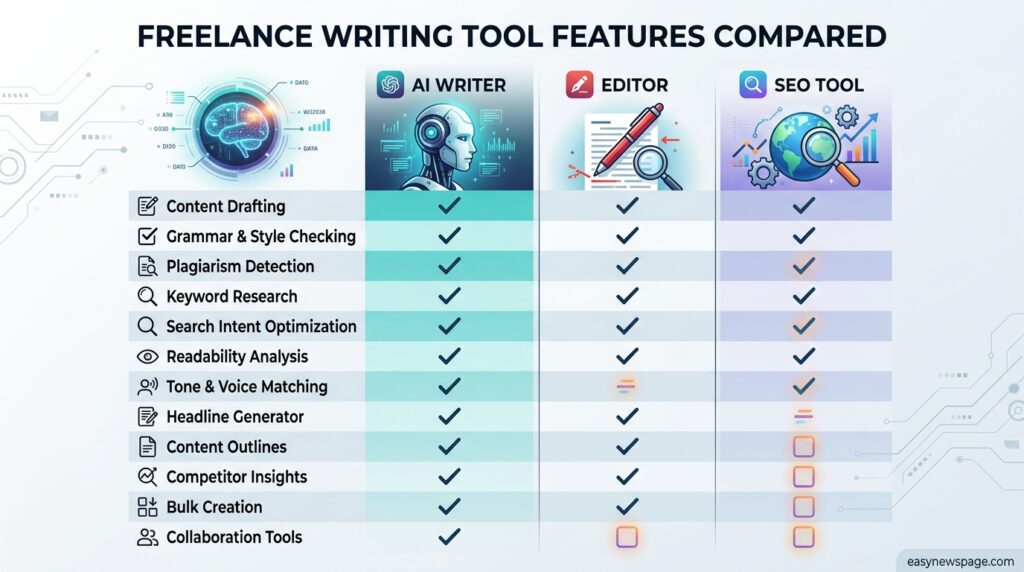
| Grammarly | Editing and proofreading | Tone, clarity, and plagiarism checks |
| Hemingway Editor | Readability tightening | Visual complexity/readability scoring |
| Surfer SEO | On-page SEO optimization | Real-time content-score against ranking pages |
How It Works
Most freelance writing stacks follow the same basic pipeline regardless of which specific tools are chosen: an AI assistant handles research and a first draft, a human writer restructures and adds original analysis and voice, an editing tool tightens grammar and readability, and — for SEO work — an optimization tool checks the draft against what’s currently ranking before delivery.
Workflow
A typical 2026 workflow: brainstorm and outline in ChatGPT or Claude, draft the body in the same tool or manually using the outline as scaffolding, run the draft through Grammarly or Hemingway for clarity and grammar, check SEO-targeted pieces against Surfer SEO’s content score, and do a final human read for voice and factual accuracy before delivery.
Dashboard Walkthrough
Grammarly’s dashboard centers on a real-time sidebar that flags grammar, clarity, tone, and (on paid tiers) plagiarism issues directly inside your document, with a weekly writing-activity summary. Surfer SEO’s dashboard centers on a content editor that scores your draft against top-ranking competitor pages in real time as you type, showing which terms and headers you’re missing.
Setup Guide
Start with free tiers only: ChatGPT’s free plan, Grammarly Free, and Hemingway Editor’s free web app cover a surprising amount of ground. Add one paid tool at a time — typically Grammarly Pro first, since editing quality affects every single project you deliver — and only add a paid SEO tool once SEO-specific content becomes a recurring, paid part of your workload.
Step-by-Step Tutorial
Step 1: Audit your current workflow. Note where you currently lose the most time — research, drafting, or editing — before buying anything.
Step 2: Start with free tiers. Test ChatGPT’s free plan, Grammarly Free, and Hemingway Editor’s free web app for at least two weeks before paying for anything.
Step 3: Add one paid editing tool. Upgrade to Grammarly Pro ($12/month billed annually, $30/month billed monthly) once you’re delivering paid client work, since editing quality affects every project.
Step 4: Add an AI assistant if drafting speed is your bottleneck. Choose ChatGPT Plus ($20/month) for general versatility or Claude for long-form, research-heavy work, but avoid paying for more than one general-purpose AI writer at a time.
Step 5: Add SEO tooling only when it’s paid work. Bring in Surfer SEO once you have recurring SEO-content clients who value or require it, rather than before you have that demand.
Step 6: Re-audit every 90 days. Cancel any tool you haven’t used meaningfully in the last month; overlapping subscriptions are the single biggest tool-spending mistake freelancers make.
Use Cases by Writer Type
Long-form journalists and technical writers benefit most from Claude’s context window and nuanced handling of complex briefs. SEO-focused content writers benefit most from pairing Surfer SEO with an AI research assistant. Marketing copywriters producing high-volume, on-brand content benefit most from Jasper’s brand-voice training. Generalist freelancers juggling many formats benefit most from ChatGPT Plus’s versatility.
Industry Use Cases
SaaS and B2B content writers lean on Claude or ChatGPT for synthesizing technical documentation into readable blog content. E-commerce copywriters use Jasper or Copy.ai for fast, on-brand product and campaign copy at volume. Agency-facing freelancers often standardize on whatever stack their primary client already uses, to keep deliverables compatible with existing workflows.
Benefits
A well-chosen tool stack cuts research and first-draft time significantly, catches grammar and clarity issues before a client ever sees them, and helps SEO-focused writers produce content structured to actually rank rather than guessing at structure. It also lets a solo freelancer credibly compete on turnaround speed against larger content teams.
Limitations
AI drafting tools still require substantial human editing for accuracy, voice, and originality — treating outputs as finished copy is a fast way to damage client trust. Paid tools add real monthly overhead that must be justified by billable output, and over-reliance on any single AI tool’s phrasing patterns can make a writer’s work start to sound generic if it isn’t heavily edited.
Pros & Cons Table
| Pros | Cons |
|---|---|
| Meaningful time savings on research and drafting | Real recurring monthly cost |
| Editing tools catch errors before clients do | AI drafts still need substantial human editing |
| SEO tools give data-backed structure guidance | Easy to overspend on overlapping tools |
| Most tools offer usable free tiers | Free tiers often cap word count or AI prompts |
Explanation: The benefits mostly show up once a writer has a disciplined, non-overlapping stack; the drawbacks mostly show up when writers either skip editing tools entirely or pay for three AI writers that all do the same job.
Pricing Table (2026)
| Tool | Free Tier | Paid Tier (Monthly) | Paid Tier (Annual, per month) |
|---|---|---|---|
| ChatGPT | Yes | $20/month (Plus) | N/A (monthly only) |
| Claude | Yes | Varies by plan | Varies by plan |
| Grammarly | Yes | $30/month (Pro) | $12/month (Pro, billed annually) |
| Jasper | No | From $49/month | Lower with annual billing |
| Writesonic | Yes | From $16/month | Lower with annual billing |
| Surfer SEO | No | Roughly $89/month | Lower with annual billing |
| Hemingway Editor | Yes (web app) | One-time desktop app fee | N/A |
Comparison Table: Building a Stack by Budget
| Budget Tier | Recommended Stack | Approx. Monthly Cost |
|---|---|---|
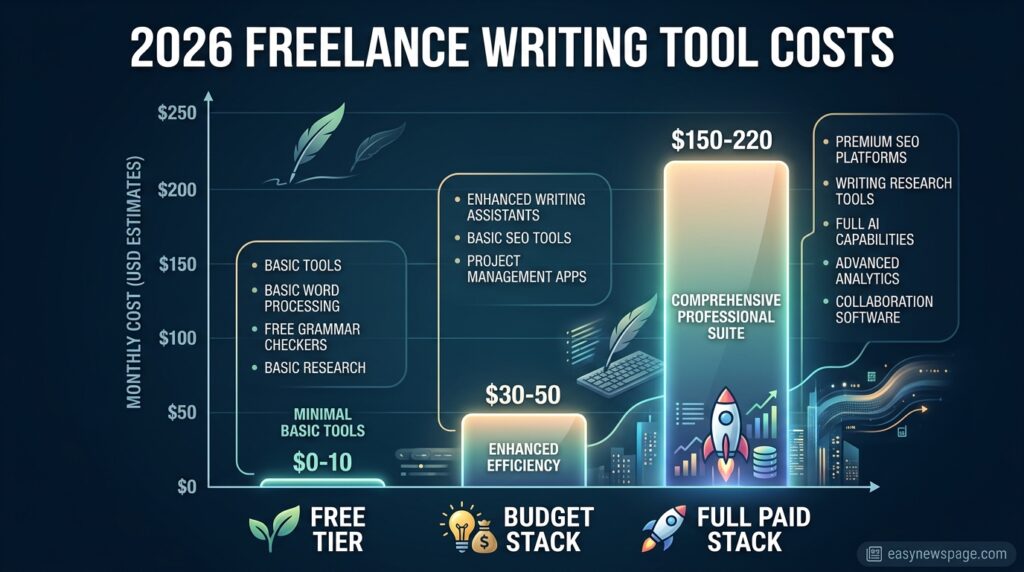
| $0/month | ChatGPT Free + Grammarly Free + Hemingway free web app | $0 |
| Under $35/month | Grammarly Pro (annual) + ChatGPT Free | ~$12 |
| Under $75/month | Grammarly Pro (annual) + ChatGPT Plus | ~$32 |
| Under $125/month | Grammarly Pro (annual) + ChatGPT Plus + entry Surfer SEO plan | ~$100+ |
Specifications
Most AI writing assistants in this category support browser-based access, document upload for context (PDFs, transcripts), and export to common formats like Google Docs or Word. Editing tools like Grammarly integrate directly into browsers, Google Docs, Microsoft Word, and desktop apps via a persistent sidebar.
Security, Privacy, and Compliance
Before uploading client documents to any AI tool, check the client’s confidentiality terms — many contracts restrict pasting proprietary content into third-party AI systems. Reputable tools like Grammarly and the major AI assistants publish data-handling policies covering whether your text is used for model training, and freelancers handling sensitive client material should confirm opt-out settings are enabled.
Performance
Performance in this category is best measured by time saved per piece and error rate reduction, not abstract benchmarks. Writers producing five or more articles weekly commonly report meaningful hours saved per week on drafting and initial research once a stack is dialed in, though exact savings vary by writer and content type.
Integrations
Grammarly integrates with Google Docs, Microsoft Word, most browsers, and Slack. Surfer SEO integrates with Google Docs and WordPress for direct publishing. ChatGPT and Claude both support browser extensions and, on higher tiers, connections to external documents and data sources for research.
API
Most of these tools offer developer APIs (OpenAI’s API behind ChatGPT, Anthropic’s API behind Claude, Grammarly Business API) intended for teams building custom tooling rather than individual freelancers, who generally interact with the consumer apps directly.
Customer Support
Grammarly and the major AI platforms offer help-center documentation and ticket-based support on paid tiers, with faster response times generally reserved for business or enterprise plans rather than individual subscriptions.
Latest Updates
The clearest 2026 shift is Grammarly’s consolidation of its “Premium” and “Business” plans into a single Grammarly Pro tier, keeping the same core price points while folding in features that used to require a separate business plan. On the AI-writer side, the market has matured toward specialization — Claude for nuanced long-form work, Writesonic and Jasper for volume and brand-voice content — rather than one tool trying to do everything equally well.
Expert Tips
Pick one AI writer and one editing tool before adding anything else, and resist the urge to subscribe to a third overlapping AI tool “just in case.” Track which tool you actually open daily for two weeks before renewing any annual plan. Reserve SEO tools like Surfer for clients who specifically pay for SEO-optimized content, rather than using them on every piece regardless of need.
Common Mistakes
The most common mistakes are subscribing to two or three overlapping AI writers (Jasper and Copy.ai and Writesonic simultaneously), skipping an editing tool entirely and relying only on an AI assistant’s built-in polish, paying annually for a tool before confirming you’ll actually use it weekly, and treating AI drafts as finished copy without a real human editing pass.
Troubleshooting
If your tool spending feels high relative to your freelance income, audit which tools you opened in the last 14 days and cancel the rest — most freelancers find at least one unused or overlapping subscription on the first pass. If AI drafts consistently need heavy rewriting, the fix is usually a more detailed prompt or brief, not switching tools.
Myths vs Facts
Myth: You need a paid AI writing tool to freelance write professionally in 2026. Fact: Free tiers of ChatGPT and Grammarly cover a meaningful amount of research, drafting, and editing work; paid tiers add convenience and volume, not a baseline requirement.
Myth: More AI tools in your stack means faster output. Fact: Overlapping AI writers mostly add subscription cost and decision fatigue rather than speed, since most of their core drafting capability duplicates what a single strong tool already does.
Decision Matrix
| Criteria | ChatGPT Plus | Claude | Jasper | Surfer SEO |
|---|---|---|---|---|
| Versatility | 9/10 | 8/10 | 6/10 | 4/10 (SEO-only) |
| Long-form/nuance handling | 7/10 | 9/10 | 6/10 | N/A |
| Brand-voice consistency | 6/10 | 7/10 | 9/10 | N/A |
| SEO structure guidance | 3/10 | 3/10 | 5/10 | 9/10 |
| Cost-effectiveness for beginners | 8/10 | 7/10 | 5/10 | 4/10 |
Beginner vs Advanced Stack
Beginners should stay on free tiers of one AI assistant plus Grammarly Free until they have consistent paid client work, since tool spending before revenue is a common early cash-flow mistake. Advanced, established freelancers should audit for overlap quarterly, adding specialized tools like Surfer SEO or Jasper only when a specific, recurring client need justifies the cost.
Read more: How I Made My First $1,000 With Freelance Writing
Read more: Freelance Writing vs Fiverr Gigs: Which Makes More Money?
Read more: 5 Mistakes to Avoid When Starting Freelance Writing
Best Alternatives
Writers who want editing without Grammarly’s cost can use Hemingway Editor‘s free web app for readability scoring, or LanguageTool, which offers multilingual grammar checking at a notably lower annual price point than Grammarly Pro. Writers who want AI research without a ChatGPT or Claude subscription can start with each platform’s free tier before upgrading.
Alternative Comparison
| Tool | Category | Notable Advantage |
|---|---|---|
| Hemingway Editor | Editing | Free web app, one-time desktop fee |
| LanguageTool | Editing | Lower annual cost, strong multilingual support |
| ProWritingAid | Editing | Lifetime plan option avoids recurring billing |
| Copy.ai | AI generator | Strong for short-form marketing copy |
Who Should Use Which Tool
SEO-focused content writers should prioritize Surfer SEO paired with an AI research assistant. Long-form journalists and technical writers should prioritize Claude for its context handling. Marketing-focused copywriters serving brand clients should prioritize Jasper. Generalist freelancers juggling many formats should prioritize ChatGPT Plus for its versatility.
What is the best free AI writing tool for freelancers?
ChatGPT’s free tier is generally the most useful free option for brainstorming, outlining, and early-stage research, though paid tiers of tools like Writesonic or Jasper typically produce stronger polished drafts.
How many writing tools does a freelance writer actually need?
Most freelancers only need two to three tools total: one AI writing assistant, one editing/grammar tool, and one research or SEO tool, added in that order as paid client work increases.
Is Grammarly Premium still available in 2026, or has it changed?
Grammarly renamed its paid Premium tier to Grammarly Pro during 2025–2026; the features and price points carried over, so anyone searching for “Grammarly Premium” pricing today is looking at Grammarly Pro.
Is Claude or ChatGPT better for freelance writing?
Claude is generally considered stronger for long-form, nuanced drafting and analyzing lengthy research documents, while ChatGPT Plus is considered more versatile for everyday brainstorming, quick drafts, and general-purpose tasks across formats.
Do I need a paid SEO tool like Surfer SEO as a freelance writer?
Only if SEO-optimized content is a recurring, paid part of your workload — for writers who occasionally touch SEO content, free keyword research tools are usually sufficient until that work becomes consistent.
Rating Scorecard
| Category | Score (out of 10) |
|---|---|
| Value for beginners (free tiers) | 8 |
| Value for established freelancers | 7.5 |
| Editing tool quality (Grammarly) | 8.5 |
| AI drafting quality (Claude/ChatGPT) | 8 |
| SEO tool value (Surfer SEO) | 7 (for SEO-heavy workloads specifically) |
Conclusion
The best freelance writing tools in 2026 aren’t the ones with the longest feature list — they’re the smallest set that actually earns its keep in your specific workflow. For most writers, that means one AI assistant for research and drafting, one dedicated editing tool for polish, and an SEO tool added only once that kind of work becomes a real, recurring part of the job. Everything past that point is usually overlap, not leverage.
The moral here mirrors the broader lesson of freelance tool-shopping: cost discipline compounds just as much as speed does. A writer paying for three overlapping AI writers isn’t three times faster than one paying for a single well-chosen tool plus a strong editor — they’re just spending more for the same core output. The freelancers who get the most value from their tool stack are the ones who add each new subscription deliberately, tied to a specific, recurring client need, rather than collecting tools speculatively.
If you take one thing from this guide, let it be this: start free, add Grammarly Pro first because editing quality touches every project, add one AI assistant that matches your writing style, and only reach for specialized tools like Surfer SEO once paid demand for that specific skill shows up. That sequence, more than any single tool on this list, is what actually protects a freelance writer’s margins while genuinely speeding up the work.
Official Sources
- Grammarly’s official pricing pages and 2026 plan documentation (Premium-to-Pro transition)
- Independent 2026 AI writing tool comparisons and pricing trackers (multiple sources cross-referenced)
- Published freelancer tool-stack guides covering Claude, ChatGPT, Jasper, Writesonic, and Surfer SEO usage patterns in 2026
Author Bio
This guide was researched and written by the easynewspage.com editorial team, drawing on current 2026 pricing pages and independently published tool comparisons rather than a single reviewer’s unverified personal impressions. Pricing is checked at time of writing and may change; always confirm current rates on each tool’s official site before subscribing.