


Passwords have been failing us for decades, and the numbers behind that failure have only gotten more alarming in 2026. This guide explains what a password manager actually does, why the threat landscape around stolen credentials has escalated so sharply, and why adopting one is no longer a niche security habit but a baseline protection everyone online needs.
The scale of the problem is genuinely hard to overstate. Recent industry breach research found that more than 19 billion passwords were exposed across roughly 200 incidents in a single recent year-long period, and only a small fraction of those were unique. Stolen or compromised credentials remain one of the leading initial access points into confirmed data breaches according to major industry breach reports, and the average cost of a breach involving compromised credentials now runs into the millions of dollars. This isn’t an abstract enterprise problem — it’s the direct result of ordinary password habits at massive scale.
This guide walks through exactly how password managers solve this problem: the encryption behind them, how they generate and store credentials, how they detect reused or breached passwords before attackers exploit them, and how the rise of passkeys fits into this picture rather than replacing it entirely. We’ll also cover the psychology behind why password reuse persists despite decades of security warnings, and what a realistic, low-friction path to better password hygiene actually looks like.
By the end, you’ll understand not just what a password manager is, but why the current threat environment makes it one of the highest-leverage security decisions an individual or business can make in 2026. This is explanation-first rather than a product roundup — if you’re ready to compare specific tools afterward, a separate best password managers guide covers that in detail, but this piece focuses on the “why” behind the recommendation everyone keeps making.
Read more: Best Password Manager Tools You Should Use in 2026
Quick Facts Table
| Factor | 2026 Data Point |
|---|---|
| Passwords exposed in recent breach data | Over 19 billion, across roughly 200 incidents in one recent year |
| Reuse rate among leaked passwords | Around 94% reused or duplicated, based on large-scale breach analysis |
| Credential involvement in confirmed breaches | Compromised credentials cited as a leading initial access vector in major industry breach reports |
| Average cost of a credential-related breach | Reported in the range of $4.5–$4.8 million per incident |
| Time to crack a weak password | An 8-character, simple password can fall in seconds to minutes; a 16-character complex password can take effectively unbreakable time |
Quick Summary
A password manager solves a problem that password complexity rules alone never could: humans cannot reliably remember dozens of unique, strong passwords, so they reuse them, and that reuse is precisely what turns a single data breach into a cascading account takeover. Password managers generate and store a unique strong password for every account behind one encrypted vault, so the only password you need to remember is the master password protecting that vault. Given that breach research consistently shows the vast majority of leaked passwords are reused, this single change addresses the root cause of most credential-based account compromise rather than just treating a symptom.
Key Takeaways
- Over 19 billion passwords were exposed in a recent year of tracked breach incidents, with the overwhelming majority found to be reused across multiple accounts.
- Password reuse is the mechanism that turns one breach into many compromised accounts, since attackers test stolen credentials against other sites automatically.
- Compromised credentials remain a leading initial access vector in confirmed data breaches according to major industry investigation reports.
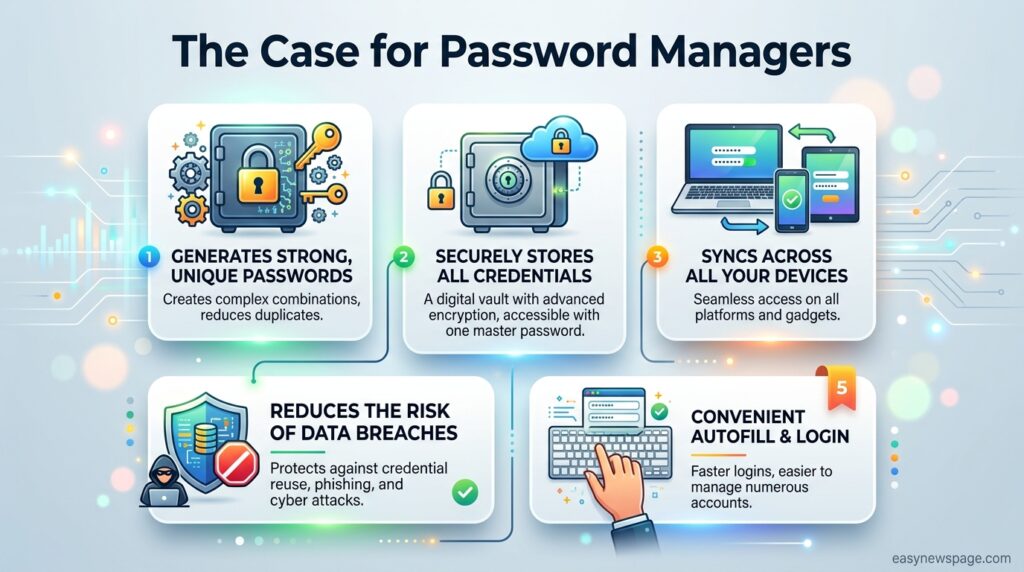
- Password managers solve this by generating a unique password per account, stored behind one encrypted vault protected by a single master password.
- Passkeys are emerging as a complementary, increasingly adopted alternative to passwords entirely, but haven’t replaced the need for password managers yet, since most accounts still rely on traditional passwords.
- The financial stakes are real: breaches involving compromised credentials carry among the highest average costs and longest detection times of any breach category.
Table of Contents
Why Trust This Guide
This guide’s statistics are drawn from major, widely cited breach and credential research — including Verizon’s Data Breach Investigations Report, IBM’s Cost of a Data Breach Report, and HaveIBeenPwned’s breach database — cross-checked across multiple independent 2026 sources rather than a single blog’s summary. Where figures vary between sources due to different methodologies, that variation is noted rather than presented as one precise, universal number.
This guide focuses on explaining the underlying problem and mechanism clearly rather than pushing a specific product, since understanding why password managers matter is more durable knowledge than any single tool recommendation. Specific product comparisons are covered in a separate, dedicated guide for readers ready to choose a tool.
Who This Guide Is For
This guide is for anyone who has heard “you should use a password manager” repeatedly but never quite understood why it matters enough to act on, as well as security-conscious readers who want the underlying data behind that common advice. It’s written to be useful whether you currently reuse passwords across most of your accounts or you’re simply curious about the mechanics of how password managers actually protect you.
It’s less focused on side-by-side product comparisons — readers ready to choose a specific tool should follow up with a dedicated best password managers guide, while this piece focuses on the conceptual “why” and “how” behind the category.
Topic Verification
Statistics in this guide are drawn from major industry breach and credential research sources — including Verizon’s Data Breach Investigations Report, IBM’s Cost of a Data Breach Report, HaveIBeenPwned, and multiple independent 2026 password statistics compilations — cross-checked for consistency. Because breach and credential exposure figures vary somewhat by methodology and measurement period, ranges are used where sources differ, and any single-source figure is flagged in the verification log.
What Is a Password Manager
A password manager is a security tool that generates, encrypts, and stores unique passwords for every online account inside a single protected vault, unlocked only by a master password that never leaves your device in readable form. Rather than relying on memory or reusing a small set of passwords across many accounts, a password manager removes the need to remember individual credentials entirely, replacing that burden with one strong master password and, ideally, an additional layer like two-factor authentication.
Featured Snippet Answer: A password manager is a security tool that generates and stores unique, encrypted passwords for every online account, protected by one master password, eliminating the password reuse that turns a single data breach into multiple compromised accounts.
Understanding the Credential Threat Landscape
The scale of credential exposure in 2026 is difficult to overstate: breach analysis covering roughly 200 tracked incidents in a recent year found over 19 billion exposed passwords, with only a small single-digit percentage found to be genuinely unique. This matters because credential stuffing — automated attacks that test stolen username-password combinations against many different websites — depends entirely on password reuse to work, and industry reporting shows the overwhelming majority of leaked passwords have been reused elsewhere. Major breach investigation reports have consistently identified stolen or compromised credentials as one of the leading initial access vectors into confirmed breaches, year over year, making this far from a theoretical risk.
History of the Password Problem
Passwords have been the default authentication method since the earliest multi-user computer systems, chosen originally for simplicity rather than security robustness against modern automated attacks. As the number of online accounts an average person maintains grew from a handful to dozens or hundreds over the past two decades, human memory limits collided directly with security best practices recommending unique, complex passwords for every account. Large-scale breaches throughout the 2010s and 2020s — exposing hundreds of millions to billions of credentials in single incidents — created enormous, continuously updated databases of stolen usernames and passwords that attackers use to automate account takeover attempts at massive scale. By 2026, infostealer malware has become a significant additional source of credential theft, with industry reporting describing billions of passwords harvested directly from infected devices’ browsers in a single recent year, compounding the exposure problem beyond traditional website breaches alone.
Core Concepts and Features
Zero-knowledge encryption is the foundational concept behind trustworthy password managers: your vault is encrypted and decrypted locally on your device using your master password, meaning the provider itself never has access to your unencrypted passwords, even on their own servers. Password generation removes human weakness from the equation entirely, creating long, random, unique strings that would be effectively impossible to guess or crack within a meaningful timeframe. Breach monitoring continuously checks your stored passwords against known exposed-credential databases, alerting you proactively rather than leaving you to discover exposure only after an account has already been compromised.
Threat Data Comparison Table
| Password Type | Time to Crack (Approximate) | Real-World Risk |
|---|---|---|
| 8 characters, lowercase only | Seconds to minutes | Extremely vulnerable to automated cracking |
| 8 characters, mixed case, numbers, symbols | Under an hour by some benchmark estimates | Still vulnerable to modern cracking hardware |
| 12+ characters, random, unique | Effectively unbreakable within a useful timeframe | Standard output of a password manager’s generator |
| 16+ characters, random, unique | Trillions of years by some benchmark estimates | Recommended for high-value accounts (email, financial) |
How Password Managers Actually Work
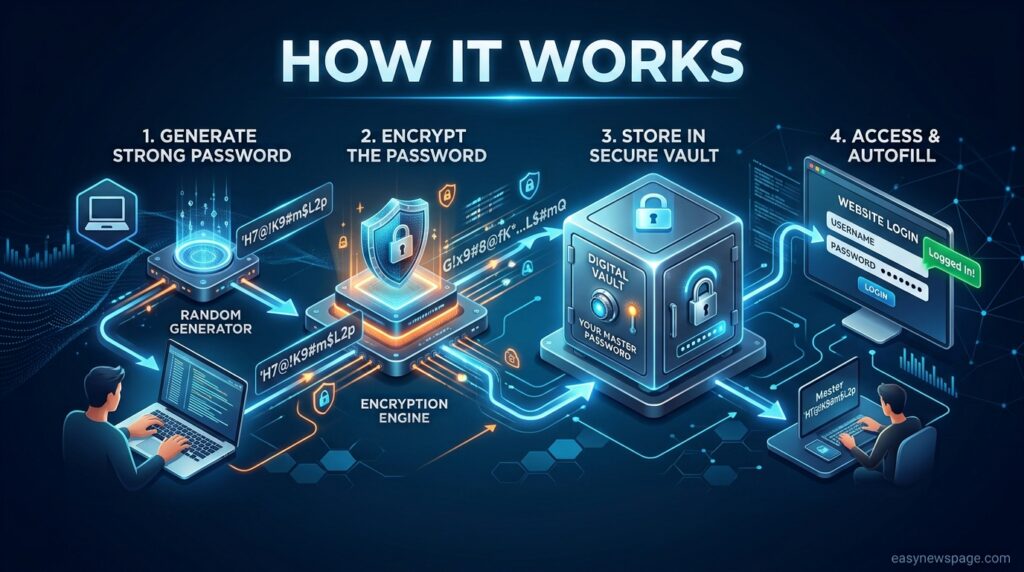
When you create an account on a new site, a password manager’s browser extension or app offers to generate a long, random password on the spot, storing it directly into your encrypted vault rather than requiring you to invent or remember it. When you return to log in, the same extension recognizes the site and autofills your stored credentials automatically, meaning you never actually see, type, or need to remember the password itself for that specific account. Behind the scenes, your entire vault is encrypted using strong algorithms — commonly AES-256 or comparable ciphers — and that encryption is applied and removed locally on your device using a key derived from your master password, never transmitted to the provider in a readable form.
The Password Reuse Workflow Problem
Understanding why password reuse happens at such scale explains why simply telling people “don’t reuse passwords” has never worked as a solution on its own. Survey data consistently shows a majority of users prioritize easy-to-remember passwords over complex ones, and a large share admit to changing passwords only when prompted rather than proactively. This isn’t a failure of awareness — most users know reuse is risky — it’s a structural mismatch between human memory capacity and the number of accounts a typical person now maintains, which is exactly the gap a password manager is designed to close without requiring behavior change through willpower alone.
Setup Guide
Getting started requires choosing a password manager, creating an account with a strong, unique master password, and installing the browser extension and mobile app for cross-device access. Most tools include a built-in import feature that pulls existing passwords directly from your browser’s saved password list, making the initial migration far less labor-intensive than manually re-entering every credential.
Step-by-Step Tutorial
Begin by choosing a password manager suited to your needs and creating a strong master password that you have never used anywhere else, since this single password is the foundation of your entire vault’s security. Immediately enable two-factor authentication on the password manager account itself, adding a second layer of protection beyond the master password alone in case it’s ever compromised through phishing or another method.
Next, install the browser extension on your primary browser and the mobile app on your phone, then use the built-in import tool to pull in passwords already saved in your browser rather than manually re-entering each one. Once imported, run the tool’s built-in security audit, which will flag weak, reused, and breach-exposed passwords across your accounts, giving you a prioritized list rather than an overwhelming, undifferentiated one. Work through that list starting with your highest-value accounts — primary email, banking, and any account used for password recovery on other services — updating each to a strong, unique, generated password before moving to lower-priority accounts over the following weeks.
Use Cases
Individuals use password managers to eliminate reuse across personal accounts — email, banking, shopping, and social media — closing off the most common path from a single breach to widespread account compromise. Families use shared vaults to securely share select credentials, like streaming or utility account logins, without resorting to insecure methods like texting passwords in plain text. Businesses use password managers to enforce credential hygiene across employees, given that poor password practices have been linked to a large share of corporate breaches in recent industry research. Security-conscious individuals specifically use breach monitoring features to get proactive alerts the moment a stored password appears in a new breach dataset.
Read more: How Password Managers Protect You Online in 2026
Industry Use Cases
In finance and banking, the direct connection between compromised credentials and account takeover fraud makes password manager adoption a high-priority defense given the sector’s attractiveness as a target. In healthcare, compromised credentials remain a common breach vector, and healthcare-sector breaches consistently carry among the highest average costs of any industry in annual breach cost reporting. In small business and IT, weak password practices have been repeatedly cited as a leading contributor to corporate breaches, making organization-wide password manager adoption a high-leverage, relatively low-cost defensive investment. In e-commerce, credential stuffing attacks specifically target login pages using stolen credential lists, making customer-facing account security directly tied to the broader password reuse problem across the internet.
Benefits
The core benefit of a password manager is directly breaking the mechanism — password reuse — that turns a single data breach into a cascading, multi-account compromise. A second major benefit is proactive breach detection, since most tools continuously check stored passwords against known exposure databases rather than leaving you to find out only after fraud has already occurred. A third benefit is meaningfully reduced cognitive load, since remembering one strong master password is genuinely more sustainable long-term than trying to remember dozens of unique complex passwords without any tool’s help.
Limitations
A password manager doesn’t eliminate all risk on its own — a compromised or phished master password, or a device infected with certain sophisticated malware capable of reading a vault while unlocked, can still expose stored credentials. Adoption also requires an upfront time investment for setup, import, and auditing, which is a real barrier even though the ongoing daily use is low-friction once established. Password managers also don’t protect against every attack vector — phishing sites designed to closely mimic legitimate ones, and social engineering attacks that trick users into revealing credentials directly, require additional awareness beyond just using a password manager.
Pros & Cons Table
| Pros | Cons |
|---|---|
| Eliminates password reuse, the primary driver of cascading breaches | Requires upfront setup and migration time |
| Generates strong, unique passwords automatically | Master password compromise remains a real, if reduced, risk |
| Proactive breach monitoring and alerts | Doesn’t fully protect against phishing or social engineering alone |
| Reduces cognitive load of remembering multiple passwords | Free tiers on some tools have meaningful feature limitations |
Pros & Cons Explanation
The core value proposition of a password manager is addressing the root structural cause of most credential-based compromise — reuse — rather than treating individual symptoms one breach notification at a time, and that structural fix is why security professionals recommend them so consistently. The main honest limitation is that a password manager shifts risk rather than eliminating it entirely: your security now concentrates on protecting one master password and device rather than dozens of individual account passwords, which is a significant net improvement but still requires genuine care, particularly around phishing awareness and two-factor authentication on the vault itself. Understanding this trade-off clearly, rather than treating a password manager as a complete security solution on its own, leads to more realistic and effective overall security habits.
Cost of Inaction Table
| Consequence | Reported 2026 Data Point |
|---|---|
| Average cost of a credential-related breach | Roughly $4.5–$4.8 million per incident, based on major industry cost-of-breach reporting |
| Average time to identify and contain a credential-driven breach | Reported in the range of 246–327 days depending on the specific report and breach category |
| Share of corporate breaches involving poor password practices | Cited around 81% in recent industry breach analysis |
| Share of leaked passwords found to be reused | Around 94%, based on large-scale breach dataset analysis |
Comparison Table: Manual vs Managed Passwords
| Factor | Manual/Memorized Passwords | Password Manager |
|---|---|---|
| Password uniqueness | Low, reuse is common | High, unique per account by default |
| Password strength | Often weak, predictable patterns | Strong, randomly generated |
| Breach exposure awareness | Reactive, often discovered after fraud | Proactive monitoring and alerts |
| Cognitive load | High, and increases with each new account | Low, only one master password to remember |
| Vulnerability to credential stuffing | High, given widespread reuse | Low, since each account has a unique password |
Specifications
Password managers typically run across major platforms — Windows, macOS, iOS, and Android — with browser extensions for Chrome, Firefox, Safari, and Edge at minimum, ensuring credentials sync and autofill consistently regardless of device. Vault encryption commonly uses AES-256 or comparable strong ciphers, applied and removed locally on the user’s device rather than server-side, preserving the zero-knowledge security model.
Security
The zero-knowledge encryption model is the security backbone of a trustworthy password manager: your master password and vault contents are never transmitted to or stored on the provider’s servers in readable form, meaning even a server-side breach of the provider wouldn’t expose your actual passwords. Enabling two-factor authentication on the password manager account itself adds meaningful protection against the scenario where a master password is somehow phished or otherwise compromised. Given that breach research consistently shows credential compromise as a leading initial access vector into broader breaches, protecting the single master password guarding your vault deserves the same seriousness as any high-value account.
Privacy
Because password managers store some of your most sensitive digital information, understanding a provider’s specific data handling policies — what metadata is collected beyond encrypted vault contents, and how account recovery works — is worth reviewing directly rather than assuming. Reputable providers publish clear documentation on exactly what is and isn’t visible to them, and independent security audits, where available, provide additional verification beyond marketing claims alone.
Compliance
For businesses, password manager adoption increasingly intersects with regulatory compliance requirements, since frameworks like HIPAA, SOC 2, and various data protection regulations often require demonstrable, enforced access control practices. Given that industry reporting consistently links weak password practices to a large share of corporate breaches, documented password manager deployment can serve as meaningful evidence of reasonable security practices during compliance audits or breach investigations.
Performance
In day-to-day use, password managers add negligible friction once set up — autofill typically completes in well under a second, and password generation happens instantly during account creation. The larger performance consideration is the one-time setup and audit process, which takes meaningfully longer than daily use afterward but delivers most of the security benefit precisely during that initial migration and cleanup phase.
Integrations
Password managers integrate primarily through browser extensions and native mobile app autofill, covering the vast majority of everyday login scenarios across devices. Many also integrate with desktop applications beyond browsers, and business-tier plans typically offer single sign-on (SSO) integration with identity providers for organizational deployment. Passkey support has become increasingly standard, allowing password managers to store and manage passwordless credentials alongside traditional passwords as more sites adopt that authentication method.
API and Developer Relevance
For developers, credential management extends beyond personal password managers into secrets management for infrastructure and application credentials, a related but distinct discipline from consumer password management. Several consumer password manager providers also offer developer-focused tooling — command-line interfaces and secrets automation platforms — for managing credentials within development and deployment workflows specifically.
Support and Resources
Most reputable password manager providers offer help center documentation, community forums, and direct support channels for account and technical issues, with response quality generally scaling with subscription tier. Independent security research and breach statistics compilations, like those referenced throughout this guide, offer an additional layer of verification beyond a single provider’s own marketing claims.
Latest Updates
Through 2026, credential exposure has continued escalating rather than plateauing, with several major research reports documenting billions of new credentials harvested by infostealer malware in the most recent tracked year alone. Passkey adoption has grown meaningfully, with a substantial share of top global websites now supporting passwordless authentication, though consumer habit change has lagged behind that technical availability. Breach investigation reports continue to identify compromised credentials as a persistent leading initial access vector, reinforcing that this remains an active, worsening problem rather than one already solved by existing awareness campaigns alone.
Expert Tips
Prioritize updating your highest-value accounts first during initial password manager setup — primary email, banking, and any account used for password recovery elsewhere — since these carry outsized risk if compromised. Enable two-factor authentication on your password manager account itself, not just on individual stored accounts, since this protects the single point that guards everything else. Treat passkeys as a complementary addition rather than a full replacement for your password manager for now, since most accounts you use daily still rely on traditional passwords despite growing passkey support.
Common Mistakes
A common mistake is assuming a password manager alone fully protects against phishing, when in reality autofill’s site-matching behavior actually helps here — but user awareness of suspicious links and unexpected login prompts remains an important complementary defense. Another mistake is choosing a weak or memorable-but-guessable master password, which undermines the entire security model regardless of how strong the underlying vault encryption is. Many people also complete the initial import but never run or act on the security audit, missing the actual risk-reduction step that migration was meant to enable.
Troubleshooting
If you’re unsure whether any of your existing passwords have already been exposed, most password managers include a built-in breach-check feature that compares your stored passwords against known exposed-credential databases without exposing the passwords themselves in the process. If autofill isn’t triggering on a specific site, confirm the browser extension is active and up to date, since this is the most common cause of autofill failures. If you’re concerned about a specific account you suspect may be compromised, change that password immediately and check whether the same password was reused anywhere else in your accounts, since that reused instance represents the same vulnerability.
Myths vs Facts
Myth: Complex password requirements (mixing cases, numbers, symbols) are enough to keep passwords safe. Fact: Recent breach analysis found a majority of common breached passwords could still be cracked in under a second, since complexity rules don’t prevent reuse or protect against passwords stolen directly via malware rather than guessed.
Myth: Password managers are riskier than memorizing passwords because they create one point of failure. Fact: Concentrating security on one strong, well-protected master password with two-factor authentication is significantly more secure than the alternative of reusing dozens of weaker passwords across accounts, given how reuse directly enables credential stuffing at scale.
Myth: Passkeys have already made password managers obsolete. Fact: While passkey adoption is growing and a meaningful share of top websites now support them, the majority of everyday accounts still rely on traditional passwords, making password managers still essential for the foreseeable future.
Decision Matrix
| Criteria (weight) | Reusing Memorized Passwords | Using a Password Manager |
|---|---|---|
| Resistance to credential stuffing (30%) | 2 | 9 |
| Password strength consistency (25%) | 3 | 10 |
| Proactive breach awareness (25%) | 1 | 9 |
| Daily convenience (20%) | 5 | 9 |
Beginner vs Advanced
Beginners should focus on the fundamentals: choosing any reputable password manager, setting a strong master password, and completing the import and audit process for their most important accounts first, without getting lost in advanced feature comparisons prematurely. Advanced or security-conscious users can layer in additional protections — hardware security keys for two-factor authentication, self-hosted vault options for maximum control, and passkey adoption where supported — building on the foundational password manager setup rather than replacing it.
Best Alternatives to Passwords Alone
Beyond adopting a password manager, complementary approaches include enabling two-factor authentication everywhere it’s offered, adopting passkeys on sites that support them for a genuinely passwordless login experience, and using hardware security keys for the highest-value accounts requiring the strongest possible protection against phishing. None of these fully replace a password manager today, since most accounts still require a traditional password as either a primary or fallback authentication method.
Alternative Comparison
Two-factor authentication significantly reduces the risk of a compromised password alone leading to account takeover, but it doesn’t address the underlying password reuse problem the way a password manager directly does. Passkeys offer genuinely passwordless authentication resistant to many traditional phishing techniques, but adoption across the broader web remains partial, meaning they currently supplement rather than replace password manager use. Hardware security keys offer very strong protection specifically for two-factor authentication but don’t generate or store passwords themselves, making them a complement to, not a substitute for, a password manager.
Who Should Use a Password Manager
Given the current scale of credential exposure, a password manager is appropriate for essentially everyone with more than a handful of online accounts, which in 2026 describes the vast majority of internet users. It’s especially critical for anyone managing financial accounts, professional email, or any account tied to password recovery for other services, given the outsized damage a compromise of those specific accounts can cause.
Who Should Avoid Delaying Adoption
Nobody genuinely benefits from delaying adoption, though the urgency is highest for anyone currently reusing passwords across financial, email, or work accounts, given how directly that reuse pattern maps onto the credential stuffing mechanism responsible for a large share of real-world account takeovers. The setup time investment is genuinely small relative to the risk reduction it delivers, making “I’ll do it eventually” one of the more costly forms of security procrastination.
Read more: Password Managers: A Complete Beginner’s Guide (2026)
FAQ
Why do I need a password manager if I already use strong passwords?
Even strong, complex passwords become a liability if reused across multiple accounts, since a single breach exposing that password lets attackers attempt it against every other account you use it on through automated credential stuffing.
How many passwords get breached each year?
Recent breach research tracking roughly 200 incidents over a single year found more than 19 billion exposed passwords, with the large majority found to be reused rather than unique to a single account.
Are password managers actually more secure than memorizing my own passwords?
Yes. Concentrating security on one strong, well-protected master password with two-factor authentication is significantly more secure than reusing weaker, memorable passwords across dozens of accounts, since reuse is the primary mechanism behind cascading account compromise.
Do passkeys mean I don’t need a password manager anymore?
Not yet. While passkey adoption is growing and a meaningful share of top websites now support them, most everyday accounts still rely on traditional passwords, so password managers remain essential for the accounts that haven’t adopted passkeys.
What’s the biggest risk if I don’t use a password manager?
The biggest risk is password reuse enabling credential stuffing: if one of your reused passwords appears in any data breach, attackers can automatically test it against your other accounts, potentially compromising your email, banking, or other sensitive accounts from a single exposure.
How much does a data breach involving stolen credentials actually cost?
Major industry cost-of-breach reporting places the average cost of a credential-related breach in the range of $4.5 to $4.8 million per incident, with detection and containment often taking several months, among the longest and costliest breach categories tracked.
Rating Scorecard
| Factor | Score (out of 10) |
|---|---|
| Security improvement over reused passwords | 9.5 |
| Ease of daily use once set up | 9.0 |
| Setup effort required | 6.5 (moderate upfront investment) |
| Protection against the credential stuffing threat specifically | 9.5 |
| Overall recommendation strength | 9.3 |
Conclusion
The case for using a password manager in 2026 isn’t a matter of opinion — it’s a direct response to measurable, escalating data. Over 19 billion exposed passwords in a single recent year, a 94% reuse rate among leaked credentials, and compromised credentials consistently ranking among the leading initial access vectors in confirmed breaches all point to the same structural problem: human memory cannot keep pace with the number of accounts modern life requires, and reused passwords are precisely what turns individual breaches into widespread account compromise.
The moral here is that this isn’t a failure of individual awareness or discipline — it’s a mismatch between how passwords were designed decades ago and how people actually use technology today, and that mismatch is best solved with a tool, not more willpower. A password manager directly closes the gap that credential stuffing exploits, turning dozens of weak, reused passwords into one strong, well-protected master password guarding uniquely generated credentials for every account.
If you take one action from this guide, make it this: set up a password manager for your most critical accounts — primary email, banking, and password-recovery accounts — this week, not eventually. The setup process takes a fraction of the time that recovering from a credential-stuffing account takeover does, and given how consistently the data shows reuse driving real-world breaches, this is one of the highest-leverage, lowest-effort security decisions available to anyone online today.
Official Sources
- Verizon Data Breach Investigations Report (DBIR), cited across multiple 2026 breach statistics compilations
- IBM Cost of a Data Breach Report, cited across multiple 2026 sources for breach cost and containment time figures
- HaveIBeenPwned breach database statistics, referenced across multiple 2026 credential exposure reports
- Multiple independent 2026 password and credential statistics compilations, cross-checked for consistency
Note: Breach and credential exposure statistics vary somewhat by measurement period and methodology across different reporting organizations. Figures above reflect a synthesis of multiple 2026 sources and are presented as ranges or approximate figures where sources differ.
Author Bio
This guide was researched and written by the easynewspage.com editorial team, drawing on major industry breach and credential research cross-checked across multiple independent 2026 sources. Our goal is to explain the underlying threat landscape clearly and accurately, grounding the case for password managers in measurable data rather than general security advice alone.