


Starting a blog is the easy part — getting on-page SEO right from your very first post is what determines whether anyone besides your friends and family ever finds it. New bloggers often assume SEO is something you tackle later, once you have “enough” content, but the truth is the opposite: the habits you build into your first ten posts are far easier to establish early than to retrofit across fifty posts later.
This matters because search engines can’t reward content they can’t understand, and a blog’s on-page structure — its titles, headings, keyword usage, and internal links — is exactly what helps Google (and increasingly, AI search tools) understand what a post is actually about. A well-written post with weak on-page structure routinely gets outranked by a thinner post that simply signals its topic more clearly.

The good news for beginners is that on-page SEO doesn’t require technical expertise or a big budget — it requires a short, repeatable checklist you apply to every post before hitting publish. Unlike backlinks or domain authority, which take time and outside cooperation to build, on-page basics are entirely within a new blogger’s control from day one.
This guide walks through exactly where to start: choosing a focus keyword before you write, structuring titles and headings correctly, writing meta descriptions that earn clicks, using keywords naturally instead of stuffing them, building your first internal links, and avoiding the handful of mistakes that quietly hold new blogs back. You’ll also find a beginner setup checklist, a simple first-post tutorial, a comparison of blogging platforms’ built-in SEO tools, and a Google-style FAQ covering what new bloggers actually search before publishing.
By the end, you won’t need to guess whether your first posts are SEO-ready — you’ll have a specific, repeatable process to run before every single one goes live, built to serve both classic search rankings and the newer AI search surfaces increasingly sending traffic in 2026.
Read more: Top On-Page SEO Mistakes That Are Killing Your Rankings
Quick Facts Table
| Fact | Detail |
|---|---|
| Best time to start on-page SEO | Before you publish your first post, not after |
| Minimum on-page checklist items | Title tag, one focus keyword, H2/H3 structure, meta description, one internal link |
| Recommended keyword placement | Title, first 100 words, and at least one H2 |
| Most beginner-friendly blogging platforms for SEO | WordPress (with an SEO plugin), Ghost, Squarespace |
| Common new-blogger mistake | Publishing without a meta description or unique title tag |
| Fastest win for a new blog | Fixing title tags and headers across your first 10 posts |
Quick Summary
On-page SEO for new bloggers starts with picking one clear focus keyword per post before writing, then making sure that keyword appears naturally in the title, the first 100 words, and at least one heading, alongside a unique meta description and one internal link to another post on your site. Getting these five basics right from your very first post is far easier than fixing them retroactively once you have dozens of posts published.
Key Takeaways
- Choose a focus keyword before writing, not after — it should guide your title, headers, and structure from the start.
- A unique title tag and meta description on every post is one of the simplest, highest-leverage habits a new blogger can build.
- Keyword stuffing hurts more than it helps; natural placement in a few key spots matters more than repetition.
- Internal linking between your own posts is free, fully within your control, and helps both readers and search engines understand your site’s structure.
- Most beginner blogging platforms (WordPress, Ghost, Squarespace) include enough built-in SEO tooling to get started without buying anything extra.
Table of Contents
Why Trust This Guide
This guide focuses specifically on what a brand-new blogger needs on day one, rather than repeating advanced technical SEO advice aimed at established sites with existing traffic. Every recommendation here reflects widely documented, stable on-page SEO fundamentals rather than speculative or unconfirmed ranking tricks.
Where a claim reflects general best practice rather than an official Google statement, that distinction is made clear rather than blurred, consistent with the Official-Source Verification notes at the end of this guide.
Who This Guide Is For
This guide is for anyone starting a new blog who wants their first posts to be genuinely discoverable, not just published. It assumes no prior SEO experience and focuses on habits that are realistic to maintain without a team, a budget, or technical development skills.
Topic Verification
The core recommendation here — that focus-keyword selection, title and header structure, meta descriptions, and internal linking are the highest-leverage on-page basics for a new blog — is consistent with widely documented SEO fundamentals used across independent guides and Google’s own published Search Central documentation on how it evaluates page structure and content relevance.
What Is On-Page SEO for Bloggers
On-page SEO for bloggers refers to everything you control directly on a blog post itself that helps search engines understand and rank it: the title, headings, body content, keyword usage, meta description, images, and internal links. It’s distinct from off-page SEO (backlinks from other sites) and pure technical SEO (site speed, crawlability), though all three work together.
For a brand-new blog with no existing authority or backlinks, on-page SEO is the one lever fully within your control from the very first post, which is exactly why it deserves attention before you’ve published anything at all.
How On-Page SEO Helps a New Blog
New blogs face a specific disadvantage: no history, no backlinks, and no established trust signals yet. Strong on-page SEO helps offset that by making each individual post as clear and well-structured as possible, so it has the best possible chance of being understood and considered relevant even without outside authority backing it up.
A new blog with excellent on-page habits and modest traffic will typically outperform, over time, a blog of the same age that ignored on-page basics — because the well-structured blog is building a foundation that compounds, while the other is accumulating pages that will eventually need to be fixed retroactively.
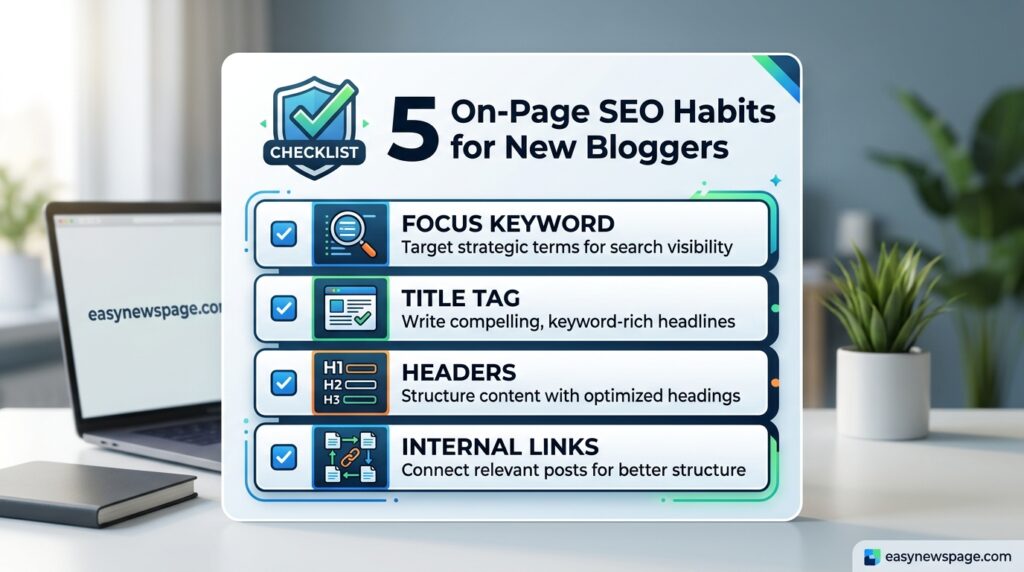
Feature Table of Beginner On-Page Elements
| Element | What It Is | Why It Matters for Beginners |
|---|---|---|
| Focus keyword | The main phrase a post targets | Guides title, headers, and structure decisions |
| Title tag | The clickable headline in search results | First impression and a strong relevance signal |
| Meta description | The short summary under the title in search results | Affects click-through rate directly |
| Header structure (H1/H2/H3) | The heading hierarchy of a post | Helps search engines parse the post’s structure |
| Internal links | Links between your own posts | Builds site structure and topical connections |
| Image alt text | Descriptive text for images | Improves accessibility and image search visibility |
How It Works
When a search engine crawls a new blog post, it reads the title tag, header structure, body content, and metadata to determine what the post is about and how well it might satisfy a given search query. A clearly structured post with a focused keyword and logical headers is simply easier for that process to interpret correctly than a post with no clear structure at all.
Setup Guide
Before publishing your first post, install an SEO plugin if you’re on WordPress (Yoast SEO and Rank Math are the two most commonly used beginner options), or familiarize yourself with your platform’s built-in SEO fields if you’re on Ghost, Squarespace, or a similar all-in-one platform. Set up Google Search Console immediately, even before your first post goes live, so you can track indexing and performance data from day one.
Step-by-Step First Post Tutorial
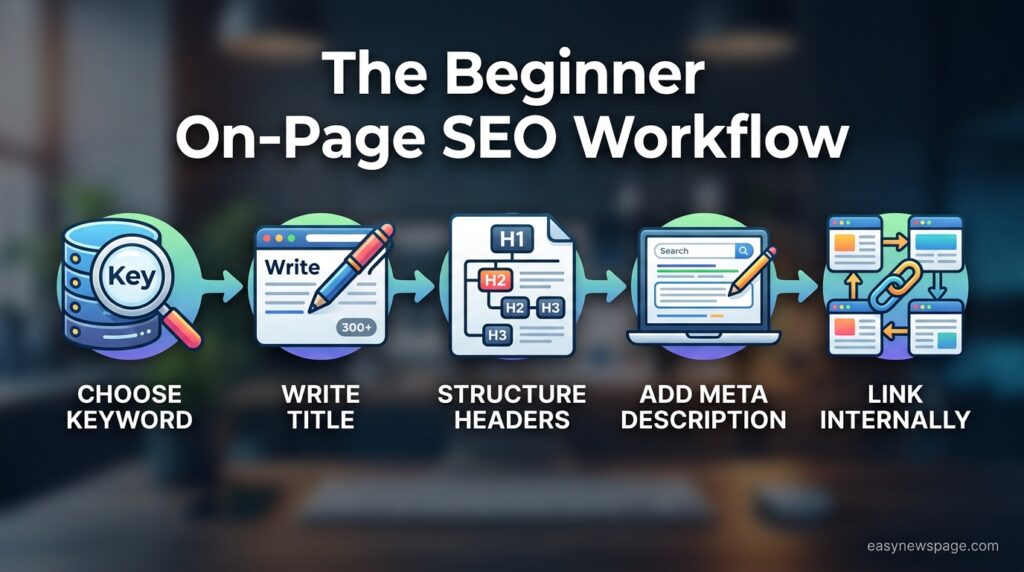
Step 1: Choose one focus keyword per post. Pick a specific, realistic phrase your target reader would actually search, rather than a broad topic with heavy competition.
Step 2: Write a title tag that includes the keyword naturally. Keep it under roughly 60 characters and make it sound like something a person would actually click, not just a keyword restated.
Step 3: Structure your post with clear headers. Use exactly one H1 (usually your post title), then break the body into logical H2 sections, adding H3s only where a section needs further breakdown.
Step 4: Place your keyword naturally in the first 100 words. State clearly, early on, what the post is about and who it’s for, using your focus keyword in a way that reads naturally.
Step 5: Write a unique meta description for every post. Summarize the post’s value in under roughly 155 characters, written to earn a click rather than simply restating the title.
Step 6: Add at least one internal link. Link to another relevant post on your own blog, using descriptive anchor text rather than generic phrases like “click here.”
Step 7: Add descriptive alt text to every image. Briefly describe what the image shows, working your keyword in only where it fits naturally rather than forcing it.
Use Cases
This checklist applies directly to a brand-new blogger publishing their very first post, an existing hobby blogger deciding to take SEO seriously for the first time, and a small business owner starting a blog to support a website that previously had none.
Industry Use Cases
Personal finance and lifestyle bloggers commonly compete in crowded niches where on-page clarity is often the only differentiator available to a brand-new site with no backlinks yet. Niche hobby bloggers (cooking, crafts, outdoor recreation) benefit especially from strong internal linking, since it helps establish topical depth quickly within a specific subject area. Small business blogs benefit from tying on-page keyword choices directly to the services or products the business actually offers.
Benefits
Strong on-page habits give a new blog its best possible chance of being found before it has any backlinks or established authority, and they cost nothing beyond time and attention. They also build a foundation that scales cleanly as the blog grows, avoiding the costly retroactive cleanup that many older sites eventually need.
Limitations
On-page SEO alone can’t overcome an extremely competitive keyword with well-established, authoritative competition — some early posts targeting broad topics may simply take time to rank regardless of how well-structured they are. New blogs also generally see slower initial results than established sites, since domain-level trust still takes time to build even with excellent on-page habits.
Read more: On-Page SEO Checklist: 15 Steps to Follow (2026)
Pros & Cons Table
| Pros | Cons |
|---|---|
| Fully within a new blogger’s control | Can’t overcome extreme keyword competition alone |
| Free to implement, no tools required | Results take longer without backlinks or domain trust |
| Builds a foundation that scales cleanly | Requires consistency across every single post |
| Works alongside any blogging platform | Easy to forget on early posts written in a rush |
Explanation: The advantages mostly reflect why on-page habits are the right place for a beginner to start, while the drawbacks explain why on-page work alone won’t guarantee fast rankings in genuinely competitive niches.
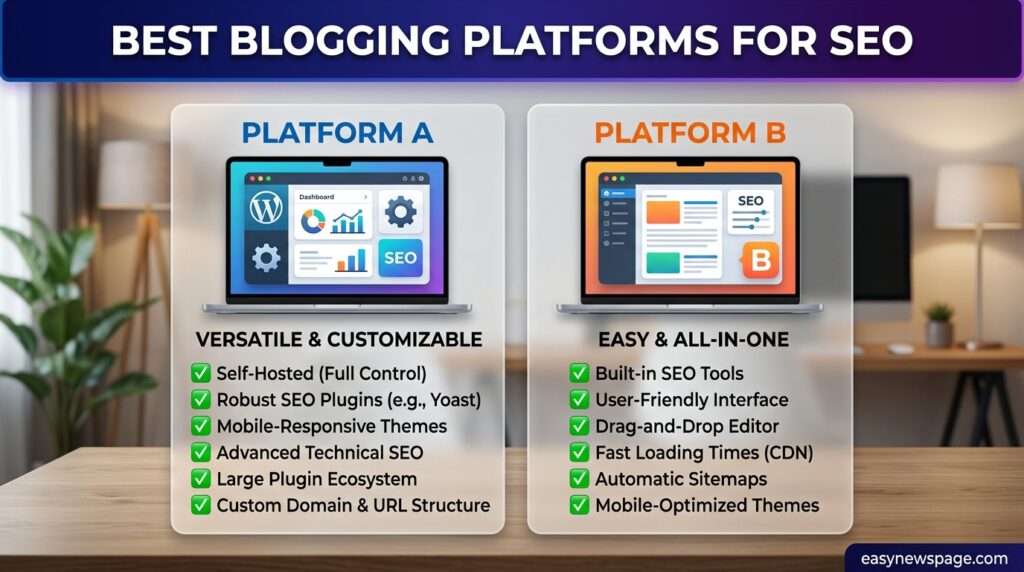
Platform Comparison Table
| Platform | Built-In SEO Tools | Best For |
|---|---|---|
| WordPress | Requires a plugin (Yoast, Rank Math) but highly flexible | Bloggers wanting full control and plugin flexibility |
| Ghost | Built-in meta fields, clean code structure | Writers wanting a lightweight, fast-loading setup |
| Squarespace | Built-in SEO fields, less granular control | Beginners wanting an all-in-one design-and-publish tool |
| Wix | Built-in SEO tools, improved significantly in recent years | Beginners prioritizing ease of use over deep customization |
Specifications
A beginner-ready blog post typically includes one H1, a title tag under roughly 60 characters, a meta description under roughly 155 characters, at least one H2 containing the focus keyword, one internal link, and descriptive alt text on every image.
Security and Privacy Basics
Every new blog should run on HTTPS from day one, which most modern hosting providers and blogging platforms now enable by default. A visible About page, clear author information, and a basic contact or privacy page also contribute to the trust signals that both readers and search engines look for, even on a brand-new site.
Performance
New bloggers don’t need to obsess over advanced Core Web Vitals metrics immediately, but choosing a reasonably fast theme, compressing images before upload, and avoiding excessive third-party embeds and plugins will prevent avoidable performance problems from accumulating as the blog grows.
Integrations
Google Search Console and Google Analytics should be connected before or immediately after your first post goes live, since early indexing and traffic data are difficult to reconstruct retroactively. An SEO plugin (on WordPress) or built-in SEO fields (on other platforms) round out the minimum integration setup for a new blog.
Common Mistakes
The most common mistakes new bloggers make are publishing without a meta description, reusing the same title tag structure without adjusting it to each post’s actual keyword, skipping internal links because there isn’t “enough content yet” to link to, and choosing keywords that are far too broad and competitive for a brand-new site to realistically rank for.
Myths vs Facts
Myth: SEO isn’t worth thinking about until you have dozens of posts published. Fact: On-page habits are far easier to build in from post one than to retrofit across dozens of posts later, making early attention to SEO more efficient, not premature.
Myth: You need to hit a specific keyword density to rank well. Fact: There’s no confirmed ideal keyword density; natural placement in the title, early content, and a heading matters far more than repeating a keyword a set number of times.
Decision Matrix
| Habit | Effort Required | Impact for New Blogs | Priority |
|---|---|---|---|
| Focus keyword selection | Low | High | Do first |
| Title tag and meta description | Low | High | Do first |
| Header structure | Low | Medium-High | Do first |
| Internal linking | Low-Medium | Medium (grows over time) | Do first |
| Image alt text | Low | Low-Medium | Do alongside |
Beginner vs Advanced On-Page SEO
Beginners should focus entirely on the five basics: focus keywords, title tags, meta descriptions, header structure, and internal linking, applied consistently across every post. Advanced bloggers, once they have a meaningful body of content, should shift toward content refreshes, structured data implementation, and Core Web Vitals optimization on top of the same foundational habits.
Best Alternatives to DIY Learning
New bloggers who want more structured guidance than a checklist can take a free introductory SEO course (Google’s own Search Essentials documentation is a solid starting point) or use a beginner-friendly SEO plugin’s built-in scoring feature, which flags common on-page issues directly inside the post editor as you write.
Alternative Comparison
| Approach | Cost | Best For |
|---|---|---|
| Manual checklist (this guide) | Free (time only) | Bloggers wanting full understanding of the “why” |
| SEO plugin scoring (Yoast, Rank Math) | Free or low-cost | Bloggers wanting real-time, in-editor guidance |
| Free structured course | Free | Bloggers wanting a guided learning path |
Who Should Prioritize This
Anyone launching a new blog, or an existing blogger who has never applied consistent on-page habits, should prioritize this checklist immediately, since the earlier these habits form, the less retroactive cleanup work is needed later.
Read more How to Master On-Page SEO in 30 Days
Who Should Avoid Overcomplicating This Early
Brand-new bloggers should avoid diving into advanced technical SEO (complex schema markup, granular Core Web Vitals tuning) before the five basics are consistently applied — those advanced tactics matter far more once there’s an established body of content to optimize.
How soon should a new blogger start thinking about SEO?
A new blogger should start applying basic on-page SEO from their very first post, since these habits are far easier to build in from the beginning than to fix retroactively across many published posts.
Do I need a paid SEO plugin as a new blogger?
No, free versions of popular SEO plugins like Yoast SEO or Rank Math cover the core on-page basics a new blogger needs; paid upgrades add convenience features that matter more once a blog has significant traffic.
How long should a blog post title be for SEO?
A blog post title tag should generally stay under roughly 60 characters so it doesn’t get cut off in search results, while still including the post’s focus keyword naturally.
Is keyword stuffing still a problem for new bloggers in 2026?
Yes, repeating a keyword unnaturally throughout a post is treated as a negative signal; placing it naturally in the title, early content, and one heading is more effective than repetition.
Which blogging platform is best for SEO as a beginner?
WordPress paired with a free SEO plugin offers the most flexibility for beginners, while Ghost and Squarespace offer solid built-in SEO fields for bloggers who prefer an all-in-one, lower-maintenance setup.
Rating Scorecard
| Category | Score (out of 10) |
|---|---|
| Ease of implementation for beginners | 9 |
| Long-term foundational value | 9 |
| Time to see initial results | 6 (new blogs take longer regardless) |
| Cost | 10 (free to implement) |
| Overall priority for new bloggers | 9 |
Conclusion
On-page SEO doesn’t need to feel overwhelming for a new blogger — it comes down to five consistent habits applied to every single post: a clear focus keyword, a well-written title tag and meta description, logical header structure, and at least one internal link. None of these require technical expertise or a budget, which makes them the ideal starting point for anyone launching a blog with no existing authority or backlinks to lean on yet.
The moral here is simple: consistency beats perfection when you’re starting out. A new blogger who applies this five-item checklist to every post, even imperfectly, will build a stronger foundation over their first twenty posts than one who waits for some imagined “later” moment to start caring about structure. Those early habits compound, turning into a site that’s genuinely easier for both search engines and readers to navigate as it grows.
If you take one thing from this guide, let it be this: treat on-page SEO as part of your writing process, not a separate task you handle after publishing. Choose your focus keyword before you write a single sentence, and check your title, headers, meta description, and internal links before you hit publish, every single time. That single habit, more than any tool or plugin, is what separates new blogs that get found from ones that quietly go unread.
Official Sources
- Google Search Central documentation on Search Essentials and how Google evaluates page content and structure
- Widely documented on-page SEO fundamentals consistent across independent beginner-focused SEO guides
- Publicly available documentation for WordPress, Ghost, and Squarespace’s built-in or plugin-based SEO features
Author Bio
This guide was researched and written by the easynewspage.com editorial team, focused specifically on what a brand-new blogger needs to know before publishing, drawing on Google’s published Search Essentials guidance and widely documented on-page SEO fundamentals rather than a single unverified personal blogging story.