


If you’re trying to decide between ChatGPT and Google Gemini in mid-2026, you’ve picked a confusing moment to compare them — both companies have shipped major model updates within the past three weeks, and pricing on both sides has shifted more than once this year. This article cuts through that by focusing on what actually matters for a buying decision: what each plan costs today, what model you’re really getting at each price point, and which one fits your workflow better.
You’ll get a side-by-side pricing table, a plain breakdown of each tool’s strengths and weak spots, and a decision framework based on how you already work — rather than which one wins generic benchmark charts, which change monthly and rarely predict your day-to-day experience. This matters right now because both companies have been repricing aggressively: ChatGPT pricing has climbed at the API level even as consumer tiers stayed roughly flat, while Google has cut consumer prices twice this year at Gemini’s entry tiers.
That means a comparison from even six months ago is already stale. We’ll also flag where the two products aren’t really competing on the same axis at all — Gemini’s biggest advantage isn’t really “smarter model,” it’s default integration into software most people already have open all day, while ChatGPT’s advantage is being the most capable standalone assistant with the deepest agent and coding tooling. By the end, you should be able to match your own habits (mostly chat vs. heavy coding vs. living inside Google Workspace) to the plan that actually earns its subscription fee, instead of picking based on whichever launched a flashier demo last week.
TL;DR / Top Pick: Both are excellent, and the honest answer is “it depends on what you already use.” ChatGPT’s Plus plan ($20/month) is the stronger general-purpose pick if you want the most capable standalone assistant and coding tools; Gemini’s Google AI Pro ($19.99/month) is the stronger pick if you live inside Gmail, Docs, Sheets, or Search and want AI built into tools you already open every day.
Methodology note: pricing and model details below are drawn from OpenAI’s and Google’s own pricing pages and cross-checked against independent tracking sites; both companies update tiers frequently, so treat exact prices as a late-July 2026 snapshot rather than a permanent figure.
Recent updates: Both products just went through major shifts. <cite index=”13-1″>OpenAI’s GPT-5.6 family reached general availability on July 9, 2026</cite>, replacing GPT-5.5 as the default flagship inside paid ChatGPT tiers. On Google’s side, <cite index=”21-1″>Gemini 3.6 Flash launched July 21, 2026</cite> as the new free-tier default, while <cite index=”17-1″>Gemini 3.5 Pro still hadn’t shipped as of July 2026</cite> despite earlier expectations.
Table of Contents
How We Compared Them
We weighed four things: current pricing across free and paid tiers, which model generation you actually get at each price (not just the marketing name), core feature access (research tools, coding agents, multimodal support), and ecosystem fit — because for many buyers, “which is smarter” matters less than “which one is already where I work.”
Quick Comparison Table
| ChatGPT | Gemini | |
|---|---|---|
| Free tier | <cite index=”10-1″>GPT-5.3 Instant, capped at 10 messages per 5 hours, with ads in the US since Feb 2026</cite> | <cite index=”22-1″>Real model access with no credit card, no explicit time limit</cite> |
| Entry paid tier | <cite index=”16-1″>Go, $8/month</cite> | <cite index=”20-1″>Google AI Plus, ~$4.99/month</cite> |
| Mainstream paid tier | <cite index=”16-1″>Plus, $20/month</cite> | <cite index=”20-1″>Google AI Pro, ~$19.99/month</cite> |
| Top tier | <cite index=”16-1″>Pro, $100 or $200/month</cite> | <cite index=”20-1″>AI Ultra, $99.99 or $199.99/month</cite> |
| Current flagship model | <cite index=”13-1″>GPT-5.6 family (Sol, Terra, Luna), GA July 9, 2026</cite> | <cite index=”21-1″>Gemini 3.1 Pro, with 3.6 Flash as the new free default</cite> |
| Business seats | <cite index=”13-1″>Business, $20–25/seat/month</cite> | <cite index=”21-1″>Bundled into Workspace Business/Plus/Enterprise tiers</cite> |
ChatGPT: Strengths and Trade-offs
Best for: power users who want the strongest standalone assistant, plus deep coding and agent tools.
ChatGPT’s biggest advantage is breadth of capability inside one app: <cite index=”13-1″>Business-tier accounts get the Codex coding agent, Deep Research, and 60+ connectors</cite> alongside the core chat model. <cite index=”16-1″>The $200 Pro tier adds unlimited Sora video generation and the Operator agent</cite>, which nothing in Gemini’s lineup directly matches yet.
The trade-off is a genuinely confusing pricing ladder. <cite index=”14-1″>Cached input tokens run at roughly a tenth of the standard rate</cite> on the API side, and <cite index=”12-1″>the flagship model price has effectively doubled roughly every few months through 2026</cite>, which makes ChatGPT harder to budget for if you’re building on the API rather than just paying for a seat. The free tier is also noticeably more restrictive than Gemini’s: <cite index=”10-1″>free users are capped at around 10 messages every five hours and don’t get GPT-5.5, Sora, Codex, Deep Research, or Agent Mode</cite>.
Gemini: Strengths and Trade-offs
Best for: anyone already living inside Gmail, Docs, Sheets, Search, or Android who wants AI folded into those tools rather than a separate app.
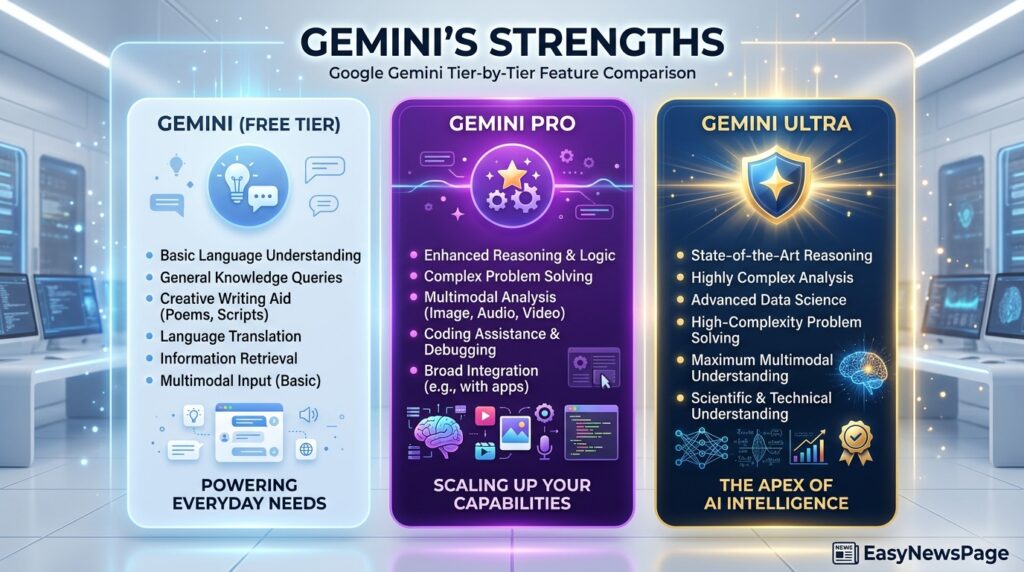
Gemini’s clearest edge is integration and a genuinely usable free tier: <cite index=”22-1″>the free tier gives real model access for research, writing, document summarizing, and image analysis with no credit card required</cite>. <cite index=”18-1″>Paid U.S. subscribers also get Gemini folded into AI Mode for Google Search, Code Assist, and Google Cloud credits</cite>, and <cite index=”21-1″>Workspace now bakes Gemini directly into Business Standard, Plus, and Enterprise seats instead of selling it as a separate add-on</cite>.
The trade-offs are real, though: <cite index=”19-1″>a pattern of feature-parity bugs hit paying subscribers in early 2026, where Pro mode disappeared from the interface while free users kept access</cite>, and <cite index=”17-1″>Gemini 3.5 Pro, widely expected to land earlier, still wasn’t live as of July 2026</cite>. The top-tier Ultra plan is also a steep jump: <cite index=”19-1″>AI Ultra costs roughly 5x the Pro tier for what’s mostly incremental access, and is really only worth it for sustained, heavy research or technical use</cite>.
How to Choose
Ask yourself three questions:
- Do you already pay for Google Workspace or use Gmail/Docs constantly? If yes, Gemini’s bundled integration likely saves you from paying for a second AI subscription on top of tools you already have.
- Do you need heavy coding-agent or video-generation tools? ChatGPT’s Codex, Sora, and Operator tooling are currently more mature and more fully featured than Gemini’s equivalents.
- Is a strong free tier important to you? Gemini’s free tier is meaningfully less restrictive than ChatGPT’s, which caps free usage hard and now shows ads.
Budget vs. Premium Picks
- Budget pick: Gemini’s free tier or $4.99 AI Plus — <cite index=”22-1″>genuinely usable for research, writing, and summarizing without paying anything</cite>.
- Premium pick: ChatGPT Pro at $200/month if you need <cite index=”16-1″>unlimited Sora video, Codex, and the Operator agent</cite> — but for most individuals, either the $20 mainstream tier (ChatGPT Plus or Google AI Pro) covers real daily use.

Read more: ChatGPT Review 2026
FAQ
Is ChatGPT or Gemini better for coding?
ChatGPT currently has the more mature coding-agent tooling through Codex, bundled into Business and Pro tiers, while Gemini’s coding tools are improving but less fully featured at equivalent price points as of mid-2026.
Which one has a better free plan?
Gemini’s free tier is less restrictive — it offers real model access with no explicit message cap, while ChatGPT’s free tier limits users to around 10 messages every five hours and now shows ads in the US.
Can I use both instead of choosing one?
Yes — many users keep a free or low-cost tier of both, since the entry-level plans on each side (Gemini free, ChatGPT Go at $8) are cheap enough to run in parallel for different tasks.
Which is cheaper for a small business?
Gemini often works out cheaper if you already pay for Google Workspace, since Gemini is now bundled into Workspace seats rather than sold separately; ChatGPT Business runs $20–25 per seat on top of whatever else you already pay for.
Conclusion
There isn’t a universal winner here, and treating this as a single “best AI” contest misses how differently these two products are actually used. If you’re choosing based on raw capability and want the most fully-featured standalone assistant — with the strongest coding agent, video generation, and browsing/agent tools — ChatGPT’s $20 Plus tier is the safer starting point, with Pro available if you outgrow it. If your daily work already happens inside Gmail, Docs, Sheets, or Google Search, Gemini’s $19.99 AI Pro tier (or even the free tier) will likely feel more useful in practice simply because it’s already where you are, without a second app to context-switch into.
The one thing we’d actively recommend against is picking based on whichever model just made headlines this week — both companies have shipped major updates in the past month alone, and the gap between them narrows and widens every few weeks. Start with the cheapest tier that unlocks the one or two features you actually need (Deep Research, a coding agent, or just a less-capped free tier), use it for two to three weeks, and only upgrade once you’ve actually hit that plan’s limits rather than upgrading preemptively. That’s a more reliable way to spend your money than chasing whichever benchmark chart looks best this month.