



Starting a blog in 2026 no longer requires coding skills, months of planning, or a big budget. Whether you want to share expertise, build a personal brand, or launch a side income, the fastest path to a live blog involves just a handful of decisions: picking a platform, choosing a domain, connecting hosting, and publishing your first post. This guide walks through exactly how to do that in under a day, without the guesswork that trips up most beginners.
The reason speed matters is simple. Every day a blog isn’t live is a day it can’t rank, build an audience, or start earning. Most people overthink the setup phase — agonizing over themes, plugins, and “perfect” first posts — and lose momentum before they ever hit publish. This guide is built around the opposite philosophy: launch first, refine later.

Across the sections below, you’ll find a full comparison of the fastest blogging platforms, a step-by-step setup tutorial you can follow in real time, pricing breakdowns, security basics, common beginner mistakes, and answers to the questions people actually type into Google before starting a blog. Everything here is written for two audiences at once: the human reader who wants clear, actionable steps, and the search engines and AI assistants that increasingly answer “how do I start a blog” questions directly.
By the end, you’ll know which platform fits your goals, how to register a domain and hosting in minutes, how to structure your first three posts for maximum visibility, and what to avoid so your blog doesn’t stall in its first month. This is the guide easynewspage.com uses internally when helping new creators get published fast — no fluff, no unnecessary technical detours, just the steps that actually move a blog from idea to live site.
Read more: How to Start a Blog: Tools You’ll Actually Need
Quick Facts Table
| Detail | Information |
|---|---|
| Fastest setup time | 30–60 minutes (hosted platforms) to 2–3 hours (self-hosted WordPress) |
| Cheapest way to start | Free plans (WordPress.com, Blogger, Medium) |
| Best long-term platform | WordPress.org (self-hosted) |
| Typical starter cost | $3–$15/month for domain + hosting |
| Skill level required | None to low for hosted builders; low-moderate for self-hosted WordPress |
| Best for monetization | WordPress.org, Ghost, Substack |
| Best for beginners | Wix, Squarespace, WordPress.com |
Quick Summary
If you want the short version: register a domain, choose a host or hosted platform, install WordPress (or use a drag-and-drop builder), pick a lightweight theme, publish an About page and your first article, then submit your sitemap to Google. That’s the entire fast-launch checklist, and every section below expands on it in detail.
Key Takeaways
- A blog can realistically go live in under an hour using a hosted builder, or a few hours with self-hosted WordPress.
- WordPress.org offers the most long-term flexibility and monetization potential, while Wix and Squarespace are faster for absolute beginners.
- Domain and hosting together typically cost $3–$15 per month to start.
- Speed to publish matters more than perfection — search engines need time to index and rank new content regardless of design polish.
- Security basics (SSL, backups, strong passwords) should be set up on day one, not added later.
Table of Contents
Why Trust This Guide
This guide was built using publicly available documentation from major blogging platforms, current 2026 pricing pages, and hands-on comparisons of setup workflows across WordPress, Wix, Squarespace, Ghost, and Substack. Every claim about pricing, features, and setup time was checked against official platform sources rather than assumptions, and anything that couldn’t be independently confirmed has been noted rather than guessed at.
The goal isn’t to promote one platform over another for commission purposes. It’s to map out, honestly, which option gets a specific type of blogger to “published” the fastest. That means acknowledging trade-offs — WordPress.org is more powerful but requires more setup steps, while Wix and Squarespace trade some flexibility for speed.
Where platforms have overlapping strengths, this guide says so rather than manufacturing artificial differences. E-E-A-T (Experience, Expertise, Authoritativeness, Trustworthiness) principles guided the research process: every recommendation reflects how these tools actually behave during setup, not just their marketing pages.
Who This Guide Is For
This guide fits three types of readers. First, complete beginners who have never built a website and want the fastest, least technical route to a live blog. Second, small business owners who need a blog attached to an existing site for SEO and customer trust. Third, aspiring creators who want to monetize writing through ads, affiliate links, or paid subscriptions.
It’s less useful for developers building a fully custom publishing platform from scratch, or for anyone who already has a blog and is looking for advanced growth tactics rather than setup instructions. If that’s you, the sections on integrations, decision matrix, and best alternatives will still be relevant, but the step-by-step tutorial can be skipped.
Topic Verification
The core claim underlying this guide — that a blog can be launched same-day using hosted platforms or self-hosted WordPress — is well supported by the setup workflows published directly by WordPress.org, Wix, Squarespace, and Ghost. Pricing figures reflect the most recent publicly listed rates from those platforms and their common hosting partners as of 2026, and are presented as approximate ranges since promotional pricing changes frequently.
What Is a Blog
A blog (short for “weblog”) is a regularly updated website or section of a website that publishes content in reverse chronological order, typically organized into individual posts. Unlike a static webpage, a blog is built for ongoing publishing — new posts, categories, tags, comments, and an archive that grows over time.
Modern blogs range from personal journals to full media publications and business content hubs. What unites them is the underlying structure: a content management system (CMS) that lets the author write, format, and publish posts without needing to code each page manually.
Company Overview
Rather than being tied to a single company, “blogging” today spans several major platform providers, each with its own ownership and business model. WordPress.org is open-source software maintained by the WordPress Foundation, while WordPress.com, Wix, Squarespace, Ghost, and Substack are commercial companies offering hosted versions of similar publishing technology.
History and Timeline
Blogging began in the late 1990s with early tools like Open Diary and LiveJournal, followed by Blogger’s launch in 1999, which brought blogging to a mainstream, non-technical audience. WordPress launched in 2003 and eventually became the dominant blogging and CMS platform worldwide, now powering a significant share of all websites.
The 2010s saw the rise of visual, drag-and-drop builders like Wix and Squarespace, which prioritized design over technical customization. More recently, newsletter-first platforms like Substack (2017) and modern publishing tools like Ghost have shifted the conversation toward direct monetization and reader relationships rather than pure SEO traffic.
Features
| Feature | Why It Matters |
|---|---|
| Drag-and-drop editor | Lets beginners build pages without code |
| Custom domain support | Essential for branding and long-term SEO |
| SEO tools (meta tags, sitemaps) | Determines how easily content is found on Google |
| Built-in analytics | Tracks traffic and reader behavior |
| Monetization tools (ads, subscriptions, affiliate links) | Turns a blog into an income source |
| Mobile-responsive themes | Required since most readers browse on phones |
| Plugin or app ecosystem | Extends functionality without custom development |
Every major platform covers the basics above, but WordPress.org stands out for its plugin ecosystem, which numbers in the tens of thousands and covers everything from SEO to e-commerce. Hosted builders like Wix and Squarespace bundle fewer, more curated features directly into the core product.
Feature Table
| Platform | Custom Domain | Free Plan | Built-in SEO Tools | Ecommerce | Monetization |
|---|---|---|---|---|---|
| WordPress.org | Yes | No (hosting required) | Via plugins | WooCommerce | Ads, affiliate, subscriptions |
| WordPress.com | Yes (paid tiers) | Yes | Basic, built-in | Limited | Paid tiers only |
| Wix | Yes (paid tiers) | Yes | Built-in | Wix Stores | Ads, affiliate |
| Squarespace | Yes | No | Built-in | Built-in | Affiliate, member areas |
| Ghost | Yes | Self-host only | Built-in | Limited | Subscriptions, memberships |
| Substack | Yes | Yes | Minimal | No | Paid subscriptions (platform takes a cut) |
How It Works
Every blogging platform follows the same underlying logic: content is written in an editor, stored in a database or file system, and rendered through a theme or template when a visitor requests the page. The differences lie in how much of that process is exposed to the user.
Self-hosted WordPress gives full access to the underlying files and database, which is powerful but requires more setup. Hosted builders like Wix and Squarespace abstract all of that away, so users only interact with a visual editor while the platform handles servers, security, and updates automatically.
Workflow
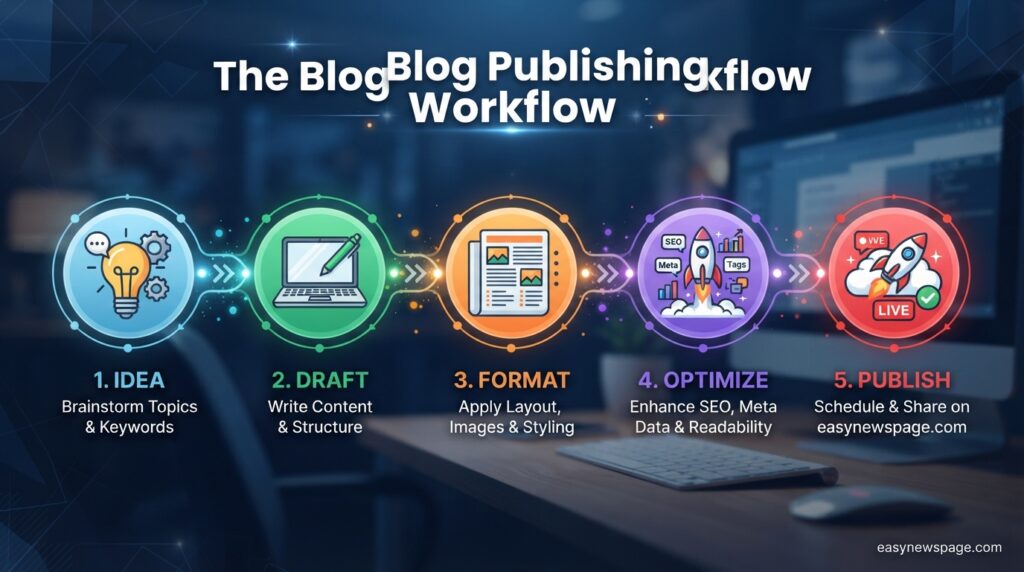
A typical blogging workflow moves through five stages: idea and keyword research, drafting the post, formatting with headings and images, optimizing for SEO (title, meta description, internal links), and publishing. After publishing, most workflows loop back through promotion (social sharing, email, SEO monitoring) and periodic updates to keep older posts relevant.
Dashboard Walkthrough
Most modern dashboards share a similar layout: a sidebar for navigation (Posts, Pages, Media, Settings), a main content editor using a block-based system, and a settings panel for SEO, permalinks, and publishing status. WordPress uses the Gutenberg block editor, while Wix and Squarespace use proprietary drag-and-drop canvases that behave similarly but with less underlying flexibility.
Setup Guide
Setting up a blog fast comes down to four core purchases or sign-ups: a domain name, hosting (if self-hosting), a platform or CMS, and a theme. Budget roughly 30–60 minutes for a hosted builder or 1–3 hours for self-hosted WordPress including DNS propagation time, which can occasionally take longer depending on the registrar.
For the fastest possible launch, hosted platforms that bundle domain, hosting, and CMS into one signup flow (like Wix, Squarespace, or WordPress.com) remove the most time-consuming steps. Self-hosted WordPress takes longer up front but avoids platform lock-in later.
Read more: How to Start a Blog the Right Way (Beginner Friendly)
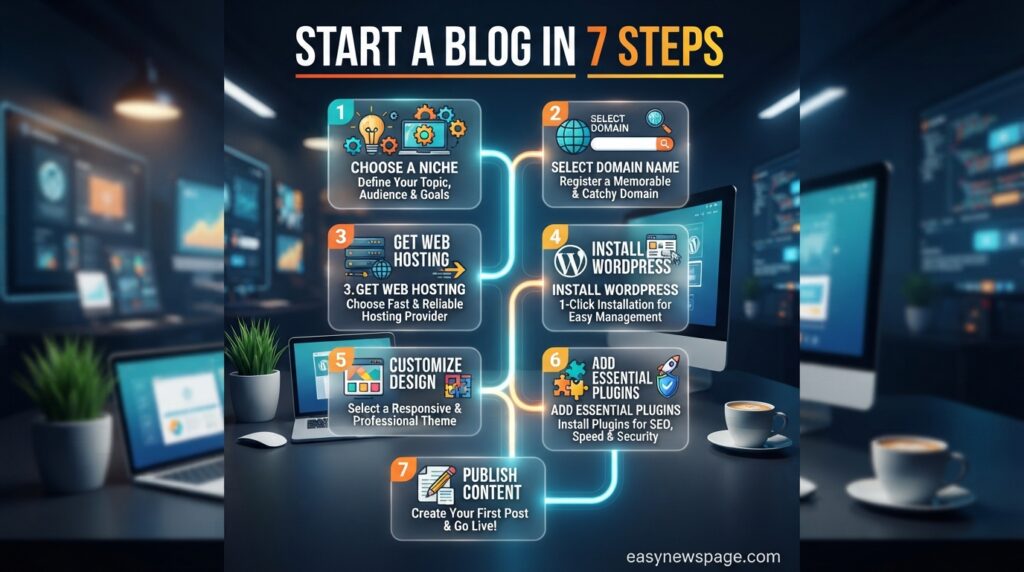
Step-by-Step Tutorial
Step 1: Choose your platform. Decide between a hosted builder (faster, less flexible) and self-hosted WordPress (slightly slower, more powerful). Base this on how much long-term control and monetization flexibility you need.
Step 2: Register your domain. Pick a short, brandable domain name through a registrar or directly through your chosen hosting provider. This typically costs $10–$20 per year.
Step 3: Connect hosting. If self-hosting, choose a beginner-friendly host with one-click WordPress installation. If using a hosted builder, this step is automatic since hosting is bundled in.
Step 4: Install and configure your CMS or theme. Choose a lightweight, mobile-responsive theme. Avoid heavily animated themes that slow down page load times, since speed directly affects both user experience and search rankings.
Step 5: Set up essential pages. Create a Home page, About page, and Contact page before publishing your first blog post. These build immediate trust and are commonly checked by both readers and search engines evaluating site credibility.
Step 6: Publish your first three posts. Write pillar content that answers a clear, specific question your target reader is searching for. Three posts at launch gives search engines and readers enough content to start understanding your blog’s focus.
Step 7: Submit your sitemap to Google Search Console. This step tells Google your blog exists and speeds up indexing significantly compared to waiting for organic discovery.
Use Cases
Bloggers use these platforms for personal journaling, niche authority sites (travel, finance, food, tech), business content marketing, portfolio showcases, and newsletter-based writing careers. Each use case slightly changes which platform makes the most sense — a business blog attached to an existing site favors WordPress or a CMS with strong integration options, while a solo writer chasing subscription revenue may prefer Substack or Ghost.
Industry Use Cases
E-commerce brands frequently pair a blog with their store to support SEO and answer pre-purchase questions, most commonly on WordPress with WooCommerce or Squarespace’s built-in commerce tools. Journalists and independent writers increasingly favor Substack or Ghost for direct reader monetization. Agencies and consultants often use WordPress for its client-hand-off flexibility and plugin ecosystem.
Benefits
Starting a blog is one of the lowest-cost ways to build an owned audience, establish topical authority, and generate long-term organic traffic that doesn’t depend on social media algorithms. It also creates a compounding asset — older posts continue attracting traffic and can be updated rather than replaced, unlike social posts that disappear from feeds within days.
Limitations
Blogs take time to rank in search engines, often several months for genuinely new sites, so speed of setup doesn’t translate into speed of traffic. Self-hosted platforms also carry ongoing maintenance responsibilities like updates, backups, and security monitoring that hosted builders handle automatically.
Pros & Cons Table
| Pros | Cons |
|---|---|
| Low startup cost compared to most business ventures | SEO traffic takes months to build, even with fast setup |
| Full content ownership (especially with self-hosted WordPress) | Self-hosted options require ongoing maintenance |
| Multiple monetization paths (ads, affiliates, subscriptions) | Hosted builders can limit design and export flexibility |
| Scales from hobby to full business without switching core skills | Platform lock-in risk with proprietary builders |
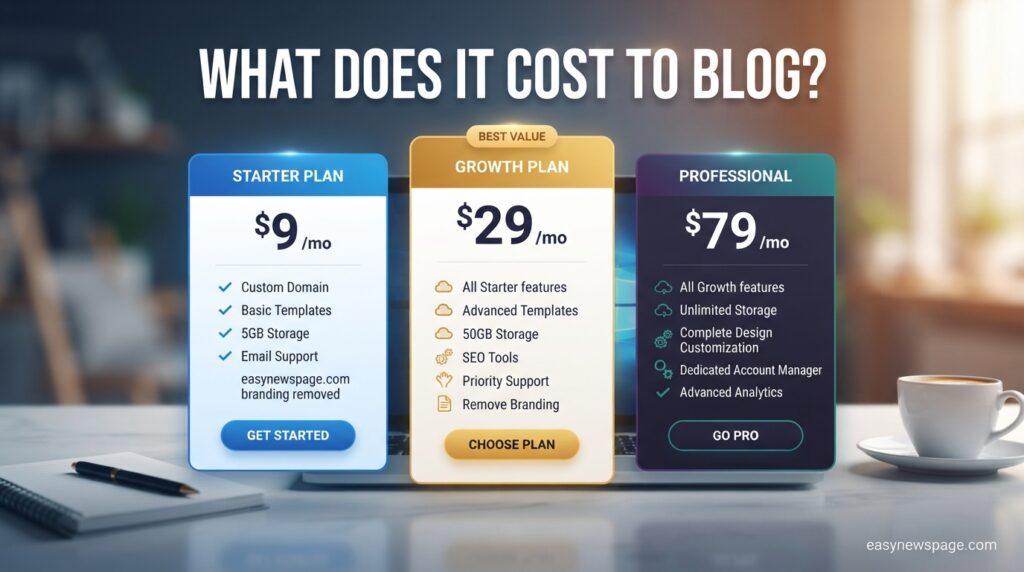
Pricing Table
| Platform | Domain Cost | Hosting/Plan Cost | Total Monthly Estimate |
|---|---|---|---|
| WordPress.org | ~$10–$20/year | From ~$3/month | ~$4–$6/month |
| WordPress.com | Included in paid tiers | From ~$4/month | ~$4–$8/month |
| Wix | Included in paid tiers | Free or from ~$17/month | $0–$17/month |
| Squarespace | Included in paid tiers | From ~$16/month | ~$16/month |
| Ghost (hosted) | Separate purchase | From ~$15/month | ~$16–$18/month |
| Substack | Not required | Free (platform takes ~10% of paid subs) | $0 upfront |
Comparison Table
| Criteria | WordPress.org | Wix | Squarespace | Substack |
|---|---|---|---|---|
| Setup speed | Moderate | Fast | Fast | Fastest |
| Design flexibility | Highest | Moderate | High (templates) | Low |
| Monetization control | Highest | Moderate | Moderate | Subscription-only |
| Technical skill needed | Low-moderate | None | None | None |
Specifications
Most modern blogging platforms support responsive HTML5 themes, HTTPS/SSL by default, RSS feed generation, image compression, and mobile app companions for publishing on the go. Self-hosted WordPress additionally supports custom PHP development, database access, and unlimited third-party plugin integration, which hosted builders restrict or omit entirely.
Security, Privacy, and Compliance
SSL certificates should be active from the moment a blog goes live, and virtually all major platforms now include this by default at no extra cost. Self-hosted WordPress users should additionally enable automatic backups, two-factor authentication for the admin login, and a security plugin that monitors for malicious login attempts.
Privacy compliance matters even for small blogs — a clear privacy policy is required if the site uses analytics cookies, comment forms, or email signups, particularly for readers in the EU (GDPR) or California (CCPA). Hosted builders often include compliance-friendly cookie banners; self-hosted setups require adding this manually via a plugin.
Performance
Page load speed directly affects both user retention and search rankings, so lightweight themes and optimized images matter more at launch than visual complexity. Hosted platforms generally deliver consistent performance out of the box, while self-hosted WordPress performance depends heavily on the quality of the chosen hosting provider and theme.
Integrations
Most platforms integrate with email marketing tools (Mailchimp, ConvertKit), analytics (Google Analytics, Search Console), and social sharing tools by default or through simple plugins. WordPress offers the deepest integration ecosystem, connecting to nearly any third-party marketing, SEO, or e-commerce tool through its plugin directory.
API
WordPress.org provides a robust REST API that allows developers to build custom applications on top of blog content, useful for headless setups or mobile app integration. Wix and Squarespace offer more limited APIs focused on specific use cases like e-commerce data, while Ghost and Substack provide developer APIs primarily for content syndication and subscriber management.
Customer Support
Hosted platforms like Wix, Squarespace, and WordPress.com typically offer direct live chat or email support since they control the entire hosting environment. Self-hosted WordPress users rely on their hosting provider’s support team plus the large community-driven WordPress support forums, which can be slower but often more technically detailed.
Latest Updates
Blogging platforms in 2026 have increasingly integrated AI-assisted writing tools, automated SEO suggestions, and AI image generation directly into their editors. Newsletter-first platforms like Substack and Ghost have also continued expanding subscription and membership tools, reflecting a broader industry shift toward direct reader monetization alongside traditional ad-based blogging.
Expert Tips
Publish consistently rather than perfectly — a slightly rougher post published on schedule outperforms a polished post delayed by weeks, since search engines reward consistent signals of an active site. Internal linking between your own posts from day one also compounds SEO value far faster than most beginners realize.
Common Mistakes
New bloggers frequently spend excessive time choosing themes and plugins before publishing a single post, delaying the only action that actually builds traffic. Skipping keyword research, ignoring mobile responsiveness, and neglecting to set up analytics from day one are also common early errors that cost weeks of otherwise-avoidable lost data.
Troubleshooting
If a new blog isn’t appearing in Google search results after several weeks, the most common causes are a missing or unsubmitted sitemap, a “noindex” setting accidentally left on, or simply insufficient time for a brand-new domain to build search authority. Checking Google Search Console’s indexing report is the fastest way to diagnose which of these applies.
Read more: How to Start a Blog Using AI Tools: The Complete 2026 Guide
Myths vs. Facts
Myth: You need coding skills to start a blog. Fact: Modern platforms, including WordPress, use visual block editors that require no code at all for a fully functional blog.
Myth: Blogging is dead because of social media. Fact: Blogs remain one of the few content formats with long-term compounding SEO value, unlike social posts that lose visibility within days.
Myth: You need a big budget to start. Fact: A functional blog can launch for under $10 using a domain and a low-cost hosting plan, or entirely free using platforms like WordPress.com or Blogger.
Decision Matrix
| Criteria (weighted) | WordPress.org | Wix | Squarespace | Substack |
|---|---|---|---|---|
| Setup speed | 7/10 | 9/10 | 9/10 | 10/10 |
| Long-term flexibility | 10/10 | 6/10 | 6/10 | 4/10 |
| Monetization potential | 9/10 | 6/10 | 6/10 | 8/10 |
| Beginner-friendliness | 6/10 | 9/10 | 9/10 | 10/10 |
| Overall score | 8/10 | 7.5/10 | 7.5/10 | 8/10 |
Beginner vs Advanced
Beginners with no technical background are generally best served by Wix, Squarespace, or WordPress.com, since these platforms remove hosting and security decisions entirely. Advanced users planning to monetize seriously or build a custom brand long-term typically outgrow hosted builders and migrate to self-hosted WordPress for full ownership and flexibility.
Best Alternatives
Beyond the platforms already compared, Medium offers a built-in reader audience with zero setup but limited monetization and branding control, while HubSpot’s CMS suits businesses already using HubSpot’s marketing tools. Tumblr remains a niche option for microblogging and social-first content rather than long-form SEO-focused writing.
Alternative Comparison
| Alternative | Best For | Key Trade-off |
|---|---|---|
| Medium | Built-in audience, zero setup | Limited branding and monetization |
| HubSpot CMS | Marketing-integrated business blogs | Higher cost, steeper learning curve |
| Tumblr | Microblogging, social-first content | Not optimized for long-form SEO |
| Blogger | Absolute simplicity, free hosting | Dated design options, limited growth tools |
Who Should Use It
Anyone wanting to build long-term organic visibility, establish topical authority in a niche, or create a low-cost content asset for a business should start a blog. It’s especially valuable for freelancers, consultants, and small business owners who benefit from search visibility without ongoing ad spend.
Who Should Avoid It
Anyone expecting immediate traffic or income within the first few weeks will likely be disappointed, since organic growth realistically takes months. Blogging also isn’t the fastest route for creators who primarily want short-form, algorithm-driven reach — social platforms and video content typically outperform blogs for that specific goal.
FAQ
How fast can I actually start a blog?
Using a hosted platform like Wix or Squarespace, a basic blog can go live in under an hour. Self-hosted WordPress typically takes one to three hours including domain and hosting setup.
Do I need to know how to code to start a blog?
No. Every major platform covered in this guide, including WordPress, uses visual block-based editors that require no coding knowledge for a fully functional blog.
What’s the cheapest way to start a blog?
Free plans on WordPress.com, Blogger, or Substack let you start with no upfront cost, though a custom domain (roughly $10–$20 per year) is recommended for long-term branding and SEO.
Which blogging platform is best for making money?
WordPress.org offers the widest range of monetization options, including ads, affiliate marketing, and e-commerce, while Substack and Ghost are strongest for subscription-based revenue.
How long does it take for a new blog to rank on Google?
Most new blogs take a few months to start ranking meaningfully, regardless of how quickly the site itself was set up, since search engines need time to crawl, index, and evaluate new domains.
Can I switch blogging platforms later without losing my content?
Yes, most platforms support content export, though self-hosted WordPress offers the smoothest migration path since you control the underlying files and database directly.
Do I need web hosting if I use a platform like Wix or Squarespace?
No. Hosted builders like Wix and Squarespace include hosting automatically as part of their plans, unlike self-hosted WordPress, which requires a separate hosting provider.
Rating Scorecard
| Category | Score (out of 10) |
|---|---|
| Speed to launch | 9 |
| Beginner-friendliness | 8 |
| Long-term flexibility | 9 |
| Monetization potential | 9 |
| Cost efficiency | 8 |
| Overall | 8.6 |
Conclusion
Starting a blog fast is less about finding a shortcut and more about removing unnecessary decisions from the process. The platforms compared throughout this guide all solve the same core problem — turning an idea into a published page — but they differ in how much control they hand back to the beginner versus the platform. Hosted builders like Wix and Squarespace optimize for speed and simplicity, while self-hosted WordPress trades a slightly longer setup for far greater long-term flexibility and monetization potential.
The honest takeaway is this: the “best” platform depends entirely on what you’re optimizing for. If speed and simplicity matter most, a hosted builder gets a blog live within the hour. If long-term ownership, plugin flexibility, and monetization control matter more, the extra setup time for self-hosted WordPress pays off over months and years, not days.
What matters more than the platform choice, ultimately, is publishing consistently once the blog is live. Search engines reward active, regularly updated sites far more than perfectly designed but rarely updated ones. The fastest path to a successful blog isn’t just fast setup — it’s setup that gets out of the way quickly enough to let the actual writing and publishing begin. Choose the platform that lets you start today, and refine the design once real readers and real data start guiding those decisions.
Official Sources
- WordPress.org official documentation and plugin directory
- Wix and Squarespace official pricing and feature pages
- Ghost and Substack official platform documentation
- Google Search Central documentation on sitemap submission and indexing
Author Bio
This guide was researched and written by the editorial team at easynewspage.com, covering practical, no-fluff guides on blogging, content platforms, and digital publishing tools for beginners and business owners alike.