


Starting a blog in 2026 is simultaneously the easiest it has ever been technically and the hardest it has ever been competitively. The technical part — buying a domain, installing software, publishing a post — now takes under an hour and costs less than a takeaway meal. The difficult part is everything that comes afterward: choosing a topic narrow enough to win, writing posts people actually finish, and surviving the eighteen-month stretch before search engines start sending meaningful traffic.
How to start a blog is one of the most searched beginner questions on the internet, and most guides answering it are written by affiliates who earn a commission when you click a hosting button. That incentive quietly shapes the advice. You get pushed toward a self-hosted WordPress blog on a shared hosting plan before anyone asks whether you actually need one. Sometimes that is the right answer. Often it is not.
This guide takes a different approach. It walks through the full decision chain in the order a real beginner faces it: pick a blog niche, choose a blogging platform, register a domain name, arrange web hosting, install and configure your site, publish your first posts, and then build traffic through search engine optimization, email, and distribution. Every step includes the trade-off, not just the recommendation.
You will find current 2026 pricing for the major platforms, a side-by-side comparison of WordPress, Ghost, Blogger, Medium, and Substack, a decision matrix scored against real beginner criteria, and an honest account of what blogging costs in time before it returns anything. You will also find the parts most guides skip — why domain privacy matters, how hosting renewal rates triple after year one, what Google’s helpful content guidance means for a new site, and the specific mistakes that kill roughly nine out of ten new blogs inside six months.
Whether you want a personal journal, a portfolio that lands clients, a niche site built for affiliate revenue, or a newsletter-first publication, the setup path is broadly the same. The difference is in the platform you choose and how long you are willing to stay consistent. Read on, and by the end you will have a blog live and a realistic plan for the first ninety days.
Read more: How to Start a Blog Using AI Tools: The Complete 2026 Guide
Quick Facts Table
| Item | Detail |
|---|---|
| Time to launch a basic blog | 45–90 minutes |
| Minimum realistic first-year cost | $0 (free platform) to roughly $60–$120 (self-hosted) |
| Most popular platform | WordPress, powering a large share of all websites worldwide |
| Domain name cost | Roughly $10–$20 per year for a .com |
| Shared hosting intro price | Roughly $2.99–$5.99/month on 1–4 year terms |
| Shared hosting renewal price | Roughly $10.99–$16.99/month after the intro term |
| Time before meaningful search traffic | 6–18 months for most new blogs |
| Posts needed before traction | 25–50 genuinely useful articles |
| Best platform for beginners on a budget | WordPress.com free tier or Blogger |
| Best platform for long-term control | Self-hosted WordPress (WordPress.org software) |
| Best platform for paid newsletters | Substack or Ghost |
| Technical skill required | None for hosted platforms; basic comfort for self-hosted |
Quick Summary
To start a blog, choose a specific niche you can write about for years, pick a platform that matches your goal, register a domain name, set up hosting if you are going self-hosted, install a clean theme, and publish your first post. A functional blog can be live in under an hour for free, or for roughly $60–$120 in the first year if you want your own domain and full control.
The platform decision is the one that matters most. A hosted platform like WordPress.com, Blogger, Medium, or Substack handles servers, security, and updates for you, but limits customization and monetization. A self-hosted blog using the open-source WordPress software gives you complete ownership, unlimited plugins, and any revenue model you want, at the cost of managing updates and paying for hosting. Beginners who are unsure should start hosted and migrate later — migration is a routine, well-documented process.
Key Takeaways
- A blog can be live in under an hour; building an audience takes twelve to eighteen months of consistent publishing.
- Niche selection predicts success more reliably than platform choice, theme design, or technical setup.
- Self-hosted WordPress is the default recommendation for anyone who wants to monetize, but it is overkill for a personal journal.
- Advertised hosting prices are introductory. Budget for renewal rates that are often two to three times higher.
- Your domain name is the one asset you truly own. Buy it early, even if you start on a free platform.
- Publishing consistently for ninety days separates blogs that survive from the majority that quietly stop.
- Email subscribers are worth more than social followers because you own the list outright
Table of Contents
Why Trust This Guide
This guide was written without affiliate links, which changes the advice in two visible ways. Most how to start a blog articles recommend a specific host in the first three hundred words because that recommendation pays a commission of roughly $65–$150 per signup. Here, hosting appears only after the niche and platform decisions, because that is the order in which the choices actually matter to the outcome.
Every price in this article was checked against current 2026 market data rather than quoted from memory, and renewal rates are stated alongside introductory rates because the gap between them is the single most common billing surprise for new bloggers. Where sources disagreed — platform plan pricing varies between monthly and annual billing, and between regions — the range is given rather than a false precise figure.
The recommendations also reflect a pattern anyone who has run content sites recognizes: the blogs that succeed are rarely the ones with the best theme or the fastest hosting. They are the ones whose owner published forty times before checking analytics seriously. That is unglamorous advice and it does not sell hosting, which is precisely why it belongs near the top.
Who This Guide Is For
This guide is written for the complete beginner who has never registered a domain, never touched a content management system, and is not sure whether blogging is still worth starting. No coding knowledge is assumed. Every technical term is defined at first use, and every step includes what happens if it goes wrong.
It will also be useful to three adjacent groups. Writers who already publish on social platforms and want a home they own will find the migration logic laid out. Small business owners evaluating whether a company blog earns its keep will find the realistic timeline. And existing bloggers stuck at low traffic will find the common mistakes section more useful than another setup tutorial.
It is not written for developers building custom publishing systems, for enterprises evaluating headless CMS architecture, or for anyone looking for a scheme to make money quickly. Blogging is a slow-compounding asset, and this guide treats it that way throughout.
Topic Verification
Blogging has not declined, but it has changed shape. Search engines now answer many simple questions directly in AI Overviews and chat interfaces, which has reduced click-through rates on thin, purely informational posts. What still earns traffic is content carrying something a summarizer cannot generate: original testing, lived experience, specific numbers, and a clear point of view.
That shift makes the advice in older guides partly obsolete. Publishing five hundred generic articles targeting easy keywords worked in 2018 and largely does not now. Publishing fifty genuinely researched articles in a defined niche, with a real author behind them, still works and arguably works better than before because the volume approach has been devalued.
The practical implication for a beginner is encouraging. You no longer need to out-publish established sites. You need to out-specify them — go narrower, go deeper, and show your work. A blog about “fitness” cannot win. A blog about strength training for people returning after a shoulder injury can.
What Is a Blog
A blog is a website where content is published as dated entries, called posts, displayed newest first, usually written in a personal voice by a named author. The word is a contraction of “weblog.” Unlike a static website, a blog is built around regular updates and around a relationship between a writer and returning readers.
Structurally, a modern blog has three layers. The content management system stores and organizes your posts. The theme controls how they look. The hosting makes the site reachable on the internet. On a hosted platform all three are bundled; on a self-hosted blog you assemble them yourself, which is where the flexibility and the extra responsibility both come from.
The line between blogs and other publications has blurred. Newsletters are blogs delivered by email. Many news sites are blogs with an editorial team. What still distinguishes a blog is the combination of chronological publishing, an identifiable author, and topical focus over time.
The Blogging Platform Landscape
Five names cover the overwhelming majority of new blogs. WordPress exists in two forms that beginners constantly confuse: WordPress.org is free open-source software you install on your own hosting, and WordPress.com is a commercial hosted service run by Automattic that uses the same software. Both are called “WordPress,” which is the single most common source of beginner confusion.
Ghost is a modern open-source platform built specifically for publications and paid newsletters, available self-hosted for free or as managed hosting. Blogger is Google’s free, no-frills platform, still running and still genuinely free with no hosting cost at all. Medium and Substack are publishing networks where you write inside someone else’s audience — excellent distribution, minimal ownership.
The correct choice depends almost entirely on your goal. Building an asset you may sell or monetize with ads points to self-hosted WordPress. Building a subscription publication points to Substack or Ghost. Simply wanting to write in public with zero setup points to Blogger or WordPress.com’s free tier.
History of Blogging
Personal websites with dated entries existed through the mid-1990s, but the format crystallized around 1999 when Blogger launched and made publishing possible without touching HTML. The early 2000s brought the blogosphere proper: political blogs, tech blogs, and the emergence of blogging as a recognized cultural form rather than a hobbyist curiosity.
WordPress arrived in 2003 as a fork of an earlier tool and became dominant by combining open-source freedom with an enormous plugin ecosystem. Automattic was founded in 2005 to commercialize the hosted version. Through the 2010s, social media absorbed casual personal blogging while professional and niche blogging consolidated into an industry built on search traffic and affiliate revenue.
The 2020s brought two more shifts: the newsletter renaissance led by Substack, which moved monetization from advertisers to readers, and the arrival of generative AI, which flooded the web with low-cost content and pushed search engines to reward demonstrable experience instead.
Timeline
| Year | Milestone |
|---|---|
| 1994–1997 | Early personal web journals; the term “weblog” is coined |
| 1999 | Blogger launches, removing the coding barrier |
| 2003 | WordPress released as open-source software |
| 2005 | Automattic founded; WordPress.com launches as a hosted service |
| 2006 | Bluehost begins a long run as a WordPress.org recommended host |
| 2012 | Medium launches, shifting focus to networked distribution |
| 2013 | Ghost launched via crowdfunding as a publication-focused platform |
| 2017 | Substack launches, popularizing paid subscription newsletters |
| 2018 | WordPress ships the Gutenberg block editor |
| 2022–2024 | Generative AI floods the web; search quality guidance emphasizes experience |
| 2025–2026 | AI-assisted editors become standard; original, first-hand content regains an advantage |
Features to Look For
Before comparing platforms, know which features actually matter in year one. Custom domain support matters immediately, because a branded address is the difference between a hobby and an asset. Full data export matters even more, because it determines whether you can leave. A platform that traps your content is a liability regardless of how nice the editor feels.
Monetization freedom is the next filter. Some platforms forbid advertising on free tiers or take a percentage of subscription revenue. SEO control — editable titles, meta descriptions, URL slugs, and redirects — determines whether search engines can index you properly. Email capture built in or via integration is how you convert readers into an audience you own.
Everything else is comfort. Theme marketplaces, block editors, AI writing assistants, and analytics dashboards are pleasant, but they do not decide outcomes. Choose on ownership, exportability, and monetization terms first.
Feature Table
| Feature | WordPress.org (self-hosted) | WordPress.com | Ghost | Blogger | Substack |
|---|---|---|---|---|---|
| Custom domain | Yes | Paid plans | Yes | Yes (you supply) | Yes |
| Full content export | Yes | Yes | Yes | Yes | Yes |
| Plugins / extensions | Unlimited | Business tier and above | Integrations only | Very limited | None |
| Ads allowed | Yes | Restricted on lower tiers | Yes | Yes | Not the model |
| Paid subscriptions | Via plugin | Via plan features | Native | No | Native |
| Email newsletter | Via plugin/service | Via Jetpack | Native | No | Native |
| SEO control | Complete | Good | Good | Basic | Limited |
| Technical maintenance | You | Handled for you | Depends on host | Handled for you | Handled for you |
| Best for | Monetized niche sites | Beginners wanting ease | Modern publications | Free personal blogs | Paid newsletters |
How Blogging Works
Mechanically, a blog works in four stages: you write a post in an editor, the platform stores it in a database, a theme renders it as a public web page, and search engines and social platforms bring readers to that page. Everything else — plugins, analytics, email tools — sits around this loop.
The business layer works differently. Traffic arrives mainly from search, and search rewards pages that answer a question better than existing results. Once traffic exists, it converts to money through advertising, affiliate commissions, digital products, services, or paid subscriptions. Most established blogs use two or three of these simultaneously rather than one.
The timing is the part beginners underestimate. A new domain typically spends several months in a low-visibility period before ranking meaningfully, regardless of content quality. Your first ninety days are an investment with no visible return, which is exactly why most blogs are abandoned in month four.
The Publishing Workflow
A repeatable workflow beats inspiration. The version that works for most solo bloggers has five steps: research a specific question your readers ask, outline the answer before writing a sentence, draft quickly without editing, edit ruthlessly for clarity and length, then optimize the title, meta description, headings, and internal links before publishing.
Research means checking what already ranks and identifying what it fails to cover. Outlining prevents the meandering structure that causes readers to leave. Drafting fast and editing separately is the single biggest productivity gain available to new writers, because it stops the two competing modes of thinking from fighting each other.
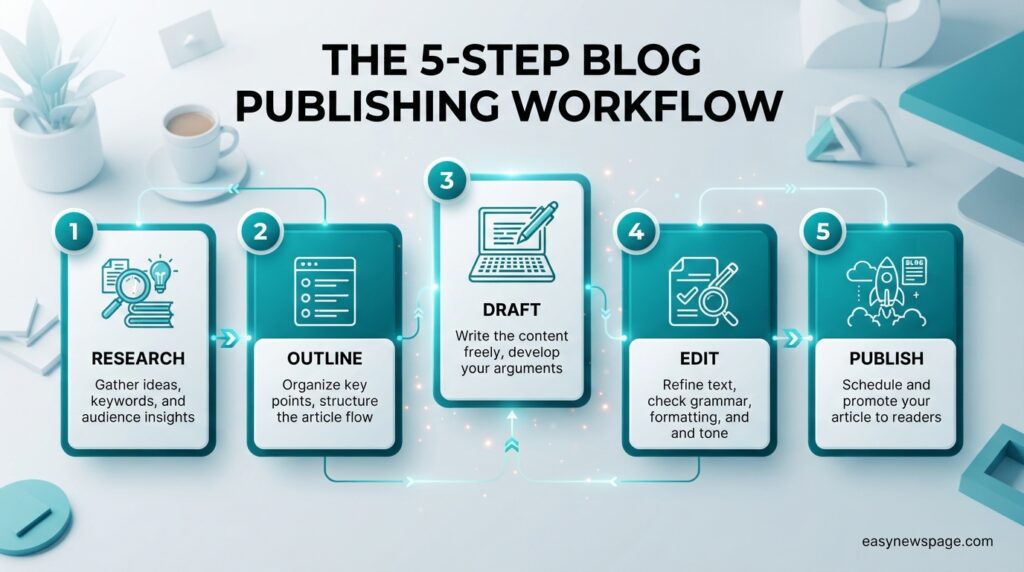
Publishing is not the end of the workflow. Add internal links from older posts to the new one, share it where your readers already are, and schedule a review in six months to update anything that aged badly. Updated posts frequently outperform new ones.
Dashboard Walkthrough
The WordPress dashboard is where most new bloggers will spend their time, and it is less intimidating than it looks. The left sidebar holds everything. Posts is where articles live. Pages is for static content like About and Contact. Media stores images. Appearance controls themes. Plugins adds functionality. Settings holds site-wide configuration.
Four settings deserve attention on day one. Under Settings, set your site title and tagline properly, because these appear in search results. Under Settings then Permalinks, choose the post name structure so your URLs are clean and readable. Under Appearance, pick one lightweight theme and resist changing it monthly. Under Users, complete your author profile, because a real named author strengthens credibility signals.
The block editor itself works by stacking content blocks — paragraph, heading, image, list, table — which you rearrange by dragging. It takes roughly twenty minutes of experimentation to feel natural.
Read more: How to Start a Blog: Complete 2026 Tutorial
Setup Guide
Setup divides into decisions and actions. The decisions are your niche, your platform, and your domain name, and they should take a few days of thought rather than a few minutes. The actions — registering, installing, configuring — take about an hour once the decisions are made.
Choose your niche by intersecting three things: what you know or are willing to learn deeply, what people actively search for, and what has some commercial angle if you intend to earn. Choose your domain to be short, memorable, easy to spell aloud, and preferably a .com. Avoid hyphens and numbers, and avoid boxing yourself in with an over-specific name you may outgrow.
For hosting, know the pricing structure before you buy. Introductory rates require long commitments and renewals are substantially higher, so evaluate the renewal figure as the real price.
Step-by-Step Tutorial
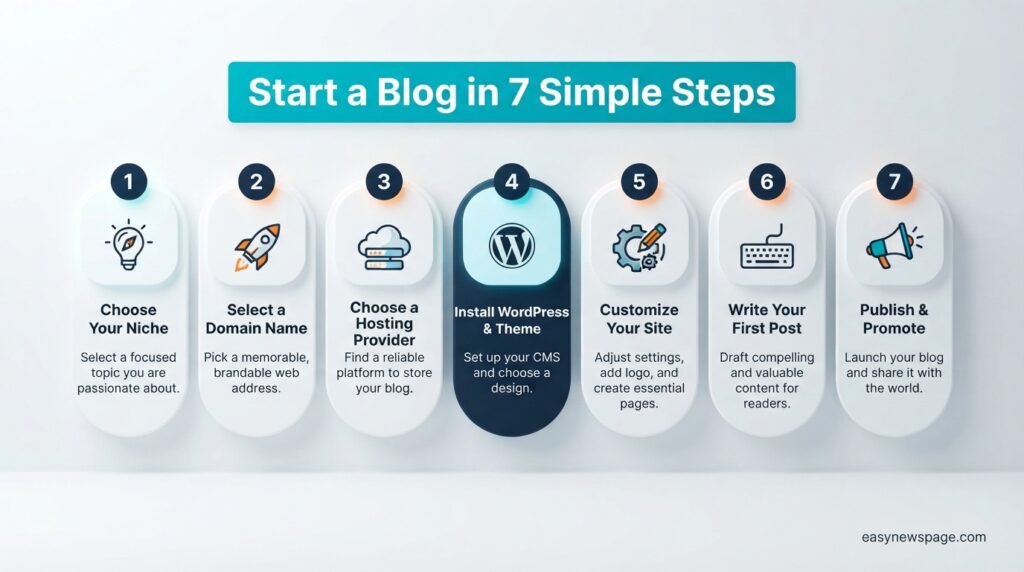
Step one: define the niche. Write one sentence describing who your blog helps and with what. If you cannot, you are not ready to buy a domain.
Step two: choose the platform. Monetizing and want control, choose self-hosted WordPress. Want simplicity, choose WordPress.com or Blogger. Building a paid newsletter, choose Substack or Ghost.
Step three: register the domain. Buy through a registrar or bundled with hosting, enable domain privacy, and enable auto-renewal so you never lose it to an expired card.
Step four: set up hosting and install. Most hosts offer one-click WordPress installation. Point the domain at the host, run the installer, and confirm HTTPS is active with a valid SSL certificate.
Step five: configure the basics. Set permalinks to post name, install a caching plugin, an SEO plugin, and a security plugin — three is sufficient, and more plugins mean more risk and slower pages.
Step six: publish the foundation pages. About, Contact, Privacy Policy. These are required for advertising programs and they build trust.
Step seven: write and publish the first post. Answer one specific question thoroughly. Then do it again, on a schedule, for ninety days.
Use Cases
The most common use case is the niche information blog built for search traffic and monetized with affiliate links or display advertising. It is the slowest-starting model and the most durable once it works, because search traffic compounds and does not depend on an algorithm feed.
The authority blog serves a different purpose: a consultant, coach, designer, or developer publishes to demonstrate expertise, and the blog converts readers into clients. Traffic requirements here are dramatically lower, because ten of the right readers can be worth ten thousand of the wrong ones.
Then there is the personal blog, written for the pleasure of thinking in public, and the company blog, which supports a product by answering the questions buyers ask before purchasing. Each is valid; each needs a different platform, tone, and measure of success.
Industry Use Cases
| Industry | Typical blog goal | Monetization path |
|---|---|---|
| Health and fitness | Educational authority | Coaching, programs, affiliates |
| Personal finance | Comparison and guidance | Affiliate, sponsorship |
| Travel | Destination guides | Affiliate, ads, partnerships |
| Software and SaaS | Product-led education | Trials and subscriptions |
| Food and cooking | Recipe discovery | Display ads, cookbooks |
| Education and tutoring | Curriculum support | Courses, memberships |
| Local services | Lead generation | Direct client enquiries |
Benefits
The core benefit of a blog is ownership. Unlike a social profile, your blog cannot be deprioritized by a feed algorithm, suspended without appeal, or diminished by a platform pivot. You control the content, the design, the email list, and the revenue model, and that control is worth the extra setup.
Blogs also compound. A post published today can attract readers for years, and each new post strengthens the site’s overall topical authority. This is the opposite of social content, which peaks within hours. The tenth year of a blog is usually its most valuable, because the archive works continuously without further effort.
Finally, writing in public improves thinking. Explaining something clearly to a stranger forces you to actually understand it, which is why many professionals report that their blog advanced their career more than any single credential.
Limitations
The dominant limitation is time. A blog needs roughly six to eighteen months of consistent publishing before search traffic becomes meaningful, and that period demands effort with no feedback. Anyone needing income within three months should not start a blog; they should sell a service instead.
The second limitation is competition. Nearly every broad topic is saturated by established sites with years of authority and dedicated teams. A beginner cannot win on breadth and must win on narrowness, which requires resisting the temptation to write about everything.
Third, self-hosted blogs carry real maintenance duties: updates, backups, security, and performance. These are manageable but not zero. Anyone unwilling to spend an hour a month on upkeep should choose a managed platform and accept the trade-off in flexibility.
Pros & Cons Table
| Pros | Cons |
|---|---|
| You own the content, domain, and audience outright | Results take six to eighteen months |
| Very low startup cost compared to most ventures | Most topics are highly competitive |
| Traffic compounds and older posts keep earning | Self-hosted sites need ongoing maintenance |
| Multiple monetization models available | Income is unpredictable and irregular early on |
| Builds credibility and career opportunities | Writing consistently is harder than it sounds |
| No gatekeepers, editors, or approval process | Search algorithm changes can shift traffic sharply |
The balance here favors patient builders. Nothing in the cons column is fatal, but every item in it is a reason people quit. The single strongest predictor of success is whether you keep publishing after the first three months of silence, which is why picking a topic you enjoy matters more than picking a topic that scores well on a keyword tool.
Pricing Table
| Option | Typical 2026 cost | What it includes | Best for |
|---|---|---|---|
| Blogger | Free | Hosting, subdomain, basic editor | Zero-budget personal blogs |
| WordPress.com Free | Free | Hosting, subdomain, limited features | Testing the habit |
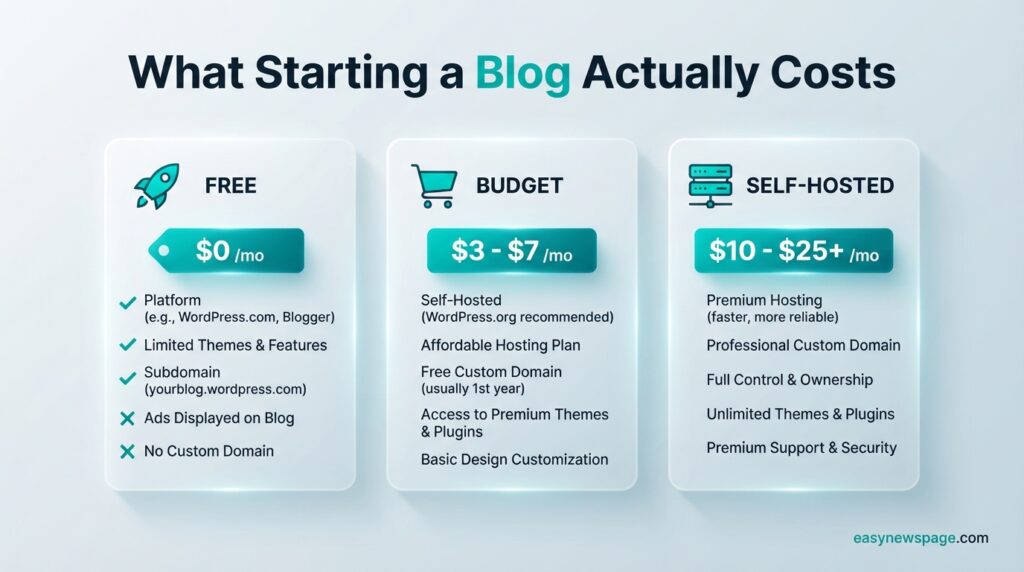
| WordPress.com paid tiers | Roughly $4–$9/mo annual, higher monthly | Custom domain, more control; plugins on Business tier | Beginners wanting ease |
| Self-hosted WordPress | Roughly $3–$6/mo intro, $11–$17/mo renewal, plus $10–$20/yr domain | Full control, unlimited plugins | Serious, monetized blogs |
| Ghost (managed) | Mid-tier monthly subscription | Native newsletters and memberships | Modern publications |
| Substack | Free to start; revenue share on paid subscriptions | Newsletter, payments, distribution | Paid newsletters |
Two pricing realities deserve emphasis. Advertised hosting rates are promotional and typically require one to four years paid upfront; renewal often lands two to three times higher. And hosted platform prices differ substantially between monthly and annual billing, so always confirm the current figure on the provider’s own pricing page before committing.
Comparison Table
| Criterion | Self-hosted WordPress | WordPress.com | Ghost | Blogger | Substack |
|---|---|---|---|---|---|
| Ease of setup | Moderate | Very easy | Moderate | Very easy | Very easy |
| Ownership and control | Complete | Partial | High | Low | Partial |
| Monetization freedom | Complete | Tier-dependent | High | Ads allowed | Subscriptions only |
| Design flexibility | Very high | Moderate | High | Low | Minimal |
| Built-in audience | None | None | None | None | Significant |
| Maintenance burden | High | None | Low to high | None | None |
| Long-term cost | Moderate | Low to moderate | Moderate | None | Revenue share |
Specifications
| Specification | Typical requirement |
|---|---|
| Hosting environment | PHP 8.x, MySQL or MariaDB, LiteSpeed or Nginx |
| Storage for a new blog | 10–50 GB is ample for years |
| Recommended page weight | Under 1 MB per page where possible |
| Target load time | Under 2.5 seconds for largest contentful paint |
| SSL certificate | Required; free via Let’s Encrypt on most hosts |
| Backups | Daily automated, stored off-server |
| Uptime guarantee | 99.9% is the industry standard |
| Image format | WebP or AVIF, compressed before upload |
Security
Security on a blog is mostly about reducing attack surface. The majority of compromised WordPress sites are broken through outdated plugins and themes, not through the core software. Keeping everything current, and deleting anything you do not actively use, prevents most incidents before they start.
Three habits handle the rest. Use a password manager and unique credentials, enable two-factor authentication on your hosting and blog admin accounts, and avoid the default “admin” username. Add a reputable security plugin for login rate-limiting and malware scanning, but do not stack three of them, because overlapping security tools conflict and slow the site.
Backups are the real safety net. Automated daily backups stored somewhere other than your server turn a catastrophic hack into a thirty-minute inconvenience. Test a restore once, so you know it works before you need it.
Privacy
Running a blog means handling other people’s data, usually without realizing it. Comment forms collect names and email addresses. Analytics tools record behavior. Newsletter signups create a database of subscribers. All of this triggers privacy obligations in most jurisdictions.
Enable domain privacy at registration so your home address is not published in public WHOIS records — many registrars now include it free. Publish a privacy policy explaining what you collect and why. Configure your analytics to anonymize IP addresses where the option exists, and only collect data you will actually use.
If you email readers, use double opt-in and include a working unsubscribe link in every message. These are legal requirements in many regions and, more practically, they keep your deliverability healthy.
Compliance
Compliance requirements scale with your audience and your revenue model. If readers in the European Union can reach your site, GDPR applies, which means lawful basis for data collection, consent for non-essential cookies, and a route for data deletion requests. California’s privacy legislation imposes similar duties for readers there.
Monetized blogs carry disclosure duties. Affiliate relationships and sponsored posts must be disclosed clearly and near the link, not buried in a footer. Advertising networks also require a published privacy policy and consent management before approving a site, so setting these up early avoids a rejection later.
Accessibility deserves a mention too. Descriptive alt text, sufficient color contrast, and proper heading hierarchy are legally relevant in some markets and improve search performance everywhere.
Performance
Page speed affects both reader retention and search visibility. Most new blogs are slow for three avoidable reasons: uncompressed images, too many plugins, and a bloated multipurpose theme loading features the site never uses.
Fix the images first, because they are usually eighty percent of page weight. Resize before uploading, compress, serve WebP, and enable lazy loading for images below the fold. Then add a caching plugin, which stores prebuilt versions of pages so the server does less work per visitor. A content delivery network helps if your readers are geographically spread.
Measure rather than guess. Free tools report Core Web Vitals — loading, interactivity, and visual stability — and tell you precisely which element is slowing the page. Aim for largest contentful paint under two and a half seconds.
Integrations
A blog becomes genuinely useful when connected to a few external tools. An email marketing platform is the highest-value integration, because email is the only channel you own outright. Connect a signup form to a service like MailerLite, ConvertKit, or Beehiiv from the first week, even if nobody subscribes for a month.
Analytics comes next. Google Search Console shows which queries bring people to you and is free and essential. A privacy-friendly analytics tool shows behavior on the site. Social scheduling tools handle distribution, and payment integrations enable products or memberships when you reach that stage.
Restraint matters. Each integration adds scripts, and scripts slow pages. Add one, confirm you use it, then consider the next.
API Access
Self-hosted WordPress ships with a REST API that exposes posts, pages, media, and users as structured data over HTTP. This enables headless setups where a separate front end renders your content, automated publishing from other systems, and custom integrations with internal tools.
Ghost provides both a Content API for reading and an Admin API for programmatic publishing, and it is often chosen specifically for headless architectures. Hosted platforms vary considerably — some expose limited APIs, others none at all, which is worth checking if automation matters to you.
For a beginner, API access is a future consideration rather than a launch requirement. Its value is optionality: choosing a platform with an open API means you are not blocked later when your needs grow more technical.
Customer Support
Support quality differs sharply by platform type. Managed hosted platforms provide direct support for everything, because they control the whole stack. Self-hosted WordPress splits responsibility: your host supports the server, the theme developer supports the theme, the plugin developer supports the plugin, and nobody owns the boundary between them.
That gap is why community resources matter. The WordPress support forums, documentation, and a large ecosystem of tutorials cover most beginner problems within a search. Paid themes and plugins from established developers usually include ticketed support, which is often worth the modest cost.
When comparing hosts, check the support channels rather than the promises. Live chat available around the clock beats email-only, and some budget hosts offer no phone support at all. For a beginner, responsive support is genuinely worth a couple of dollars a month.
Latest Updates
The most consequential recent development is the maturing of AI-assisted writing inside publishing tools. Editors across major platforms now include drafting, summarizing, and outlining assistants. Used to accelerate research and structure, they help. Used to generate finished posts, they reliably produce content that reads generically and struggles to earn links or rankings.
The second development is the rise of AI search surfaces, where answers are synthesized rather than listed. This reduces clicks on simple factual queries and increases the relative value of content carrying genuine experience, original data, or a distinct viewpoint. The practical response is to write things a summarizer cannot produce.
Third, platform pricing has been repeatedly restructured, with tiers simplified and features shuffled between them. Always verify the current price at the source before committing to an annual plan.
Expert Tips
Write your first ten posts before worrying about design. Nothing about theme selection matters if the archive is empty, and the habit is far harder to build than the site.
Target questions, not keywords. A post titled around a specific question a real person asks will outperform one built from a keyword tool, because it matches how people actually search and how AI systems extract answers.
Interlink deliberately. Every new post should link to two or three older ones, and you should periodically add links from older posts to newer ones. This distributes authority and keeps readers moving through your site.
Update rather than only adding. Refreshing a post that already ranks on page two is usually a faster win than publishing something new from zero.
Finally, publish to a schedule you can sustain at your busiest, not your most motivated. One good post a week for a year beats four a week for two months.
Common Mistakes
The most common mistake is choosing a niche that is too broad. “Travel,” “fitness,” and “personal finance” are contested by sites with enormous authority. Going narrow feels limiting and is in fact the only realistic path to early visibility.
Second is optimizing before publishing — weeks lost to theme comparisons, logo revisions, and plugin research while the blog stays empty. Third is inconsistency: publishing enthusiastically for six weeks, then stopping, which resets whatever momentum had begun.
Fourth is ignoring email from the start, so a year of readers arrives and leaves without a way to return. Fifth is installing twenty plugins, which slows the site and multiplies security risk. Sixth is checking analytics daily in month one, which produces discouragement from numbers that are meaningless at that stage.
Troubleshooting
| Problem | Likely cause | Fix |
|---|---|---|
| Site not loading after setup | DNS still propagating | Wait up to 48 hours, verify nameservers |
| “Not secure” browser warning | SSL not installed or mixed content | Enable SSL, force HTTPS, fix HTTP asset links |
| White screen after an update | Plugin or theme conflict | Disable plugins via file manager, reactivate one at a time |
| Pages load slowly | Large images, no caching | Compress images, enable caching and lazy loading |
| Posts not appearing in Google | Not indexed yet, or noindex enabled | Submit sitemap in Search Console, check indexing settings |
| Email newsletters landing in spam | Missing authentication records | Configure SPF, DKIM and DMARC for your domain |
| Lost admin access | Forgotten password | Reset via email, or reset in the database through your host |
Myths vs Facts
Myth: blogging is dead. Fact: casual personal blogging moved to social platforms, but specialized, well-researched blogs still capture substantial search and referral traffic.
Myth: you need to post daily. Fact: consistency at a sustainable cadence outperforms volume. One strong weekly post beats five thin daily ones.
Myth: you need a large budget. Fact: a fully functional blog can launch for the price of a domain, and the free tiers are genuinely usable.
Myth: AI can write your blog for you. Fact: AI accelerates research and structure, but content without first-hand experience competes poorly and rarely earns links.
Myth: more plugins means a better site. Fact: every plugin adds load time and risk. A lean install performs better on every measure.
Decision Matrix
| Criterion (weight) | Self-hosted WP | WordPress.com | Ghost | Blogger | Substack |
|---|---|---|---|---|---|
| Ease for beginners (20%) | 6 | 9 | 7 | 10 | 10 |
| Ownership and control (25%) | 10 | 6 | 9 | 3 | 5 |
| Monetization options (20%) | 10 | 6 | 8 | 5 | 7 |
| Cost efficiency (15%) | 7 | 8 | 6 | 10 | 8 |
| SEO capability (20%) | 10 | 8 | 8 | 5 | 5 |
| Weighted score | 8.8 | 7.3 | 7.8 | 6.2 | 6.8 |
Self-hosted WordPress wins on weighted score because ownership, monetization, and SEO carry the most weight for anyone building a long-term asset. If you reweight toward ease and cost — appropriate for a purely personal blog — Blogger and Substack move sharply up the table. The matrix is a tool for clarifying your own priorities, not a universal verdict.
Beginner vs Advanced
A beginner setup is deliberately minimal: one hosted or one-click-installed platform, one lightweight theme, three plugins for caching, SEO, and security, and a simple category structure. The goal in months one to six is publishing volume and habit formation, not optimization.
An advanced setup adds a staging environment for testing changes, a content delivery network, structured data beyond the basics, a documented internal linking strategy, segmented email automation, and systematic content refresh cycles. Advanced bloggers also track topical coverage rather than individual keywords, building clusters of related posts that reinforce each other.
The transition point is usually around thirty published posts or the first consistent traffic. Before then, advanced tooling is a distraction. After then, it is how you compound what is already working.
Best Alternatives
If self-hosted WordPress feels heavy, four alternatives are genuinely good rather than merely cheaper. Ghost is the best choice for a modern publication with newsletters and memberships built in, with a cleaner editor and better default performance than WordPress.
Substack suits writers who want distribution and payments handled entirely, accepting less control and a revenue share in exchange. Blogger remains a legitimately free option for personal blogs with no monetization ambition, and it has outlived many flashier competitors. Wix and Squarespace offer polished visual builders where design matters more than blogging depth.
For developers, static site generators like Hugo, Astro, or Eleventy paired with free hosting produce extremely fast sites at near-zero cost, at the price of writing in Markdown and managing deployments.
Alternative Comparison
| Alternative | Strength | Weakness | Typical cost | Best for |
|---|---|---|---|---|
| Ghost | Native newsletters and memberships | Smaller plugin ecosystem | Mid-tier monthly | Modern publications |
| Substack | Built-in discovery and payments | Minimal control and customization | Revenue share | Paid newsletters |
| Blogger | Completely free, zero maintenance | Dated, limited SEO control | Free | Personal blogs |
| Wix / Squarespace | Excellent visual design tools | Weaker for large content archives | Monthly subscription | Design-led sites |
| Static generators | Exceptional speed, near-zero cost | Requires technical comfort | Near zero | Developers |
Who Should Use It
You should start a blog if you have genuine knowledge or experience in a defined area and can commit to publishing consistently for at least a year. That combination — specific expertise plus sustained consistency — describes essentially every blog that succeeds.
It fits particularly well for professionals who want inbound clients, for hobbyists with unusual depth in a small field, for people documenting a process others are about to attempt, and for small business owners whose customers research before buying. In all these cases the blog supports something else, which relieves pressure on the blog to earn immediately.
It also suits anyone who simply likes writing and wants a permanent home for their thinking, independent of any platform that might change its rules.
Who Should Avoid It
Avoid starting a blog if you need income within three to six months. The timeline does not support it, and building a blog under financial pressure produces rushed content that fails anyway. Freelancing or a service business delivers faster returns.
Avoid it if you dislike writing. There is no version of blogging that removes the writing, and outsourcing it from day one — including to AI — produces the generic content that search engines are actively devaluing.
Avoid it if you cannot pick a focus. A blog covering whatever interested you that week never accumulates authority in anything. And avoid it if you expect to abandon it the moment analytics look flat at month three, because that is precisely when the work starts paying.
FAQ
How much does it cost to start a blog?
You can start completely free on Blogger or the WordPress.com free tier. A self-hosted blog with your own domain typically costs roughly $60 to $120 in the first year, combining a domain at around $10 to $20 per year with shared hosting at introductory rates. Budget for higher renewal pricing in year two.
How long does it take to make money from a blog?
Most blogs take twelve to twenty-four months to earn meaningful income, with the first small amounts often appearing around six to twelve months if publishing is consistent. Blogs supporting an existing service or product can earn much sooner because they need far less traffic to convert.
Is WordPress.com the same as WordPress.org?
No. WordPress.org is free open-source software that you install on hosting you control, giving you complete freedom. WordPress.com is a commercial hosted service run by Automattic that uses the same software but applies plan-based limits on plugins, customization, and monetization.
Do I need to know how to code to start a blog?
No. Every major platform lets you build and run a blog entirely through visual interfaces. Basic familiarity with HTML or CSS is occasionally useful for small tweaks, but it is not required to launch, publish, or monetize.
How many blog posts do I need before I get traffic?
Most blogs begin seeing consistent search traffic somewhere between twenty-five and fifty well-researched posts within a focused topic. The number matters less than the coverage — a tight cluster of posts around one subject outperforms a scattered archive of the same size.
Can I move my blog to a different platform later?
Yes. Every reputable platform offers full content export, and migration between platforms is a well-documented process. Keep your own custom domain from the beginning, because that is what makes a move invisible to readers and search engines.
What should I write my first blog post about?
Write the post you wished existed when you were starting out in your topic. Answer one specific question completely, including the details other guides skip. Specific, useful first posts outperform introductory “welcome to my blog” posts, which nobody searches for.
Is blogging still worth it in 2026?
Yes, but the winning approach has narrowed. Generic informational content competes poorly against AI-generated summaries, while content built on first-hand experience, original testing, and a clear point of view is more valuable than ever precisely because it cannot be synthesized.
Rating Scorecard
| Category | Score | Notes |
|---|---|---|
| Ease of getting started | 9/10 | Genuinely simple; live in under an hour |
| Cost to start | 9/10 | Free options exist; paid setup stays cheap |
| Long-term potential | 8/10 | Compounds well, but slowly |
| Speed of results | 4/10 | The main barrier; expect a long runway |
| Control and ownership | 9/10 | Self-hosted gives near-total ownership |
| Monetization flexibility | 8/10 | Multiple viable models |
| Skill requirement | 8/10 | No coding needed on any major platform |
| Overall | 7.9/10 | Excellent for patient builders, poor for quick income |
Conclusion
Starting a blog is a solved problem technically and an unsolved problem behaviorally. The setup — domain, platform, hosting, first post — is an afternoon’s work that anyone can complete without technical skill. What separates the blogs that matter from the ones abandoned by month four is not the theme, the host, or the plugin stack. It is whether the person behind it keeps publishing during the long stretch when nobody is reading.
The verdict is straightforward. If you want an asset you own, capable of compounding for a decade, choose self-hosted WordPress, pick a niche narrow enough that you can plausibly become the best resource in it, and commit to a publishing cadence you can hold at your busiest week rather than your most inspired one. If you want simplicity above all, start on a free platform today and migrate later — the migration is easy and the delay is not.
The moral running through everything above is that blogging rewards specificity and patience, and punishes breadth and impatience. A narrow topic covered exceptionally well beats a broad topic covered adequately, every time. Forty posts published steadily over a year beats two hundred published in a frantic month and then abandoned.
Buy the domain. Publish the first post this week, imperfect as it will be. Then publish the second. In twelve months you will either have something real or you will have learned, cheaply, that this was not for you. Both outcomes are worth the fifty dollars and the afternoon it costs to find out.
Official Sources
- WordPress.org — official open-source software, documentation and support forums: https://wordpress.org
- WordPress.com — official hosted service and current plan pricing: https://wordpress.com/pricing
- Ghost — official documentation and pricing: https://ghost.org
- Google Search Central — official search documentation and quality guidance: https://developers.google.com/search
- Blogger — official free blogging platform by Google: https://www.blogger.com
- Substack — official newsletter platform and pricing terms: https://substack.com
Author Bio
Written by the editorial team at easynewspage.com, which covers practical technology, online publishing and digital tools for non-technical readers. This guide draws on hands-on experience setting up and running content sites across WordPress, Ghost and static-site stacks, and on current 2026 pricing and platform documentation checked at the time of writing. We publish without affiliate links on setup guides so that recommendations reflect what suits the reader rather than what pays a commission. Corrections and reader questions are welcome through our contact page and are used to update guides on a rolling basis.