


A password manager is one of the few security tools that genuinely makes your life easier and safer at the same time — but only if you set it up correctly. Millions of people now rely on one to generate, store, and autofill credentials across dozens or hundreds of accounts, replacing the old habit of reusing the same weak password everywhere. That shift matters because most account takeovers today do not start with a hacker cracking a password; they start with credential reuse after one unrelated site gets breached.
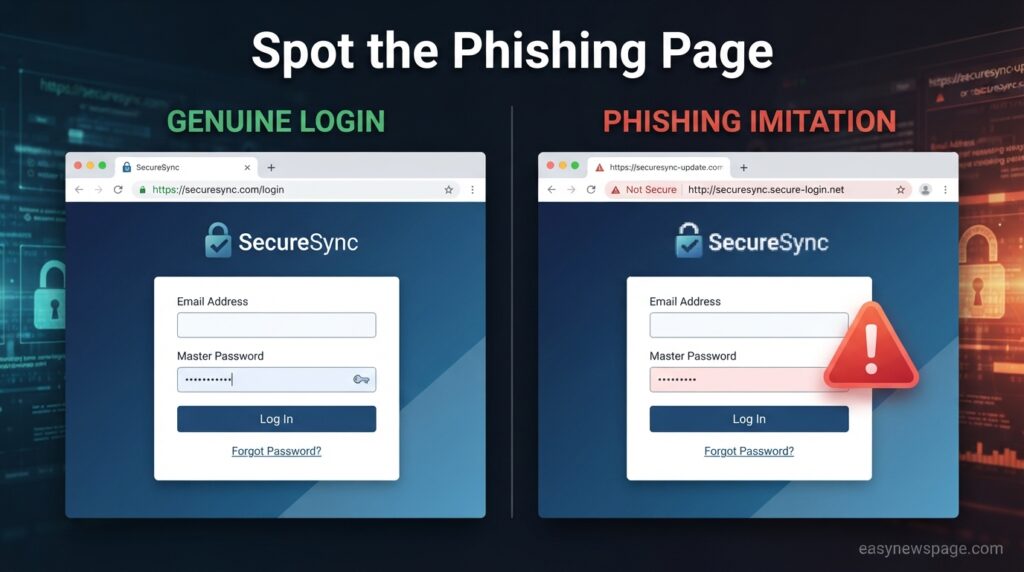
Still, a password manager is not a “set it and forget it” appliance. Your entire digital life now sits behind a single master password, which means that one weak link — a guessable master password, a missing two-factor authentication (2FA) layer, or a phishing page designed to imitate your vault’s login screen — can undo all the benefits at once. This guide walks through exactly how to protect yourself while using a password manager, not why to avoid one.
You’ll learn how these tools actually work under the hood, what real risks exist (including the kinds of supply-chain and phishing incidents that have hit even reputable providers), and the specific habits that separate a genuinely secure setup from a false sense of security. We’ll cover master password strategy, 2FA and recovery planning, device hygiene, how to evaluate a provider’s encryption model, common mistakes people make, and the myths that keep circulating about password manager safety.
By the end, you’ll have a clear, practical checklist you can apply today, regardless of which password manager you use — browser-based, standalone, or enterprise. The goal isn’t to make you paranoid about a tool that is, by every independent measure, safer than the alternative of memorizing or reusing passwords. It’s to make sure you’re using it the way security researchers actually recommend, so the one password you do have to remember is the strongest link in the chain, not the weakest.
Read more: Best Password Manager Tools You Should Use in 2026
Quick Facts
| Fact | Detail |
|---|---|
| Core risk | A weak or reused master password is the single biggest point of failure |
| Best defense | Pairing a password manager with multi-factor authentication (MFA) |
| Encryption standard | Reputable providers use AES-256 encryption with a zero-knowledge architecture |
| Current guidance | NIST SP 800-63B-4 favors long passphrases over forced complexity and periodic rotation |
| Biggest behavioral mistake | Reusing the master password anywhere else, or storing it unencrypted |
Quick Summary
Password managers reduce risk overall, but they concentrate that risk into a single master password and account. Protecting yourself means hardening that one entry point — a long, unique passphrase, mandatory 2FA, a tested recovery plan, and awareness of phishing attempts that specifically target vault logins — while keeping the devices you access it from clean and updated.
Key Takeaways
- Your master password is the single most important password you own; treat it differently from every other credential.
- Enable two-factor authentication on the password manager account itself, not just on the accounts stored inside it.
- Choose a provider with a documented zero-knowledge encryption model, so even the company itself cannot read your vault.
- Build a recovery plan before you need one — losing the master password with no backup can mean permanent lockout.
- Watch for phishing pages that imitate your password manager’s login screen; these are now a more common attack path than breaking the encryption itself.
Table of Contents
Why Trust This Guide
This guide draws on published guidance from the U.S. National Institute of Standards and Technology (NIST), documented security incidents affecting password manager providers, and consistent recommendations from independent security researchers rather than any single vendor’s marketing claims. Nothing here is tied to promoting a specific paid product — the advice applies whether you use a free, open-source, or enterprise password manager.
Who This Guide Is For
This is written for everyday internet users who already have, or are considering, a password manager — not IT administrators managing enterprise credential vaults, though many of the same principles apply at scale. If you’re choosing between specific commercial tools, that’s a separate comparison; this guide focuses on the security habits that matter regardless of which one you pick.
What Is a Password Manager
A password manager is software that generates, encrypts, and stores your login credentials in a single vault protected by one master password. Instead of memorizing dozens of passwords, you memorize one strong passphrase, and the manager autofills the rest. Most modern managers also flag reused or weak passwords, generate random ones on demand, and increasingly support passkeys, a newer passwordless login standard.
The category includes browser-built-in managers, standalone apps, and enterprise vault platforms — the underlying security model is similar across all three, even though features and interfaces differ.
How Password Managers Work
At the core of a trustworthy password manager is zero-knowledge encryption: your vault is encrypted and decrypted locally on your device using a key derived from your master password, and the provider’s servers only ever see the encrypted blob. This means that, in theory, even the company hosting your data cannot read your passwords — which is also why losing your master password with no recovery method set up can mean the data is unrecoverable by anyone, including support staff.
When you type your master password, the app derives an encryption key locally, decrypts your vault in memory, and autofills credentials into websites and apps you’ve saved. Syncing across devices happens by transmitting the still-encrypted vault, not the plaintext data, so a breach of the provider’s servers alone should not expose readable passwords if the encryption is implemented correctly.
Setting Up Your Vault Securely
The setup phase is where most long-term security is won or lost. A rushed setup with a weak master password, no 2FA, and no recovery plan creates a single point of failure that undermines everything else the tool is supposed to protect.
Take the extra ten minutes at setup to choose a genuinely long passphrase, turn on MFA immediately, and write down (physically, not digitally) an emergency access plan, rather than treating these as optional steps to revisit later.
Step-by-Step Hardening Tutorial
1. Build a long passphrase, not a complex password. Current NIST guidance favors length over symbol complexity — a random four- or five-word passphrase (12–16+ characters) is both easier to remember and harder to brute-force than a short string of symbols.
2. Turn on two-factor authentication for the vault itself. This is separate from the 2FA you might enable on individual stored accounts — it protects the master password login itself, so a leaked or guessed master password alone isn’t enough to get in.
3. Set up recovery before you need it. Most managers offer an emergency kit, recovery codes, or a designated emergency contact. Store this offline, in a safe or lockbox, not in a screenshot or cloud note.
4. Audit your vault for reused or weak passwords. Most managers include a built-in health check that flags duplicate, weak, or breached passwords — run it immediately after setup and periodically afterward.
5. Keep your devices and browser extensions updated. A password manager can’t protect you from malware or an outdated browser exploit that captures data before it’s even encrypted.
6. Bookmark your password manager’s real login page. Never reach it by clicking a link in an email or search ad — this closes off one of the most common phishing paths.
Read more: Password Managers Explained: Why It Matters More Than Ever
Real-World Risks and Incidents
No password manager is immune to every risk, and being clear-eyed about what has actually gone wrong helps you defend against the right threats rather than the wrong ones.
Documented incidents in this space have generally fallen into a few categories: supply-chain attacks on companion tools like command-line packages, phishing pages that imitate a vault’s login screen to harvest the master password directly, and device-level malware that captures data after it’s decrypted for use. Notably, direct cracking of a properly implemented zero-knowledge vault has been far rarer than these surrounding attack paths — which is exactly why device hygiene, phishing awareness, and MFA matter as much as the encryption itself.
Benefits and Limitations
Benefits: unique passwords for every account, breach and weak-password monitoring, autofill convenience that discourages reuse, and cross-device syncing that keeps you out of the habit of writing passwords down insecurely.
Limitations: the master password becomes a single point of failure, recovery can be difficult or impossible without prior planning, and the tool cannot protect against malware already running on your device or a convincing phishing attempt aimed at the human, not the encryption.
Pros & Cons
| Pros | Cons |
|---|---|
| Generates and stores unique, strong passwords | Master password becomes a single point of failure |
| Flags reused, weak, or breached credentials | Losing the master password without recovery setup can mean permanent lockout |
| Reduces phishing risk via domain-matching autofill | Still vulnerable to device-level malware or convincing fake login pages |
| Supports MFA and increasingly passkeys | Some free tiers limit devices or advanced features |
Security, Privacy, and Compliance
Look for explicit confirmation that a provider uses zero-knowledge, client-side encryption (commonly AES-256), publishes independent security audits, and has a clear incident-disclosure history rather than a spotless-sounding marketing page. Compliance certifications like SOC 2 or ISO 27001 are a reasonable signal for business use, though they don’t replace checking how the provider has actually responded to past incidents.
Common Mistakes
The most common mistake is reusing the master password somewhere else, which defeats the entire model — if that other site is breached, your whole vault is exposed. A close second is skipping 2FA on the vault itself because it feels redundant, and a third is storing the master password or recovery codes in an unencrypted note, screenshot, or cloud document.
Myths vs. Facts
Myth: “If my password manager gets hacked, all my passwords are instantly exposed.” Fact: With proper zero-knowledge encryption, a breach of the provider’s servers exposes only encrypted data, not usable plaintext passwords, unless your master password is separately compromised.
Myth: “Storing all my passwords in one place is inherently riskier than spreading them across my memory.” Fact: Most real-world account takeovers stem from reused or weak passwords, which a manager directly prevents — concentration of risk is manageable with MFA, while reuse across dozens of accounts is not.
Beginner vs. Advanced Practices
| Level | Practice |
|---|---|
| Beginner | Long unique passphrase, MFA enabled, built-in weak-password audit run once |
| Advanced | Hardware security key for MFA, offline recovery kit, passkeys enabled where supported, regular breach-monitoring review |
Who Should Use One (and Who Needs Extra Precautions)
Almost everyone benefits from a password manager, since manual password management scales poorly past a handful of accounts. People handling especially sensitive accounts — financial administrators, journalists, or anyone facing targeted threats — should add a hardware security key and treat recovery planning as mandatory rather than optional.
Read more: Password Managers: Common Mistakes That Put You at Risk (2026 Guide)
FAQS
Is it safe to store all my passwords in one password manager?
Yes, provided the manager uses zero-knowledge encryption and you protect the master password with a strong passphrase and two-factor authentication. The alternative — reusing weak passwords across many sites — carries a higher real-world risk.
What happens if I forget my master password?
It depends on the recovery options you set up in advance, such as an emergency kit or recovery code. Without one, some providers cannot recover your vault at all, since they never store your master password or an unencrypted copy of your data.
Can a password manager be hacked?
The encrypted vault itself is difficult to break directly, but attackers more commonly target the human layer — phishing pages imitating the login screen, or malware capturing data after it’s decrypted on your device — which is why MFA and device hygiene matter as much as the encryption.
Do I still need two-factor authentication if I use a password manager?
Yes, on both the password manager account itself and on any sensitive accounts stored inside it. A password manager protects against weak or reused passwords; MFA protects against a compromised password being enough on its own.
Are free password managers safe to use?
Many reputable free password managers use the same zero-knowledge encryption model as paid tiers, with paid plans mainly adding convenience features like extra device syncing rather than stronger core security.
Rating Scorecard
| Criterion | Score (out of 5) | Notes |
|---|---|---|
| Security model (when properly configured) | 5 | Zero-knowledge encryption is strong when combined with MFA |
| Convenience | 5 | Autofill and generation remove the burden of manual password management |
| Recovery resilience | 3 | Entirely dependent on the user setting up recovery in advance |
| Resistance to phishing | 3 | Strong domain-matching autofill helps, but human vigilance is still required |
Conclusion
Password managers are not the risk — poor setup and habits around them are. The evidence is consistent: most account takeovers trace back to reused or weak passwords, not to a properly encrypted vault being cracked outright. A password manager directly removes that biggest risk factor, replacing dozens of weak, repeated passwords with unique, randomly generated ones behind a single strong passphrase.
The work that remains is protecting that one entry point. A long, unique master passphrase, two-factor authentication on the vault itself, a tested and offline recovery plan, and basic vigilance against phishing pages imitating your login screen together close off nearly every realistic attack path. None of this requires technical expertise — it requires ten minutes of setup and a bit of ongoing awareness.
The takeaway is straightforward: don’t avoid password managers out of fear of concentrating risk in one place — concentrate that risk deliberately, then defend that one place properly. Choose a provider with a documented zero-knowledge architecture and a transparent incident history, harden the master password and recovery process on day one, and keep your devices clean. Do that, and a password manager remains one of the most effective, low-effort security upgrades available to any internet user today.
Official Sources
- NIST Special Publication 800-63B-4, Digital Identity Guidelines
- Have I Been Pwned, Pwned Passwords database
Author Bio
Written by the easynewspage.com editorial team, drawing on published NIST guidance and documented security incident reports rather than vendor marketing claims.